





SilentStorm
Members
-
Joined
-
Last visited
Everything posted by SilentStorm
-
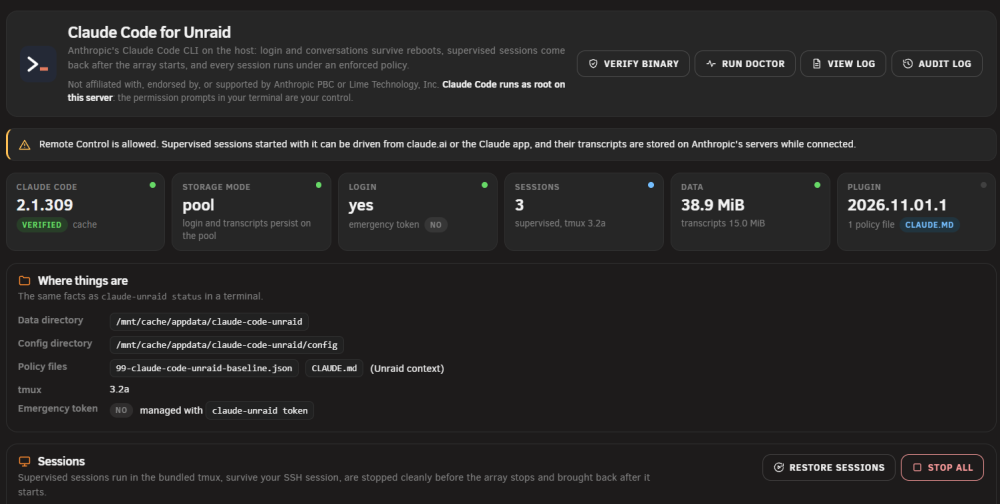
Claude Code for Unraid installs Anthropic's Claude Code CLI natively on the Unraid host. After installing, claude works in any terminal on the server, your login and conversations survive reboots, supervised sessions come back after the array starts, and every session runs under an enforced safety policy. It keeps working with the array stopped and Docker disabled, which is the point: diagnostics and recovery. Not affiliated. This is a community plugin, not affiliated with, endorsed by, or supported by Anthropic or Lime Technology. Claude Code is proprietary Anthropic software; the plugin downloads it from Anthropic's official servers at install time and verifies it against Anthropic's signed release manifest. It never redistributes it. Status: beta. The hardware test results for each release are recorded in the repository (docs/TESTING.md). Please read the security section before installing. What it does claude in any terminal, including the web terminal, with your login kept across reboots. Supervised sessions (claude-unraid start <workspace>) run in a bundled tmux, survive your SSH session, are stopped cleanly before the array stops and resumed after it starts. A settings page under Settings, User Utilities, Claude Code: status, workspaces with an "Open terminal" button, a permissions editor, doctor and audit log. A managed policy around an agent that runs as root (see Security below). Works in fallback mode with the array stopped: a temporary config in RAM, so you can use it for recovery work. Install Community Applications: search "Claude Code". Or Plugins, Install Plugin: https://github.com/tabilzad/claude-code-unraid/releases/latest/download/claude-code-unraid.plg Requirements Unraid 7.0.0 or newer, x86_64, a Claude subscription or an Anthropic API key, and about 600 MB free on the flash drive (the plugin caches the current and the previous binary so that boots never need the network). First steps claude-unraid status claude-unraid work server, then cd into the workspace it prints claude, then /login Supervised sessions: claude-unraid start server, claude-unraid attach server (detach with Ctrl-b d), claude-unraid list, claude-unraid stop --all. Security, plainly Claude Code runs as root, like every plugin. The plugin wraps it in a managed policy: Manual permission mode (every command and edit prompts); bypass mode disabled; auto mode and Remote Control off unless you enable them in the settings. A guard hook blocks mkfs, wipefs, dd to a disk, rm -rf on /mnt or /boot, zpool destroy and SMART state changes, and forces a prompt with a reason for network access, container escapes, mounts, cron, service restarts and plugin changes. /boot is mounted read-only inside every session (the /proc/<pid>/root way around it is guarded and logged, not closed; the security doc explains). One audit line per tool call in the syslog (claude-code-unraid-audit), redacted. This is not a security boundary. It reduces accidents and casual prompt injection. The prompts you approve are your control; the guard matches text and can be bypassed by an obfuscated command, which the docs list honestly: docs/SECURITY.md Storage Pool mode (array started): login, settings and transcripts under <appdata>/claude-code-unraid (the direct pool path when your appdata share lives on one pool). Fallback mode (array stopped): a temporary config in RAM. An optional emergency token lets you use Claude Code while the array is down without a browser login; if you store one, do not export the flash share over SMB. Details: docs/storage.md Reporting problems claude-unraid doctor /usr/local/emhttp/plugins/claude-code-unraid/scripts/collect-diagnostics writes a redacted report under /tmp; attach it. Open an issue at github.com/tabilzad/claude-code-unraid/issues or post here with the Unraid version, what you did, and what you expected. Known limitations (beta) x86_64 only (Claude Code's linux-x64 build). Mounts the agent performs inside a session stay inside the session's mount namespace (run mount from a normal shell). Plain claude sessions you start by hand are not stopped or restored by the plugin; only claude-unraid start sessions are. The hardware checklist in docs/TESTING.md lists what was verified on which Unraid versions; reports from other setups (ZFS pools, large arrays) are welcome. Links Project: github.com/tabilzad/claude-code-unraid Issues: github.com/tabilzad/claude-code-unraid/issues Changelog: CHANGELOG.md Mods: please move this to Plugin Support.
-
Docker Batch Update adds a "Batch Update" tab to the Docker page. Tick the containers you want to update and click Update Selected. They are updated one after another, in the order shown, using Unraid's own update routine. Unraid gives you "Update All" or one container at a time. This plugin covers the in-between case: update just the five you care about, skip the one you want to hold back, and do it in a single run with the normal progress window. What it does Lists every container with a pending update, in the same order as the Docker Containers page Checkboxes with select all / none Shows the current and new image digests "Check for Updates" button that runs the stock update check "Show all containers" lets you force-update containers that are already up to date Greys out containers Unraid can't update itself (Docker Compose, no Unraid template) and says why Refuses to start if another container update is already running How it works The plugin has no update logic of its own. It hands your selection to Unraid's own update_container script, the same one behind "apply update" and "Update All". For each container in turn it pulls the new image, stops the container if it was running, recreates it from its template, starts it again only if it was running before, and removes the old image once nothing uses it. So containers update exactly as they would from the Docker page, including Tailscale and WireGuard handling. Install Search for "Docker Batch Update" in Community Applications, or install from Plugins > Install Plugin with: https://raw.githubusercontent.com/tabilzad/unraid-docker-batch-update/main/plugin/docker.batch.update.plg Then open Docker > Batch Update. Requirements Unraid 7.0 or newer. Tested on 7.3.x. Tips Updates run in the order shown. To update databases before the apps that use them, drag them higher on the Docker Containers page. You can close the progress window; the update keeps going in the background, just like Update All. Links Source (MIT): https://github.com/tabilzad/unraid-docker-batch-update Bug reports and feature requests: https://github.com/tabilzad/unraid-docker-batch-update/issues or reply in this thread. Screenshot: Mods: I can't start topics in Plugin Support yet. Could this thread be moved there, please?
