





Shahmatt
Members
-
Joined
-
Last visited
Everything posted by Shahmatt
-
Hi all, I took out my 10 year old PC and installed UNRAID on it over the weekend. This is my first ever NAS. The specs as follows: Intel i3-2100 + Biostar TZ68A+ board 2x4GB DDR2 RAM Ikonik EN2 case FSP Aurum 400w Gold PSU Storage: Two 1TB WD Red WD10EFRX drives - one set to Parity, and one to storage: These drives are around 7 or 8 years old I think - but were never heavily used. One Crucial M4 - 64GB SSD, around 7 or 8 years old as well. This holds, as cache, my appdata, domains and system folders. I've run and rerun SMART checks on all the disks and, besides many old-age errors and a handful of pre-fail errors, the values still look good and the disks pass FWIW. But since these drives are very old I've gone ahead and purchased a Toshiba S300 4TB to add as a new Parity. It should be delivered soon. I've setup Syncthing. It is a new discovery for me. I originally intended to try Nextcloud but simplified my requirements progressively until I ended up with this tool. I have connected folders with my main PC, laptop and phone. With Syncthing these other devices act as redundancies, so should the NAS fail I should not be overly concerned. I am considering what upgrades and in what order. 1. I may purchase another drive in the not too distant future, and reduce these WD drives to a second fiddle role in the array. 2. I suspect a new case and power supply unit may be necessary. Looking for small as small can be. Any suggestions would be welcome. 3. Should I continue with the Crucial M4 SSD or would it be necessary to upgrade this as well? 4. The motherboard is likely end of life, and though the processor may be alright I could not find any new LGA1155 motherboards as replacement (only refurbished). Any advice on a cheap overall replacement would be appreciated. Thanks in advance for any comments.
-
Thanks for the response. Would it be correct to say that Write performance is limited to the speed of the Parity drive or relevant Array drive, whichever is slower, but Read would be limited to the Array drive only? If so, perhaps the S300 would make a good Parity drive, and for Read I could invest in something more speedier. I think Read would be a more urgent requirement compared to Write. Any thoughts?
-
I have found that I can buy a Toshiba S300 4TB WT740 (5400RPM, 128MB cache, SMR) for quite a reasonable price. This seems to be designed for surveillance use. Since my use case is mainly remote backup, bottle-necked by internet speeds, would this be a suitable drive? Would I be right in assuming it won't make difference even if I were to choose a faster drive?
-
Newbie here. I want to build an unraid server and use it with a cloud service like Nextcloud (or something similar). The main purpose is syncing stuff remotely on my computers and phones. Sort of like OneDrive. So my connection speed is likely to be the bottleneck. Given this use case I think having a SSD cache may not be useful. Would it make sense to invest more in a parity drive and for storage pick something cheaper? I am considering the Toshiba N300 4TB for parity and two cheaper WD Purple 4TB for 8TB of total storage. Would this setup make sense? Advice and considerations are welcome. Thanks.
-
Sorry for this late reply. Life got in the way. I have actually been trying a variety of settings including changing the video card but I still get the same problem. The VM crashes just when Windows begins to load. The same thing happens if I try installing Windows 7. However I can get Ubuntu to run with no problems. I am wondering if this could be hardware related. I will do some maintenance (removing dust etc.) to see if it makes a difference. Any ideas would be appreciated.
-
I am trying to get a Windows 10 VM to start. The VM crashes just as the Windows installation screen loads. I get the following error in the log: -uuid ca8a66dd-2296-9687-e659-9d04f78cea55 \ -no-user-config \ -nodefaults \ -chardev socket,id=charmonitor,fd=31,server,nowait \ -mon chardev=charmonitor,id=monitor,mode=control \ -rtc base=localtime \ -no-hpet \ -no-shutdown \ -boot strict=on \ -device ich9-usb-ehci1,id=usb,bus=pci.0,addr=0x7.0x7 \ -device ich9-usb-uhci1,masterbus=usb.0,firstport=0,bus=pci.0,multifunction=on,addr=0x7 \ -device ich9-usb-uhci2,masterbus=usb.0,firstport=2,bus=pci.0,addr=0x7.0x1 \ -device ich9-usb-uhci3,masterbus=usb.0,firstport=4,bus=pci.0,addr=0x7.0x2 \ -device virtio-serial-pci,id=virtio-serial0,bus=pci.0,addr=0x4 \ -blockdev '{"driver":"file","filename":"/mnt/user/domains/Windows 10/vdisk1.img","node-name":"libvirt-3-storage","cache":{"direct":false,"no-flush":false},"auto-read-only":true,"discard":"unmap"}' \ -blockdev '{"node-name":"libvirt-3-format","read-only":false,"cache":{"direct":false,"no-flush":false},"driver":"raw","file":"libvirt-3-storage"}' \ -device virtio-blk-pci,bus=pci.0,addr=0x5,drive=libvirt-3-format,id=virtio-disk2,bootindex=1,write-cache=on \ -blockdev '{"driver":"file","filename":"/mnt/user/isos/Windows 10 new/Windows.iso","node-name":"libvirt-2-storage","auto-read-only":true,"discard":"unmap"}' \ -blockdev '{"node-name":"libvirt-2-format","read-only":true,"driver":"raw","file":"libvirt-2-storage"}' \ -device ide-cd,bus=ide.0,unit=0,drive=libvirt-2-format,id=ide0-0-0,bootindex=2 \ -blockdev '{"driver":"file","filename":"/mnt/user/isos/virtio-win-0.1.190-1.iso","node-name":"libvirt-1-storage","auto-read-only":true,"discard":"unmap"}' \ -blockdev '{"node-name":"libvirt-1-format","read-only":true,"driver":"raw","file":"libvirt-1-storage"}' \ -device ide-cd,bus=ide.0,unit=1,drive=libvirt-1-format,id=ide0-0-1 \ -netdev tap,fd=33,id=hostnet0,vhost=on,vhostfd=35 \ -device virtio-net-pci,netdev=hostnet0,id=net0,mac=52:54:00:04:ac:22,bus=pci.0,addr=0x3 \ -chardev pty,id=charserial0 \ -device isa-serial,chardev=charserial0,id=serial0 \ -chardev socket,id=charchannel0,fd=36,server,nowait \ -device virtserialport,bus=virtio-serial0.0,nr=1,chardev=charchannel0,id=channel0,name=org.qemu.guest_agent.0 \ -device usb-tablet,id=input0,bus=usb.0,port=1 \ -vnc 0.0.0.0:0,websocket=5700 \ -k en-us \ -device vmware-svga,id=video0,vgamem_mb=16,bus=pci.0,addr=0x2 \ -device virtio-balloon-pci,id=balloon0,bus=pci.0,addr=0x6 \ -sandbox on,obsolete=deny,elevateprivileges=deny,spawn=deny,resourcecontrol=deny \ -msg timestamp=on 2022-01-29 10:21:51.597+0000: Domain id=5 is tainted: high-privileges 2022-01-29 10:21:51.597+0000: Domain id=5 is tainted: host-cpu char device redirected to /dev/pts/0 (label charserial0) 2022-01-29 10:22:56.710+0000: shutting down, reason=crashed The XML is as follows: <?xml version='1.0' encoding='UTF-8'?> <domain type='kvm'> <name>Windows 10</name> <uuid>ca8a66dd-2296-9687-e659-9d04f78cea55</uuid> <metadata> <vmtemplate xmlns="unraid" name="Windows 10" icon="windows.png" os="windows10"/> </metadata> <memory unit='KiB'>2097152</memory> <currentMemory unit='KiB'>2097152</currentMemory> <memoryBacking> <nosharepages/> </memoryBacking> <vcpu placement='static'>2</vcpu> <cputune> <vcpupin vcpu='0' cpuset='1'/> <vcpupin vcpu='1' cpuset='3'/> </cputune> <os> <type arch='x86_64' machine='pc-i440fx-5.1'>hvm</type> </os> <features> <acpi/> <apic/> <hyperv> <relaxed state='on'/> <vapic state='on'/> <spinlocks state='on' retries='8191'/> <vendor_id state='on' value='none'/> </hyperv> </features> <cpu mode='host-passthrough' check='none' migratable='on'> <topology sockets='1' dies='1' cores='1' threads='2'/> <cache mode='passthrough'/> </cpu> <clock offset='localtime'> <timer name='hypervclock' present='yes'/> <timer name='hpet' present='no'/> </clock> <on_poweroff>destroy</on_poweroff> <on_reboot>restart</on_reboot> <on_crash>restart</on_crash> <devices> <emulator>/usr/local/sbin/qemu</emulator> <disk type='file' device='disk'> <driver name='qemu' type='raw' cache='writeback'/> <source file='/mnt/user/domains/Windows 10/vdisk1.img'/> <target dev='hdc' bus='virtio'/> <boot order='1'/> <address type='pci' domain='0x0000' bus='0x00' slot='0x05' function='0x0'/> </disk> <disk type='file' device='cdrom'> <driver name='qemu' type='raw'/> <source file='/mnt/user/isos/Windows 10 new/Windows.iso'/> <target dev='hda' bus='ide'/> <readonly/> <boot order='2'/> <address type='drive' controller='0' bus='0' target='0' unit='0'/> </disk> <disk type='file' device='cdrom'> <driver name='qemu' type='raw'/> <source file='/mnt/user/isos/virtio-win-0.1.190-1.iso'/> <target dev='hdb' bus='ide'/> <readonly/> <address type='drive' controller='0' bus='0' target='0' unit='1'/> </disk> <controller type='pci' index='0' model='pci-root'/> <controller type='ide' index='0'> <address type='pci' domain='0x0000' bus='0x00' slot='0x01' function='0x1'/> </controller> <controller type='virtio-serial' index='0'> <address type='pci' domain='0x0000' bus='0x00' slot='0x04' function='0x0'/> </controller> <controller type='usb' index='0' model='ich9-ehci1'> <address type='pci' domain='0x0000' bus='0x00' slot='0x07' function='0x7'/> </controller> <controller type='usb' index='0' model='ich9-uhci1'> <master startport='0'/> <address type='pci' domain='0x0000' bus='0x00' slot='0x07' function='0x0' multifunction='on'/> </controller> <controller type='usb' index='0' model='ich9-uhci2'> <master startport='2'/> <address type='pci' domain='0x0000' bus='0x00' slot='0x07' function='0x1'/> </controller> <controller type='usb' index='0' model='ich9-uhci3'> <master startport='4'/> <address type='pci' domain='0x0000' bus='0x00' slot='0x07' function='0x2'/> </controller> <interface type='bridge'> <mac address='52:54:00:04:ac:22'/> <source bridge='virbr0'/> <model type='virtio'/> <address type='pci' domain='0x0000' bus='0x00' slot='0x03' function='0x0'/> </interface> <serial type='pty'> <target type='isa-serial' port='0'> <model name='isa-serial'/> </target> </serial> <console type='pty'> <target type='serial' port='0'/> </console> <channel type='unix'> <target type='virtio' name='org.qemu.guest_agent.0'/> <address type='virtio-serial' controller='0' bus='0' port='1'/> </channel> <input type='tablet' bus='usb'> <address type='usb' bus='0' port='1'/> </input> <input type='mouse' bus='ps2'/> <input type='keyboard' bus='ps2'/> <graphics type='vnc' port='-1' autoport='yes' websocket='-1' listen='0.0.0.0' keymap='en-us'> <listen type='address' address='0.0.0.0'/> </graphics> <video> <model type='vmvga' vram='16384' heads='1' primary='yes'/> <address type='pci' domain='0x0000' bus='0x00' slot='0x02' function='0x0'/> </video> <memballoon model='virtio'> <address type='pci' domain='0x0000' bus='0x00' slot='0x06' function='0x0'/> </memballoon> </devices> </domain> Would appreciate any help in resolving this. I am quite new to Unraid and VMs in general, so this is a learning experience for me.
-
It is stopped
-
Thanks. I didn't think to consider this. But indeed yes, the VM stops running at the same time the signal is lost. So the problem is to do with something else. I need to understand why the VM would be failing just as Windows loads.
-
I can't seem to resolve this problem whatever I do. The connection always fails as Windows (either 7 or 10) starts. I've tried logging on from another PC but the same problem persists, so not a browser issue. Could VNC have hardware incompatibility issues? I am using a somewhat ancient i3-2100 CPU.
-
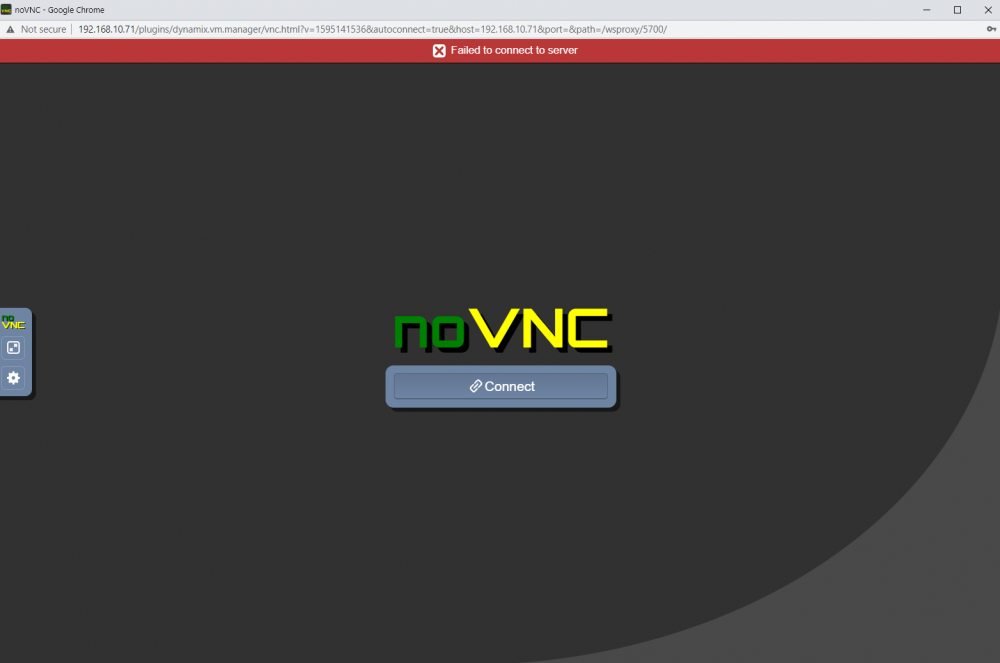
Hi, Here is a screenshot. When I press the "Connect" button I get the "Failed to connect..." on top.
-
Hi, I'm trying to set up either a Windows 10 or 7 VM. For both OS's the VM is able to start and I get the Windows start screen. But as it proceeds to the first step of installation I get a noVNC error and failure to connect to the server. I've googled the problem and found that clearing the cache could help fix the problem. I tried doing that but to no avail. I would appreciate any advice on how I should proceed. Thanks.
