morecrap
Members
-
Joined
-
Last visited
-
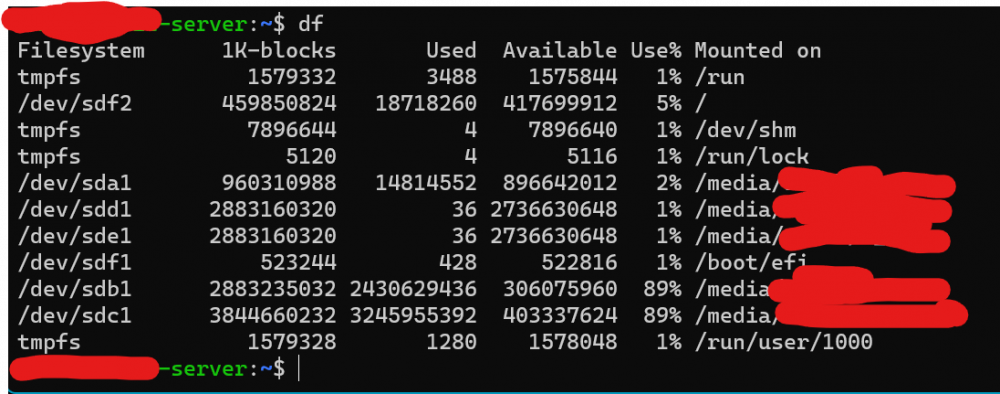
So I had an old Ubuntu desktop computer where I was dual booting with Windows. Below is the df output of the same. Request your advice on how I can move to an unRAID array. Also, should I move to an unRAID array? The data stored in these drives is pretty much movie and TV show backups. Nothing too critical. Also, is it possible to setup unRAID without setting up an array. The drives are all with single partition ext4. Just for context, I really found unRAID to be very interesting in manageability. I wish to run Plex and use this as a network storage; I do not have the budget to buy another disk at this point. I would want to prioritize space over anything else at the moment. Also, I have no issues erasing all data on /dev/sdf2, which is my current / partition. Here's my thought process for this as of now: Scenario 1 - Go for array Move all data from sda1, sdd1, sde1 to sdb1 Create array with sda1, sdd1,sde1 Move data from sdb1 to the array Add sdb1 to the array Move data from sdc1 to the array Add sdc1 to the array Scenario 2 - No array Create an array with the 1 TB sda1 after emptying its contents onto another drive Use the rest as independent ext4 What would be the downsides of using scenario 2? Is this possible? I do not have any prior experience with unRAID though.