rcurrier8
Members
-
Joined
-
Last visited
-
I removed this disk, started a new array and the speeds have significantly improved. For my knowledge how could you see that the disk was having connection problems (where in the logs)?

-
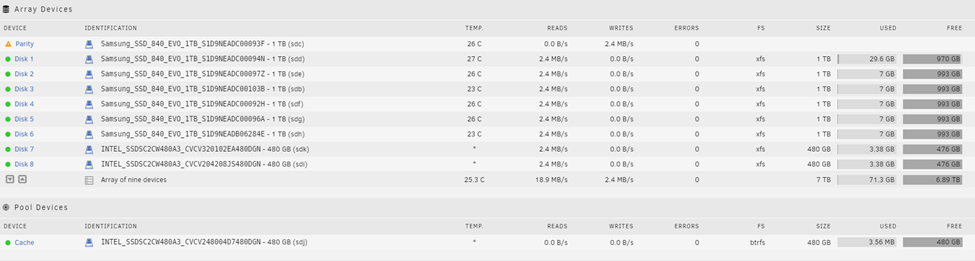
I am trying my hand at creating my first server for media. I am just messing around with the hardware using spare SSDs prior to buying all new hard drives to learn the software. I am seeing incredibly slow read/writes when doing the parity check and when using preclear disk. I thought this may be a CPU limitation, so I purchased an upgrade with no change. Then thought my HBA may be the culprit, updated it and still no change. Ran “Fix Common Problems” and no errors were found. Am I wrong with thinking this is too slow? With (IMO) good hardware and SSDs I was expecting read/writes of at least 100 mb/s. Current hardware: MB: Intel S2600CP (12/23/13 BIOS as Intel no longer supports MBs so no update is available) CPU: Xeon E5-2697 V2 (x1 but have the option to run dual CPUs) Ram: 128GB ECC DDR3 HBA: LSI 9211-8i updated to V20 in IT mode Hard Drives: 6x Samsung 840 1tb, 3x Intel 520 series 480GB (one to be used as cache) Attached is the diag files as well as the disk smart files. tower-diagnostics-20220126-1346.zip DISK_SMART_FILES.zip