





Nathan Knight
Members
-
Joined
-
Last visited
Everything posted by Nathan Knight
-
OK thanks I'll deal with them shortly👍
-
Um ok, it was the card I linked to but ok?? Not really sure how I'm supposed to tell the difference bot I'll try the cable
-
New card put in and I got the disc mounted again but something still not right, I have backups of all the data so don't care about losing anything. Everything just seems to be struggling?? theark-diagnostics-20230314-2220.zip
-
thanks mate, hopefully this has been the root of my problems👍
-
this be ok? https://www.ebay.com.au/itm/255724690177?hash=item3b8a611b01:g:DoEAAOSwHXFjIIbY&amdata=enc%3AAQAHAAAAoOW3%2FxyTSti52hrHmf4gw55U3OAPP9J0RJ0Qs99mZuSZC%2Br9HOGaECOvvjYjcuOYmN1JBIGE6ZaFVQB4tjns6xBd9f45WUHnvbLKL78NwH6AzAEgfVtWCFcGDgqplMjkJsB33jW4bDWnOUGDCT8JCs16mPVfdU72dcbUPPvf%2Bdo18a3SbCSQMr8eZwluCZ4WDvNowUkAWXfA%2BF7dDKdWrmg%3D|tkp%3ABk9SR47m8efWYQ
-
ok thanks again for the help
-
OK so I have taken the new sata card out and started everything back up and the rebuild is happening much faster but now have the #3 disk being 'Unmountable: wrong or no file system" as well as the #1 disk showing the same. #3 was the only 'new' drive. Diogs attached theark-diagnostics-20230306-0714.zip
-
The card you put in the PC-i slots?
-
Sorry not real up with the names of things, you mean the sata port cards?
-
Hi all, Had a really not old drive go down today, bit suss, threw another spare drive in just cause I had one and the rebuild speed is really slow (400kb/s). I suspect there is a problem is cabling but dont know how to even start reading the diogs. Attached them below, grateful for any help theark-diagnostics-20230305-2037.zip
-
Thanks yet again, seems fine
-
Have done a 'burn it all down' rebuild today and have just started putting all the content back. Had replaced disc 5 with a brand new disc and its throwing errors flat out. I am having continual problems with this server and have no idea why and am about this close to setting fire to it for real. Any help appreciated theark-smart-20230204-1946.zip theark-diagnostics-20230204-1957.zip
-
thanks
-
Sorry to be a further bother, but did the diags indicate what happened?
-
Yeah, without assigning Disk1. All the files look like they are there so I'll start up the rebuild. You sir, are a steely eyed, missle man and have the patience of a saint, thanks for sticking with me
-
Started without mounting Disk1 and diags attached theark-diagnostics-20230119-2243.zip
-
I'm guessing typing this into the "Check" space? xfs_repair -v /dev/md1
-
this is the report now, unsure of next step?? Phase 1 - find and verify superblock... Phase 2 - using internal log - zero log... ALERT: The filesystem has valuable metadata changes in a log which is being destroyed because the -L option was used. - scan filesystem freespace and inode maps... clearing needsrepair flag and regenerating metadata block (2,468703-468716) multiply claimed by cnt space tree, state - 4 block (2,9384387-9384400) multiply claimed by cnt space tree, state - 2 agf_freeblks 45486949, counted 45486922 in ag 2 agf_freeblks 36321250, counted 36320029 in ag 0 agi_freecount 7894, counted 7891 in ag 0 sb_fdblocks 269167766, counted 275982655 - found root inode chunk Phase 3 - for each AG... - scan and clear agi unlinked lists... - process known inodes and perform inode discovery... - agno = 0 imap claims a free inode 1795285099 is in use, correcting imap and clearing inode cleared inode 1795285099 imap claims a free inode 1795285101 is in use, correcting imap and clearing inode cleared inode 1795285101 - agno = 1 - agno = 2 data fork in ino 4298782906 claims free block 537347853 - agno = 3 - process newly discovered inodes... Phase 4 - check for duplicate blocks... - setting up duplicate extent list... - check for inodes claiming duplicate blocks... - agno = 0 - agno = 2 - agno = 3 - agno = 1 entry "Screenshots" in shortform directory 4298784859 references free inode 1795285101 junking entry "Screenshots" in directory inode 4298784859 entry "Lake.Placid.Legacy.2018.1080p.WEBRip.x264-[YTS.AM].mp4" in shortform directory 1795285098 references free inode 1795285099 junking entry "Lake.Placid.Legacy.2018.1080p.WEBRip.x264-[YTS.AM].mp4" in directory inode 1795285098 Phase 5 - rebuild AG headers and trees... - reset superblock... Phase 6 - check inode connectivity... - resetting contents of realtime bitmap and summary inodes - traversing filesystem ... - traversal finished ... - moving disconnected inodes to lost+found ... disconnected inode 1795285105, moving to lost+found disconnected inode 1795285106, moving to lost+found disconnected inode 1795285107, moving to lost+found Phase 7 - verify and correct link counts... resetting inode 4298784859 nlinks from 4 to 3 Maximum metadata LSN (1:264338) is ahead of log (1:2). Format log to cycle 4. done
-
I should do this, yes? The Options field is initialized with -n which specifies check-only. If repair is needed, you should run a second Check pass, setting the Options blank; this will permit xfs_repair to fix the file system
-
This is the report Phase 1 - find and verify superblock... - block cache size set to 527120 entries Phase 2 - using internal log - zero log... zero_log: head block 262496 tail block 262479 ALERT: The filesystem has valuable metadata changes in a log which is being ignored because the -n option was used. Expect spurious inconsistencies which may be resolved by first mounting the filesystem to replay the log. - scan filesystem freespace and inode maps... block (2,468703-468716) multiply claimed by cnt space tree, state - 4 block (2,9384387-9384400) multiply claimed by cnt space tree, state - 2 agf_freeblks 45486949, counted 45486922 in ag 2 agf_freeblks 36321250, counted 36320029 in ag 0 agi_freecount 7894, counted 7891 in ag 0 sb_fdblocks 269167766, counted 275982655 - found root inode chunk Phase 3 - for each AG... - scan (but don't clear) agi unlinked lists... - process known inodes and perform inode discovery... - agno = 0 imap claims a free inode 1795285099 is in use, would correct imap and clear inode imap claims a free inode 1795285101 is in use, would correct imap and clear inode - agno = 1 - agno = 2 data fork in ino 4298782906 claims free block 537347853 - agno = 3 - process newly discovered inodes... Phase 4 - check for duplicate blocks... - setting up duplicate extent list... free space (2,477286-477299) only seen by one free space btree free space (2,9396032-9396045) only seen by one free space btree free space (2,9396090-9396103) only seen by one free space btree free space (2,9396158-9396171) only seen by one free space btree - check for inodes claiming duplicate blocks... - agno = 0 - agno = 1 - agno = 2 - agno = 3 entry "Screenshots" in shortform directory 4298784859 references free inode 1795285101 would have junked entry "Screenshots" in directory inode 4298784859 entry "Lake.Placid.Legacy.2018.1080p.WEBRip.x264-[YTS.AM].mp4" in shortform directory 1795285098 references free inode 1795285099 would have junked entry "Lake.Placid.Legacy.2018.1080p.WEBRip.x264-[YTS.AM].mp4" in directory inode 1795285098 No modify flag set, skipping phase 5 Inode allocation btrees are too corrupted, skipping phases 6 and 7 Maximum metadata LSN (1:264338) is ahead of log (1:262496). Would format log to cycle 4. No modify flag set, skipping filesystem flush and exiting. XFS_REPAIR Summary Thu Jan 19 21:35:41 2023 Phase Start End Duration Phase 1: 01/19 21:35:26 01/19 21:35:28 2 seconds Phase 2: 01/19 21:35:28 01/19 21:35:28 Phase 3: 01/19 21:35:28 01/19 21:35:41 13 seconds Phase 4: 01/19 21:35:41 01/19 21:35:41 Phase 5: Skipped Phase 6: Skipped Phase 7: Skipped Total run time: 15 seconds
-
should i run the test? I'm sorry for this just not sure what I'm doing
-
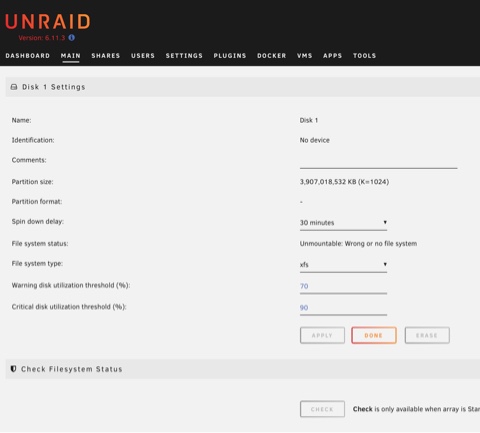
xfs I think
-
theark-diagnostics-20230119-2003.zip
-
This is a case of a little bit of knowledge being a dangerous thing. I thought if I replaced the drive and did a parity rebuild everything would be fine but it stalled about 5% in, so I put the original drive back in and if I start the array it is going to try and do a parity rebuild again and I'm worried 1) itll wipe the original drive and 2) I've already gone to far to save the data
-
https://wsi.li/dl/Bh3WpB4qJ2v4Ecv9A/ Think I've done it right

