





dekadmin
Members
-
Joined
-
Last visited
Everything posted by dekadmin
-
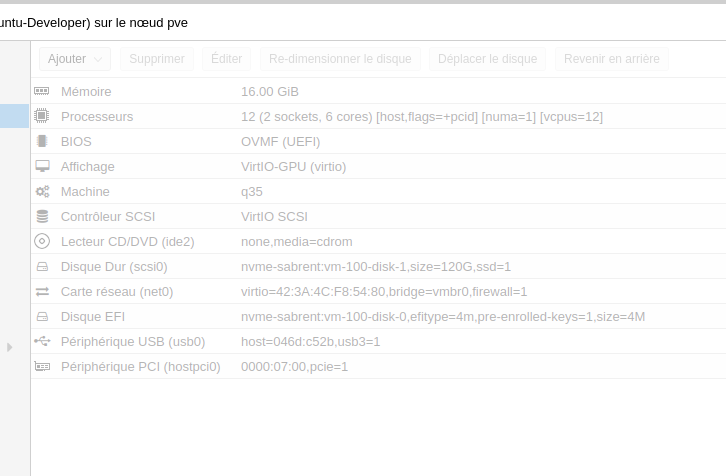
Little update I have released some tests to check if Unraid is the "problem". I temporally install Proxmox on the same host machine. Under Proxmox, I have created a VM with following settings: And all is great ! Proxmox expose a more recent version of pc-Q35. Maybe it can come from there ? (Please, I don't wanna run Unraid inside Proxmox )
-
Hi I directly passthrough my NVME drive to the VM. It's not really to improve performances. It was to test if it was my problem.
-
Hi whipdancer, Because I want to use this VM as personal working station.
-
Hello there Description of usage: I just have created a new VM to run Ubuntu to develop on it. This VM will be used to run services like Apache2, PHP and MariaDB inside docker containers (with docker-compose). Description of problem is: My Ubuntu VM look to run great on the OS. But performance linked to my web app are so poor. Navigate to local web application (pages make long time to load) Inject database seeding (fake data) My host configuration: OS Version: UnRaid 6.9.2 CPU: AMD Ryzen 7 3700X (8 Cores 16 Threads) RAM: 32 GO running at 3200 MHz GPU: NVIDIA GeForce RTX 2070 SUPER UnRaid PassThrough configuration: Group 14 01:00.0 1987:5012 Non-Volatile memory controller: Phison Electronics Corporation E12 NVMe Controller (rev 01) Group 22 07:00.0 10de:1e84 VGA compatible controller: NVIDIA Corporation TU104 [GeForce RTX 2070 SUPER] (rev a1) Group 23 07:00.1 10de:10f8 Audio device: NVIDIA Corporation TU104 HD Audio Controller (rev a1) Group 24 07:00.2 10de:1ad8 USB controller: NVIDIA Corporation TU104 USB 3.1 Host Controller (rev a1) *USB devices attached to controllers bound to vfio are not visible to unRAID* Group 25 07:00.3 10de:1ad9 Serial bus controller [0c80]: NVIDIA Corporation TU104 USB Type-C UCSI Controller (rev a1) UnRaid CPU Isolated CPUs: UNRAID: 0-8 1-9 ISOLATED: 2-10 3-11 4-12 5-13 6-14 7-15 VM Settings: CPU Mode: Host Passthrough Logical CPUs: Isolated CPUs selected Machine: Q35-5.1 (for NVIDIA GPU) BIOS: SeaBIOS OS Install ISO: Path to Ubuntu ISO file OS Install CRRom BUS: SATA (remove after install) Graphics card: NVIDIA Card Other PCI Devices: NVME Disk Primary vDisk: None (because NVME PassThrough) <emulatorpin cpuset='0-8,1-9'/> added to cputune XML section More details here (if you need) Ubuntu VM configuration I don't understand why performances are so bad. Have you got any idea ? 03-running.xml
