unraid.l5lrj
Members
-
Joined
-
Last visited
-
Disk /dev/sde: 12.73 TiB, 14000519643136 bytes, 27344764928 sectors Disk model: WDC WUH721414AL Units: sectors of 1 * 512 = 512 bytes Sector size (logical/physical): 512 bytes / 4096 bytes I/O size (minimum/optimal): 4096 bytes / 4096 bytes Disklabel type: gpt Disk identifier: 92E64CB8-68D7-4F49-AB0E-DD5BECDB2C2C Device Start End Sectors Size Type /dev/sde1 2048 27344746495 27344744448 12.7T Solaris /usr & Apple ZFS /dev/sde9 27344746496 27344762879 16384 8M Solaris reserved 1
-
Thanks! Diagnostics attached. If the array starts what might you look for in the diagnostics? If all good I presumably format the disk and then add it to the array? tower-diagnostics-20231002-1924.zip
-
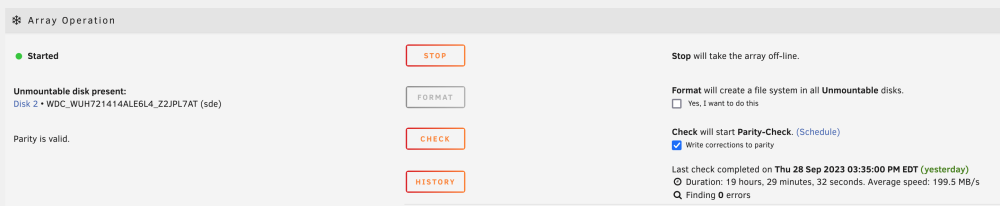
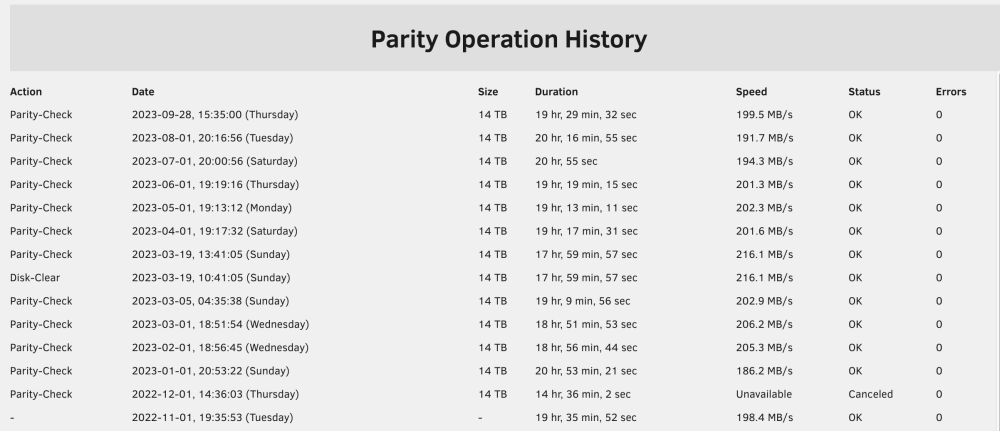
I have 3 14tb drives used to create an array. There was a power outage recently and now upon booting I see one disk is marked "Unmountable: Unsupported partition layout". Regarding the array health: Since this disk was originally part of the array shouldn't I expect to see an error somewhere? All of my data appears to still be available - since this drive was added the the array last is it possible it's unused? Parity check ran without issue (09-28-2023). Regarding the disk itself: Ran SMART short test which returned no errors (will update once extended test completes). Any suggestions for how to diagnose what has happened to it?