





Sam A
Members
-
Joined
-
Last visited
-
Solved this problem (at least for myself - YMMV).. Solution was rather silly; I'm still curious what changed between 6.9.2 and now 6.11.1 (I'm guessing Samba related, and the update to Unraid carried it over).. However, what I did was change the initial group in the SMB settings to be the default value of "Domain Users" (originally had it set as Domain Admins) -- You could probably use some other group that would be considered least-privilege (but includes all users that need access to the share - both RW and RO).. Then, SSH'd back into the Unraid server as root, cd /mnt/user and ran the following commands to reset all permissions: chgrp -Rc "Domain Users" * && chown -R Administrator * Once that command finished running, I connected as the domain administrator and re-wrote the permission from there; Included Domain Users which by default had "Full control" I change that to read only, and set the permissions to replace all child permissions. Seems to have done the trick. I didn't intend for Domain Users to be "read only" but it works for my use-case. I'll keep my "read-only" group as well... The reason I chose to go with "Domain Users" as the initial owner over the other RO specific group was that I didn't want to nest-groups; because of this new 'feature' (read: limitation) by setting the initial owner to by the Read Only group, I would also need to nest the RW/Read Write group inside the Read Only group so that they also had access to the share. While that works (verified/tested on my secondary/backup server) I didn't like the way it looked and it triggered my OCD a little. TLDR; It seems like the "initial" is really "Share" permissions. So at a minimum, the initial group needs to include all users that may possibility access the share; set your permissions for this group to be the most restrictive (RO), and then you're able to open up permissions via other groups... Someone can correct me if I'm misunderstanding or communicating this. -- I just spent a few hours churning at it so I could be wrong. But it's back working as expected. RO users == Read only, and Read Write users basically have full control. All users can now access the share regardless of their group permissions since they're a member of Domain Users.
-
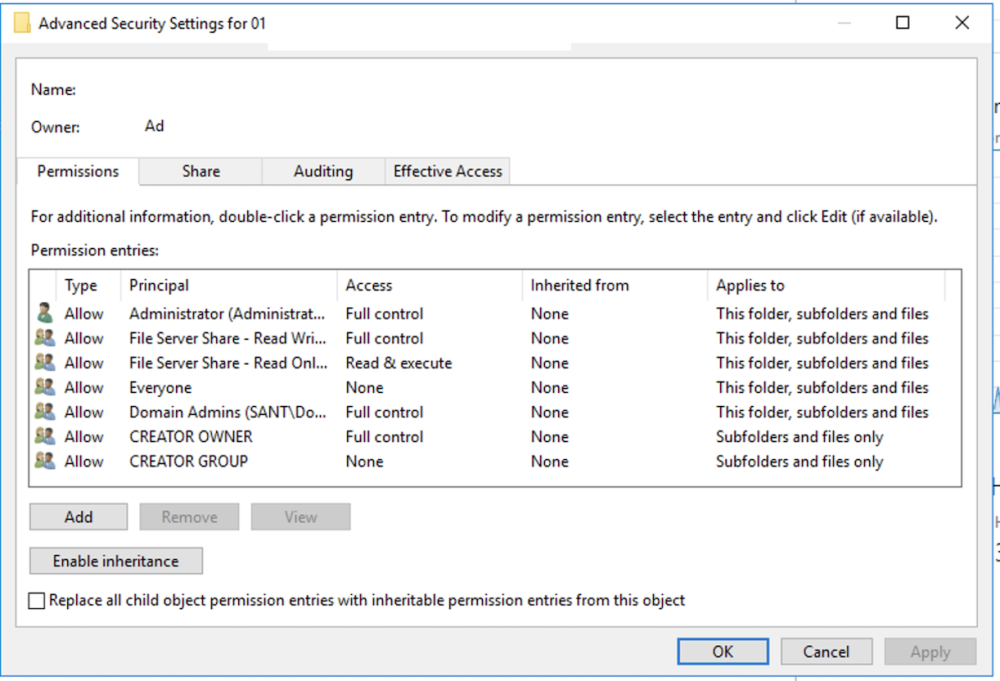
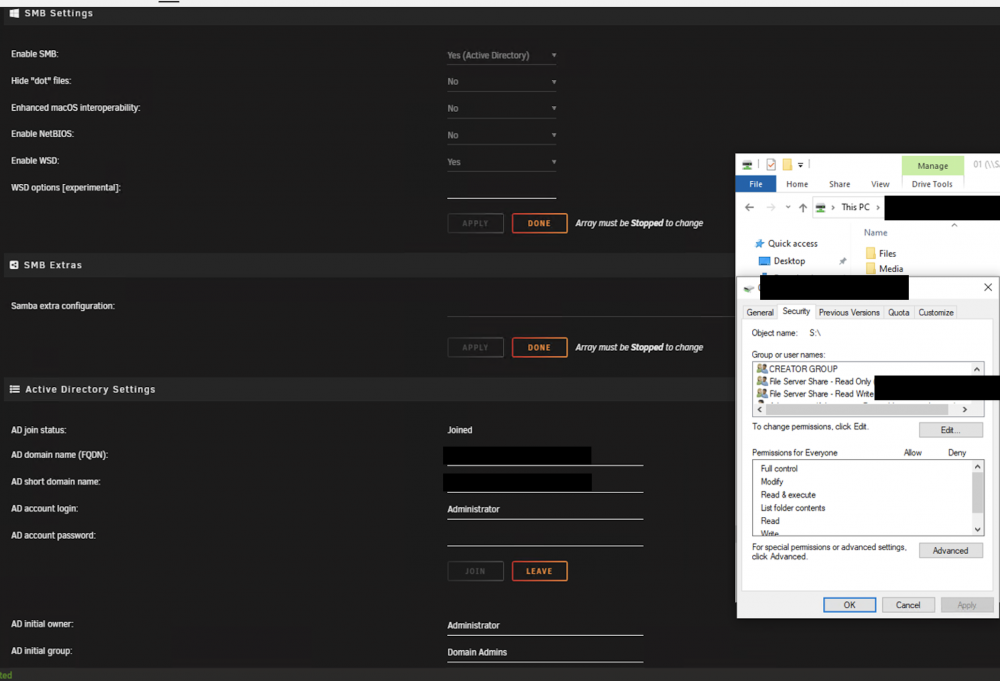
Hi everyone, Figured I'd post what I'm seeing on two of my Unraid servers. Both servers are AD joined; permission structure and config is rather basic. I'm only using them for network storage (no Docker or VMs running on Unraid). The problem I'm having is that after upgrading from 6.9.2 to either 6.10.x or 6.11.x the only permissions that seem to be respected are the "initial owner" and "initial group" permissions. Adding users manually to the top-level of the share, and enabling inheritance doesn't work; and members of the two groups (Group1_RW and Group2_RO) get access denied. -- I am able to access the share, and write/update permissions from the Domain Administrator account, and members of the Domain Admins groups; which are the default/initial accounts set on the SMB settings. I've also done the following to recursively set the permissions for both of those accounts as well after adding the SMB extras below; using the following commands via shell/CLI: (which was required, so I could connect as the domain administrator account and write the additional permissions) root@NAS01:~# cd /mnt/user root@NAS01:/mnt/user# ls -l total 0 drwxrws---+ 1 1883242996 1883243008 20 Apr 4 2022 01/ root@NAS01:/mnt/user# chown -R administrator * root@NAS01:/mnt/user# chgrp -R "domain admins" * root@NAS01:/mnt/user# ls -l total 0 drwxrws---+ 1 administrator domain admins 20 Apr 4 2022 01/ Configuration as follows: Unraid -> Settings -> SMB: Enable SMB: Yes (Active Directory) Hide Dot Files: No Enhanced macOS interoperability: No Enable NetBIOS: No Enable WSD: Yes ESD Options: empty/blank SMB Extra: (originally tried it blank, have since added the following and re-wrote permissions as result -- works great with or without this on 6.9.2; except it does stop some of the nuisance logging that was patched in 6.11.x) [global] idmap config * : backend = tdb idmap config * : range = 3000-7999 idmap config SITE : backend = rid idmap config SITE : range = 10000-4000000000 Active Directory Settings AD join status: Joined FQDN: site.domain.com (example) AD short name: SITE (again, example; it's set correctly) Username and password obviously are good since it's joined. AD initial owner: administrator (which ends up resolving to the default domain administrator) AD initial group: domain admins (again, great... no issues resolving to domain admins). Share structure is pretty basic: [Share name] Permissions: (initial owner) [email protected] = Full control (verified that owner is set) (initial group) domain [email protected] = Full control(verified that group owner is set) [email protected] = Read Only//Read & execute [email protected] = Full control (unable to set modify only, samba elevates to full control; no biggie) (default added) Everyone = None CREATOR Owner/Group = Defaults e.g.: Extra callouts: Domain Controllers are a mix of 2019 and 2022 Windows Server; 2019 functional level. I've verified that permissions are inherited and are set correctly all throughout the share. I don't have any sub-permissions set; everything is at the top-level of the share. EVERYTHING works as expected with 6.9.2; no issues at all... Super stable. I just want to be in a place to eventually upgrade if needed; and not be screwed. I was running without any extras in the smb settings; however I stumbled upon this post; and figured I'd try it. Series of events were... Stable on 6.9.2; upgrade to 6.11 or 6.10; broke permissions... Tried to re-write permissions (fully remove any additional permissions (minus the initial owners) and re-add them... That didn't fix it. (small rant/scope creep) Said screw it to Active Directory since it doesn't see much adoption here (called out in some posts); and switched to a workgroup permission style and configured all respective users/passwords.. Got everything working, and then realized that inheritance seems broken; when a user with R/W permissions would create a new folder/files it would set that user as the owner; and break any read access to the users with R/O access to those *new* files. I would have to keep recursively updating permissions for it to reset back so the R/O users could access the newer files. Could be scripted; but seemed a bit like a nightmare. I'm sure I missed something here; I tried doing the "New permissions" tool; and even manually setting permissions as well as 'chmod g+s' to the main share... No dice and the wife started getting upset that her new TV shows were not getting added to Plex; so I rolled back to 6.9.2... Found the these posts that mentioned the smb extras above, and how this was adopted in 6.11.x & may have misunderstood what "This change was put into 6.11.0:" it could mean they adopted the new changes to the smb extras as new defaults (unlikely adopting the tbd since the permissions on the first upgrade still looked correct); so I am not sure what changes -- maybe just filtered out the annoying logs? Posts: After making the changes to the SMB extras, re-writing permissions under 6.9.2; and verifying that everything is working on 6.9.2; I decided to upgrade again to 6.11.0.. Problem persisted. Figured I would try re-writing the permissions (again) and still no dice. Added the users in the RW and RO groups manually to the top-level; with inheritance enabled and overwrite checked... e.g. MediaServer = RO, MyUser = RW... Still would get access denied when trying to access the share from either account... I could still access/browse as the domain administrator; or a member of the domain admins group. Rolled back to 6.9.2...
-
I have a very similar set up to you @Clevernickname.... AD Initial owner: Administrator; AD initial group is Domain Admins; then I manage the permissions based on group membership; which was added by a Windows machine. Permission like this is on the files/metadata. I'm surprised that rewriting the permissions resolved the issue. Also, if feel like my issue was more around share permissions; not so much file permissions.. I could test the affective permissions from my domain admins account; effective permissions were good... But testing with the impacted account couldn't even access the root of the server e.g. \\<hostname>\ ; as well as the \\<hostname>\<shareName>\ ... I don't understand Unraid well enough to know if they somehow apply the same share permissions as the file permissions? Maybe; In windows they're treated differently/independent of one another. I'll give that a shot after a couple more .releases. Hopefully they identify the issue and resolve it, or have a very clear work-around documented... Seems like a defect/bug.
-
I have a similar set up to you. Running 6.9.2, Domain Joined Unraid server. Works great on 6.9.2.. Upgraded to 6.10.2 and lost access to shares. Folder/File permissions looked correct, and testing from a Windows machine, the effective permissions were correct. That said, I could not access the share from a linux server or some a windows machines that wasn't logged in as a domain administrator. None of my troubleshooting worked. I ended up reverting back to 6.9.2 as well... I tried leaving the domain (which wouldn't leave); so I reverted the settings back to Workgroup setting for SMB, rebooted.. Then tried to join the domain again, join was successful; but permission was still not working on the share.

