




Skip to content
View in the app

A better way to browse. Learn more.

Unraid

A full-screen app on your home screen with push notifications, badges and more.

To install this app on iOS and iPadOS
  1. Tap the Share icon in Safari
  2. Scroll the menu and tap Add to Home Screen.
  3. Tap Add in the top-right corner.
To install this app on Android
  1. Tap the 3-dot menu (⋮) in the top-right corner of the browser.
  2. Tap Add to Home screen or Install app.
  3. Confirm by tapping Install.

oneu85

Members
  • Joined

  • Last visited

Everything posted by oneu85

  1. Got it Figured Out Qnap device had to be set to Raid in order for the Unraid app to detect the Controller. all is now working thanks
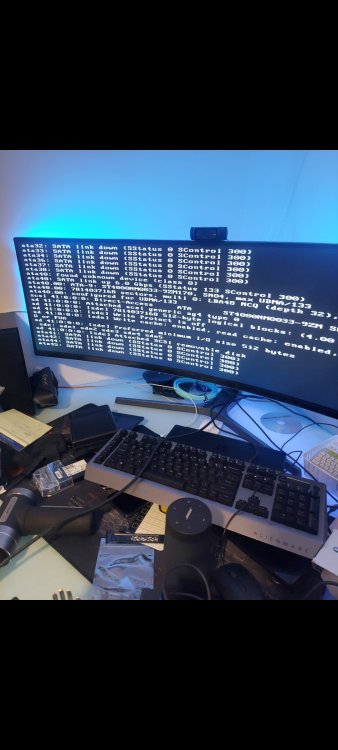
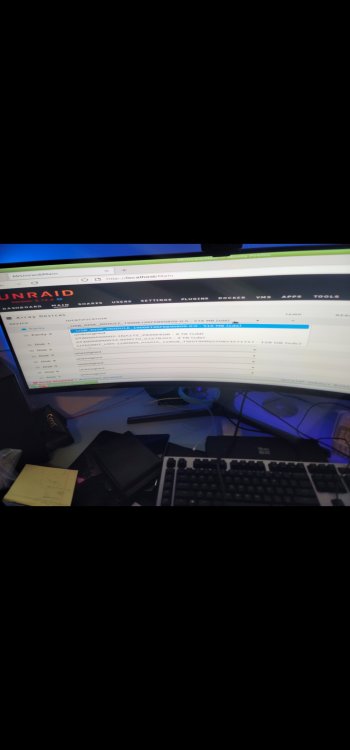
  2. hello friend sorry if this is the wrong section. had a quick question so see if any of this 2 Qnaps are compatible with Unraid. I got them free from work and wanted to set them up at home. TS-EC2480U-RP TS-2483XU-RP on the TS-EC2480 when i loaded the Unraid app it only shows USB_DISK_MODULE on the Parity 1. Drop down and doesnt show any of my Drives. I did notice when I power on the device as it boots :SATA LINK DOWN _SSTATUS 0 SCONTROL 300) Im in process of getting the Board replaced for the TS2483XU-RP via RMA but before I ship it to California and waste the money to get it up and runing
Account

Navigation

Search

Search

Configure browser push notifications

Chrome (Android)
  1. Tap the lock icon next to the address bar.
  2. Tap Permissions → Notifications.
  3. Adjust your preference.
Chrome (Desktop)
  1. Click the padlock icon in the address bar.
  2. Select Site settings.
  3. Find Notifications and adjust your preference.