BoomLiam
Members
-
Joined
-
Last visited
-
BoomLiam changed their profile photo
-
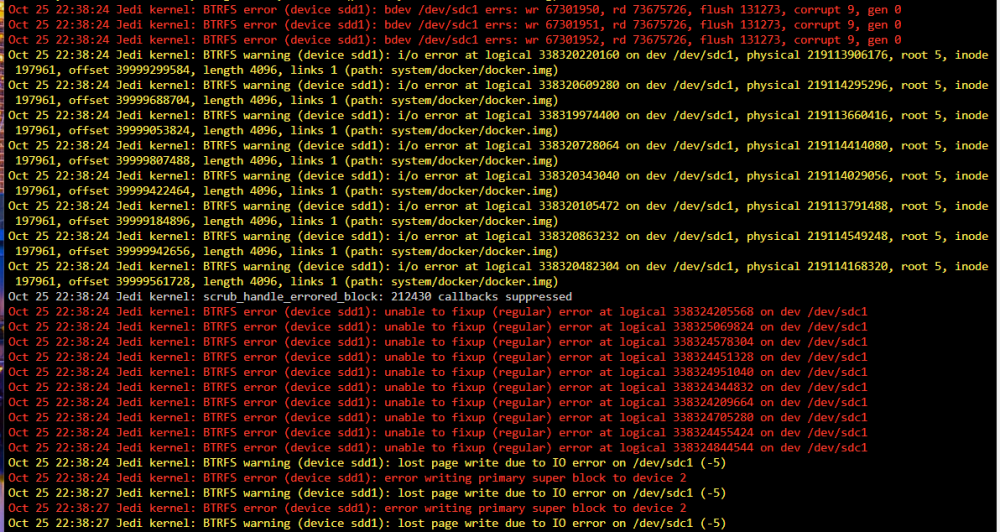
@JorgeBYou're amazing. Thanks so much! Looks like it was the firmware on the MX500. Unfortunately I took the wrong drive offline so the one which was corrupt remained and I messed up the whole Cache but thankfully, I trusted my backups, updated the firmware on both of them following instructions in the other post and now we're all good and after 24 hours, no sign of BTRFS errors. Absolute wizard. Thanks so much! Will certainly setup that better pool monitoring too because I agree, it's annoying that Unraid doesn't report on these errors until my log file fills up. Thanks again!
-
Hi! Hoping someone may be able to advise me on this issue that has been bugging me for the past couple of days. My log file has been filling up with BTRFS errors from my cache drives (2x Crucial MX500 SSDs). The timing is quite interesting because this started happening when I upgraded my system from an old Xeon to an i7 8700k so that means new motherboard, non-ECC RAM. I've tried scrubbing to no avail, I reseated all cables, everything internally seems fine. This morning I tried replacing SATA cables and that seemed to work, I did a scrub which corrected all the errors, ran another scrub and not a single BTRFS error, but then after returning from work, the errors are flooding back. Doesn't seem like anything is actually degraded in Unraid itself, everything on the cache drive seems fine, it is just that my log file is slowly filling up. When reading through the diagnostics file, this morning at 2023-10-25 09:50:17 I started a scrub to correct the errors on the bad SSD after changing the SATA cable. That completed at 10:00:11 and I ran another just to check and it found no errors this time at 10:10:27 After that I went to work and the errors seem to have returned at 10:18:55. jedi-diagnostics-20231025-2239.zip