





Sascha Hermann
Members
-
Joined
-
Last visited
-
Schön, das es jetzt auch bei dir klappt. Kannst dich ja melden zum quatschen. @sascha:matrix.jomisa.eu
-
Oh, mann. Das war es auch bei mir. Den ersten Block hatte ich eingetragen, aber den zweiten Block nicht. Endlich klappt es mit der Federation. Habe mich 2 Wochen tot gegoogelt und probiert. Danke Euch!!!!!!
-
Sascha Hermann changed their profile photo
-
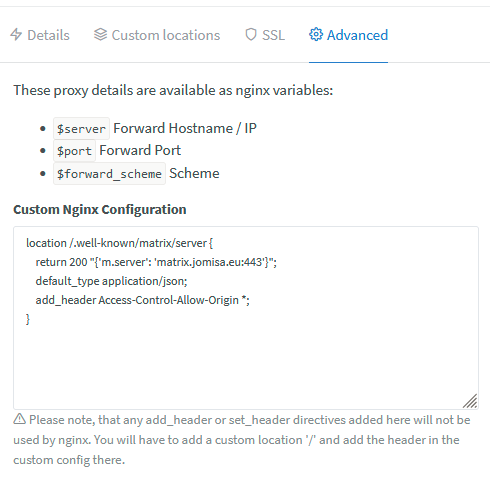
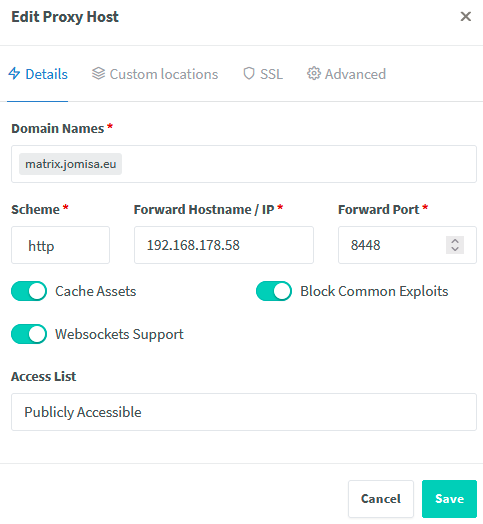
Hallo BuTscH, erstmal danke für die schnelle Antwort. Das habe ich hier eingetragen: Mal blöd gefragt, aber ist das überhaupt richtig? Die Antwort von der Federation kommt an der Fritz an 443 ==> 18443 (NPM) ==> 8448 (Matrix)
-
Hallo Zusammen, ich habe Matrix-Synapse auch installiert und soweit ist auch erstmal alles gut. Server ist von Außen erreichbar unter: matrix.jomisa.eu Nur bekomme keine Verbindung zur Federation. Port 8008 & 8448 leite ich vom Router zu NgnixPM und von da aus auf 8448. # https://matrix-org.github.io/synapse/latest/usage/configuration/config_documentation.html server_name: "matrix.jomisa.eu" pid_file: /data/homeserver.pid listeners: - port: 8448 tls: false type: http x_forwarded: true bind_addresses: ['172.19.0.3'] # Either set to 0.0.0.0 or ip address it uses for network bridge. resources: - names: [client, federation] compress: false database: name: sqlite3 args: database: /data/homeserver.db log_config: "/data/matrix.jomisa.eu.log.config" media_store_path: /data/media_store registration_shared_secret: "XXXXXXXXXXXXXXXXXXXXXXXXXXXXXXXXXXXXXXXXXXXXXX" report_stats: false macaroon_secret_key: "XXXXXXXXXXXXXXXXXXXXXXXXXXXXXXXXXXXXXXXXXXXXXXXXXXXXXX" form_secret: "XXXXXXXXXXXXXXXXXXXXXXXXXXXXXXXXXXXXXXXXXXXXXXXXXXXXXXXXXXX" signing_key_path: "/data/matrix.jomisa.eu.signing.key" trusted_key_servers: - server_name: "matrix.org" federation_domain_whitelist: - example.com - matrix.org - something.net suppress_key_server_warning: true # I recommend enabling this if you want outside users to be able to access your public rooms. # I believe they can still join your rooms via an invite if this option is disabled. allow_public_rooms_over_federation: true # Enable registration for new users. enable_registration: true enable_registration_without_verification: true Wo ist denn hier mein Denkfehler?

