




Skip to content
View in the app

A better way to browse. Learn more.

Unraid

A full-screen app on your home screen with push notifications, badges and more.

To install this app on iOS and iPadOS
  1. Tap the Share icon in Safari
  2. Scroll the menu and tap Add to Home Screen.
  3. Tap Add in the top-right corner.
To install this app on Android
  1. Tap the 3-dot menu (⋮) in the top-right corner of the browser.
  2. Tap Add to Home screen or Install app.
  3. Confirm by tapping Install.

MaliJ

Members
  • Joined

  • Last visited

  1. I uninstalled NUT but same issue. I disabled all plugins using Dynamix Safe Mode, same issue. Anything else I can do?
  2. I'm using NUT 2023.07.26 by SimonFair as recommended in the Upgrade notes of 6.12 I'll try disabling plugins to see which one is interferring with the dashboard
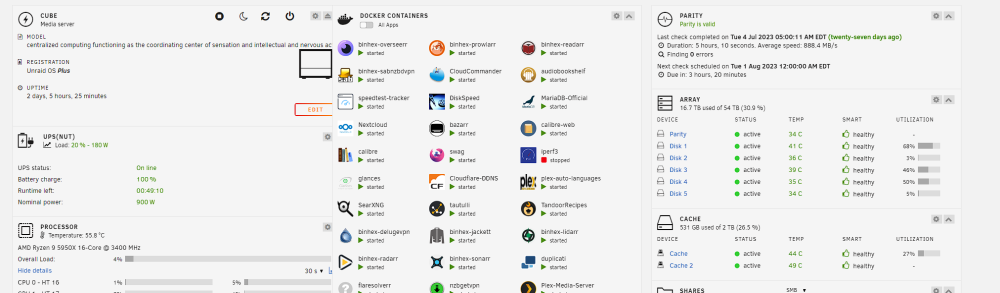
  3. Hi Guys, I'm having problem with ultrawide and 3 columns, the first 2 overlap and nothing can seem to fix it. 2 column is fine but as soon as I go full screen it does this. tried changing : zoom, browser, text size, cleared cache. same thing every time. some help would be much appreciated.
Account

Navigation

Search

Search

Configure browser push notifications

Chrome (Android)
  1. Tap the lock icon next to the address bar.
  2. Tap Permissions → Notifications.
  3. Adjust your preference.
Chrome (Desktop)
  1. Click the padlock icon in the address bar.
  2. Select Site settings.
  3. Find Notifications and adjust your preference.