Skip to content
View in the app

A better way to browse. Learn more.

Unraid

A full-screen app on your home screen with push notifications, badges and more.

To install this app on iOS and iPadOS
  1. Tap the Share icon in Safari
  2. Scroll the menu and tap Add to Home Screen.
  3. Tap Add in the top-right corner.
To install this app on Android
  1. Tap the 3-dot menu (⋮) in the top-right corner of the browser.
  2. Tap Add to Home screen or Install app.
  3. Confirm by tapping Install.

piBear

Members
  • Joined

  • Last visited

  1. I'm a newbie here - probably a very trivial question: I was able to install Calibre, the library is accessible - but I can't find the reader in the program. The reader is attached to the USB Port of the servers Would be grateful for tips Benedikt

  2. Bin Neuling hier - wahrscheinlich eine ganz banale Frage: Hab Calibre installieren können, Bibliothek ist erreichbar - aber ich kann den Reader nicht finden im Programm . Dieser hängt am USB der Servers - Hab lang gegoogelt - aber da steh ich an Wäre dankbar für Hinweise Benedikt
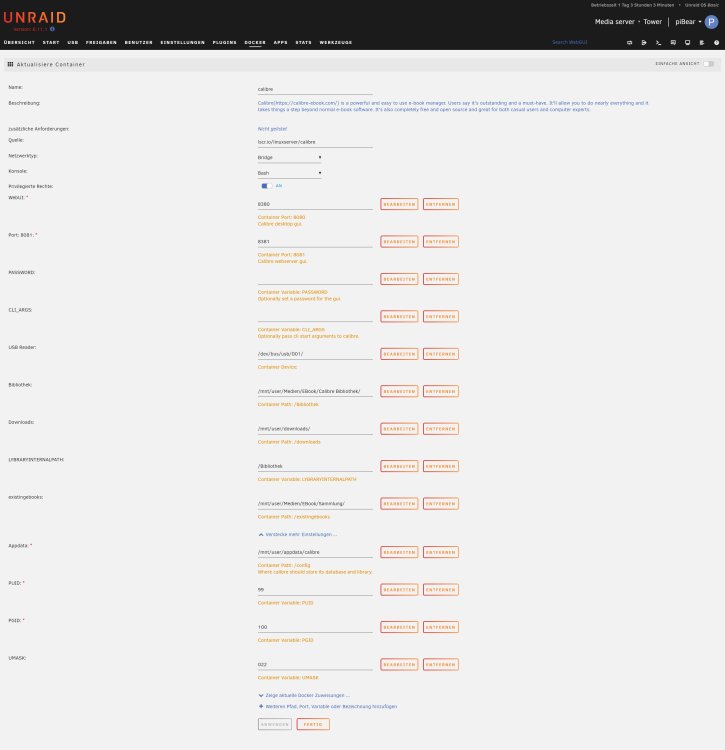
  3. Ich seh im Calibre das am USB des Hosts angesteckte Ebook nicht - was übersehe ich da?? Danke für jeder Unterstützung! Benedikt

Account

Navigation

Search

Search

Configure browser push notifications

Chrome (Android)
  1. Tap the lock icon next to the address bar.
  2. Tap Permissions → Notifications.
  3. Adjust your preference.
Chrome (Desktop)
  1. Click the padlock icon in the address bar.
  2. Select Site settings.
  3. Find Notifications and adjust your preference.