cliffdog510
Members
-
Joined
-
Last visited
-
The mkdir in the setup steps has a quoting bug that silently creates the folders somewhere other than where the container expects. I think it explains the recurring "/srv/users: no such file or directory" reports in this thread. The instructions say: mkdir -p /mnt/user/FileBrowser Files/users chown -R 1000:100 /mnt/user/FileBrowser Files/users The share name contains a space and the path isn't quoted, so mkdir receives two arguments instead of one. It creates: /mnt/user/FileBrowser (empty) Files/users - relative to whatever directory you're currently in ...and never creates /mnt/user/FileBrowser Files/users, which is what /srv/users actually maps to. mkdir -p exits 0, so nothing appears to go wrong. In my case the second directory landed in /mnt/user/appdata/filebrowserQuantum/Files/users because that's where I happened to be cd'd to, and the chown -R followed it there. The result after logging in is a 404, and this in the container log: [ERROR] Failed to open root directory: open /srv/users: no such file or directory [ERROR] could not update user: MakeUserDirs: scope folder does not exist: /srv/users GET | 404 | admin | "/api/resources?path=%2F&source=My Files" The fix is just quoting: mkdir -p "/mnt/user/FileBrowser Files/users" chown -R 1000:100 "/mnt/user/FileBrowser Files/users" Worth clarifying that the share name is not the problem. A few people have suggested renaming the share to FileBrowser or FileBrowserFiles. That does work, but only because it sidesteps the unquoted argument. Mine is still named "FileBrowser Files" and works fine now that the directory exists. Extra warning for anyone on a ZFS pool: the stray/mnt/user/FileBrowser isn't just an empty folder. Unraid provisions a ZFS dataset for a new directory at the pool root, so you end up with a phantom cache/FileBrowser dataset and an empty share in the UI. Clearing it needs zfs destroy cache/FileBrowser, and in my case that failed with "dataset is busy" until I restarted two unrelated containers that had inherited the mount into their own mount namespace at startup. If you're already affected, to recover: mkdir -p "/mnt/user/FileBrowser Files/users" chown -R 1000:100 "/mnt/user/FileBrowser Files/users" docker restart FileBrowserQuantum Then clean up the two strays: /mnt/user/FileBrowser, and Files/users under whichever directory you originally ran the command from. Could the Requires text in the template be updated to quote both paths? It would save the next person the same hunt.
-
That worked! I didn't realize you have to set permissions of your bot from the "Installation" tab on the Discord Developer Portal. After doing that and updating the docker, the autocomplete works as intended and everything works perfectly! 😁 Thanks, you're a legend! 🙏🙏🙏
-
When I try to play a book, the bot says "Bot is not ready or author not in voice channel, please try again later." I've made sure to join the voice channel first. Log: INFO - bot : Bot is Starting Up! | Startup Time: 2024-07-25 23:34:16.887923-04:00 INFO - bot : Starting up bookshelf traveller v.Beta_1.0.9 WARNING - bot : Please wait for this process to finish prior to use, you have been warned! INFO - bot : Testing Server Connection INFO - bot : Server URL http://192.168.1.30:13378 INFO - bot : Connection Established! INFO - bot : Current Server Status = 200, Good to go! INFO - bot : Providing Auth Token to Server INFO - bot : Cleaning up, authentication INFO - bot : Logging user in and verifying role. INFO - bot : ABS user logged in as ADMIN with type: admin INFO - bot : Audio module loaded! INFO - bot : MULTI_USER module loaded! INFO - bot : Initializing Sqlite DB INFO - bot : Shard ID 0 | Starting Shard INFO - bot : Shard ID 0 | Shard is attempting to connect to gateway... INFO - bot : Shard ID 0 | Gateway connection established INFO - bot : Overwriting 0 with 17 application commands INFO - bot : Registered initial user Audiobook-bot successfully ERROR - bot : POST::https://discord.com/api/v10/channels/1265978577376120845/messages: 403 ERROR - bot : Ignoring exception in Startup(): HTTPException: 403|Forbidden || Cannot send messages to this user INFO - bot : [] INFO - bot : Autocomplete Called: $play with event.ctx.focussed_option = SlashCommandOption() | event.ctx.kwargs = {'book': ''} INFO - bot : Successfully Reached /libraries with Status 200 INFO - bot : Autocomplete Called: $play with event.ctx.focussed_option = SlashCommandOption() | event.ctx.kwargs = {'book': 'T'} INFO - bot : Successfully Reached /libraries with Status 200 INFO - bot : Successfully Reached /libraries with Status 200 INFO - bot : Autocomplete Called: $play with event.ctx.focussed_option = SlashCommandOption() | event.ctx.kwargs = {'book': 'The Hung'} INFO - bot : Autocomplete Called: $play with event.ctx.focussed_option = SlashCommandOption() | event.ctx.kwargs = {'book': 'The Hunge'} INFO - bot : Successfully Reached /libraries with Status 200 INFO - bot : Autocomplete Called: $play with event.ctx.focussed_option = SlashCommandOption() | event.ctx.kwargs = {'book': 'The Hunger '} INFO - bot : Successfully Reached /libraries with Status 200 INFO - bot : Autocomplete Called: $play with event.ctx.focussed_option = SlashCommandOption() | event.ctx.kwargs = {'book': 'The Hunger Games'} INFO - bot : Command Called: play with event.ctx.args = ['The Hunger Games'] | event.ctx.kwargs = {'book': 'The Hunger Games'} INFO - bot : [] INFO - bot : Autocomplete Called: $play with event.ctx.focussed_option = SlashCommandOption() | event.ctx.kwargs = {'book': ''}
-
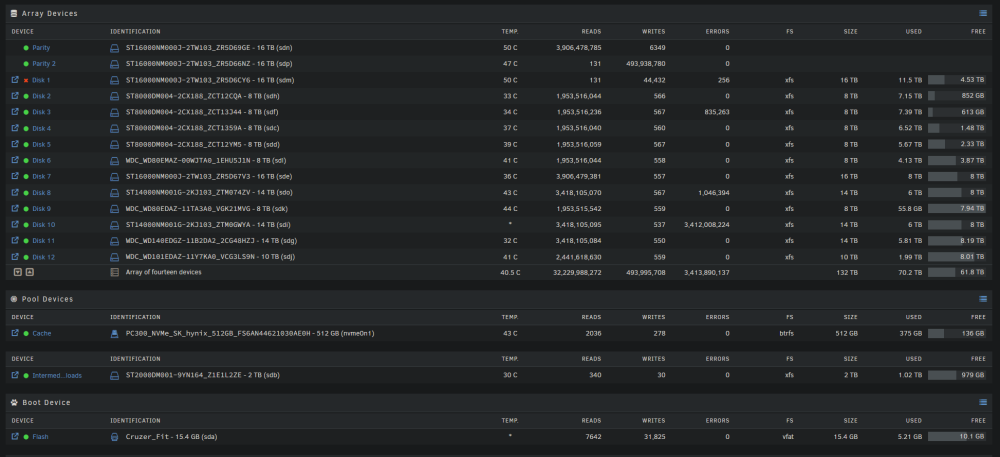
Looking for general advice or a sanity check. During a scheduled parity check, one of my two parity drives plus drive 1 of the array became "Disabled." Weird but ok...I take the array offline and run extended SMART tests on both drives, they both pass. I remove them both from the array, add them back, and start the array again, which automatically starts to rebuild the array. During the rebuild, I notice disk 10 is returning millions of errors, nearly as many as the writes. I stop the array again, run extended SMART on disk 10, which also passes. I start to rebuild again. Disk 10 still throws errors, but now disks 3 and 8 are also throwing errors. The rebuild fails, obviously. And just as a cherry on top...the crappy old 2TB drive I was using as a cache for torrent downloads is also showing a SMART error. Five stage of grief later, and I've come to grips with all my data being gone. Luckily it wasn't anything I can't just download again with enough time and patience. I'm more interested to know how this could have happened, especially with no prior warning?? I have notifications on, they all go to my private Discord server and I get them instantly on my phone, and there was no prior warning for any of this. I'm not using a UPS, could this have been a power event? Do I need to replace ALL the drives with errors, or can I pre-clear them and start a new array if they pass extended SMART? Cheers, --unraid-diagnostics-20230703-0603.zip