





tsgeek
Members
-
Joined
-
Last visited
Everything posted by tsgeek
-
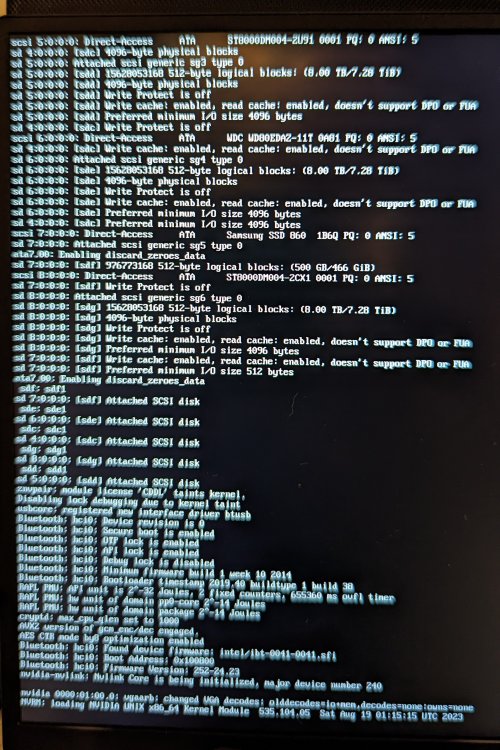
Well crud. I spoke too soon. Now it hangs too soon in the boot process to log anything to syslog. I've restarted twice today (Sept 4), get to the OS selection menu, selected Safe Mode (2nd time, Safe Mode no GUI). I attached syslog and a photo of my monitor at the point where the system locked up. Now I'm starting to wonder about my NVME cache drive and/or the nVidia card. Regardless, are we getting into hardware-only territory if unRaid isn't fully loading? syslog
-
I'm comfortable saying disabling C States did the trick. Thanks!
-
I ran a couple memtests (no errors) and disabled C-States in the bios. So far so.good. The only odd thing now is that I lost the ability to access unRAID web gui via the local domain name. At first boot it was fine. When I started the array I lost the local domain name option. I am able to access via IP address, and it all looks good so far. I attached my latest syslog, and with my untrained eye it looks much cleaner. syslog.bin
-
Thanks! I'm out now but I'll try when I get home. I had just updated the bios , but I honestly don't remember if it was before or after these issues started. I'm intrigued about the C-States disable. I enabled it probably a year ago for more efficient power consumption. I have no issue with disabling. I've read that you might need to run memtest multiple times. Is that true? I ran it once 4-5 days ago, with no reported issues
-
I've had this issue for several days now, and tried a lot of things to try to stabilize the system. The issue remains that I boot my server, everything comes up fine, but after a coupe hours of inactivity the system locks up and becomes unresposnsive through the web GUI. Abouthalf the time I can get to my cmd login directly on the server, but it gets stuck shortly after that. I'm able to stay logged in long enough to run a clean shutdown, nothing more. When I'm able to run the shutdown commend, the system still hangs. I've let it sit for an hour or longer waiting to see if the system will shut down on its own. Even I need to power down manually or hit the reset button, and the ctcle begins again. What I've tried: A complete reset copying only the pools folder, super.dat and key file from the flash drive A complete reset using an unmodified boot image on a clean flas drive (no files from config, no key, etc.) The unmodified boot image seemed to help a little, as I wasn't ever able to get to the web GUI from the initial rebuilt flash drive. The clean image drive worked enough for me to get the system re setup manually (2nd new flash drive, so I had to contact support to get the new key). I copied the appdata and domains info from the cache drives to the array, completely reformatted each of the cache disks to zfs, and even deleted the old docker image. I was able to get a couple docker images running, and left the system alone overnight. Came back in the morning and everything is locked up again. No web GUI. Had to manually shut down, etc. And then start the cycle again, only to crash after it sits idle for a few hours. I'm at a loss. I did have syslog write to the flash, so I have the attached here. I see lors of errors, but I don't know how to interpret them. Any insights? Thanks! Dan syslog

