





Teknicallity
Members
-
Joined
-
Last visited
-
Fixes published to the beta. I'll push to stable in a day or so.
-
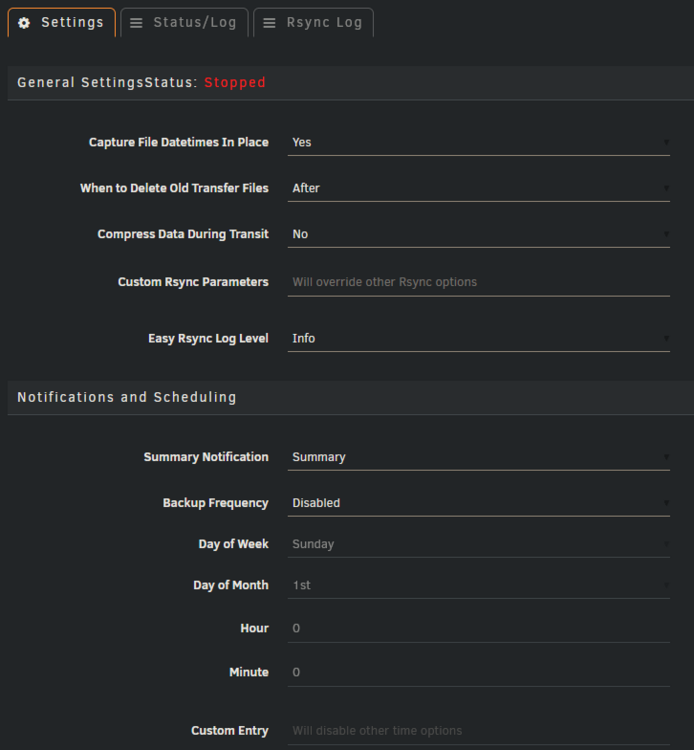
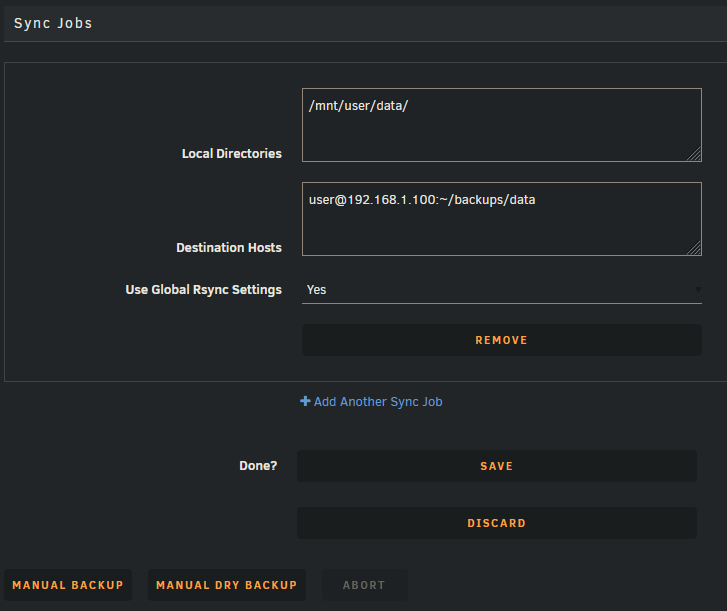
A web-based UI for configuring and running rsync backups on Unraid. Set up source paths, remote destinations, and a backup schedule from the Settings page. Handles invoking rsync, logging, and notifications. Features - Multiple sync entries, each with its own sources, destinations, and rsync flags - Daily / weekly / monthly schedules, or a custom cron expression - Manual backup and dry-run buttons in the UI - Abort a running backup from the UI - Per-job rsync log + plugin status log, viewable in their own tabs - Notifications via Unraid's notification system Screenshots Github: https://github.com/Teknicallity/easy-rsync Install through Community Applications or build from source.
-
Hopefully this can help someone else in the future. I'm not sure why I was afraid to just cancel the parity check. Ultimately, I just shut down, swapped in the cold spare, then started the array rebuild operation.
-
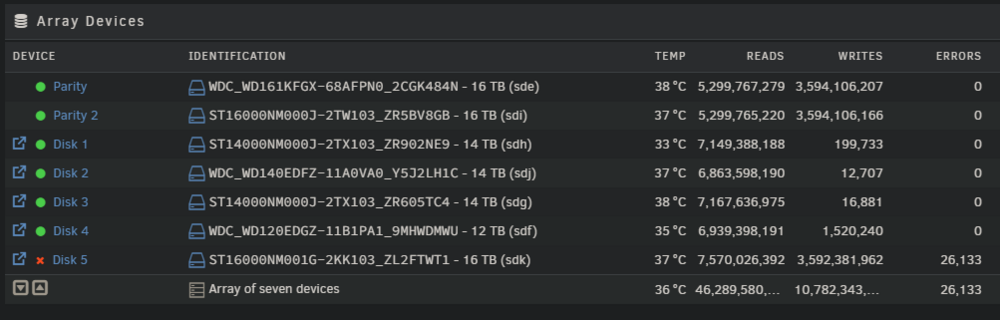
Hello all, My scheduled parity check started this morning, and I just got the notification that one of my drives skyrocketed with errors, then was disabled by Unraid. As of writing, the parity check has 0 sync errors detected. I have a cold spare of the same size and type ready to put in the server, but am unsure exactly how. I am running an LSI 9207-8i card, and have tested that in theory, I can "hot-swap" drives with it. Does that work in Unraid? What is the best way for me to swap in a new drive considering that the parity check is still running? Thanks pearl-diagnostics-20250407-0934.zip pearl-smart-20250407-0938.zip
-
Application Name: StoreDown Application Github: https://github.com/FoxUSA/StoreDown Application Demo: https://storedown.org/dist/#/ Docker Github: https://hub.docker.com/r/foxusa/storedown An inventory system that is hopefully simple enough for everyone! I did not make this application, only converted it to an Unraid template. Post any questions or issues relating to this docker in this thread. Installation For setup, run a CouchDB instance and configure with the following: Set the user and password environment variables. Go to `http://$serverurl:$port/_utils/#_config/nonode@nohost/cors` and enable CORS for your domain. Go to `http://$serverurl:$port/_utils/#_config/nonode@nohost` and in the httpd section, set `WWW-Authenticate` to `administrator` Go to `http://$serverurl:$port/_utils/#_config/nonode@nohost` and set in the chttpd section `require_valid_user` to `true` Then create a database at `http://$serverurl:$port/_utils/` Finally log in to storedown with the username, password, url, port, and database.
-
Application Name: JMusicBot Application Github: https://github.com/jagrosh/MusicBot Application Website: https://jmusicbot.com Docker Github: https://github.com/yojoshb/jmusicbot-docker Docker Repo: https://github.com/yojoshb/jmusicbot-docker/pkgs/container/jmusicbot-docker A Discord music bot that's easy to set up and run yourself! I did not make the bot, only helped convert it to a container. Post any questions or issues relating to this docker in this thread.
-
Looks extremely similar, yeah. Thank you
-
Hi, I just updated to 6.11.5 from 6.10.x a couple days ago and have quite a few problems starting with what I assume was docker.img corruption. Now I'm facing a sporadic problem where my server will work fine for a few hours, but suddenly becomes unresponsive when trying to access the dashboard or any part of the gui except for the log in page. It allows ssh connections, which is how I got the diagnostics, and most docker containers are still running fine. Oddly, qBittorent does not load its gui, not sure if that could be related. Ive tried using the remote access feature and incognito separately and together with all the same results. pearl-diagnostics-20230420-1529.zip


