



Skip to content
View in the app

A better way to browse. Learn more.

Unraid

A full-screen app on your home screen with push notifications, badges and more.

To install this app on iOS and iPadOS
  1. Tap the Share icon in Safari
  2. Scroll the menu and tap Add to Home Screen.
  3. Tap Add in the top-right corner.
To install this app on Android
  1. Tap the 3-dot menu (⋮) in the top-right corner of the browser.
  2. Tap Add to Home screen or Install app.
  3. Confirm by tapping Install.

FlikaMasha

Members
  • Joined

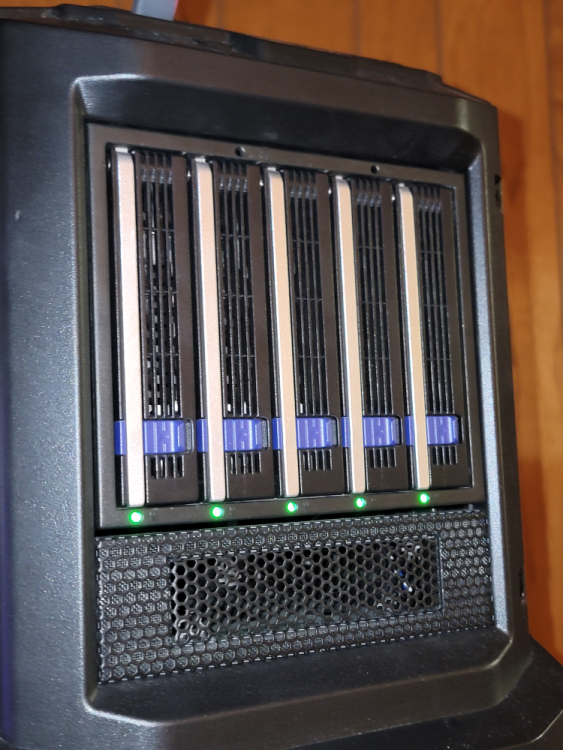
  1. I know this is an older post and not meaning to necro-post but I am using an old computer case for my Unraid and I purchased a hot swap cage that holds 5 drives and fits into a 3x 5.25" bay. I do recommend it but also mine is housing 5 14tb drives and with parity being ran they do get into 50c range. I plan on swapping 3 out for SSDs for better air flow and moving them (3 HDDs) to different location once I get this case in this thread. https://www.icydock.com/goods.php?id=155 I also replaced the included fan with a Noctua one that is quieter/better.
Account

Navigation

Search

Search

Configure browser push notifications

Chrome (Android)
  1. Tap the lock icon next to the address bar.
  2. Tap Permissions → Notifications.
  3. Adjust your preference.
Chrome (Desktop)
  1. Click the padlock icon in the address bar.
  2. Select Site settings.
  3. Find Notifications and adjust your preference.