



Skip to content
View in the app

A better way to browse. Learn more.

Unraid

A full-screen app on your home screen with push notifications, badges and more.

To install this app on iOS and iPadOS
  1. Tap the Share icon in Safari
  2. Scroll the menu and tap Add to Home Screen.
  3. Tap Add in the top-right corner.
To install this app on Android
  1. Tap the 3-dot menu (⋮) in the top-right corner of the browser.
  2. Tap Add to Home screen or Install app.
  3. Confirm by tapping Install.

Kerber

Members
  • Joined

  • Last visited

  1. Kerber started following Kiwix help
  2. Kerber posted a topic in General Support
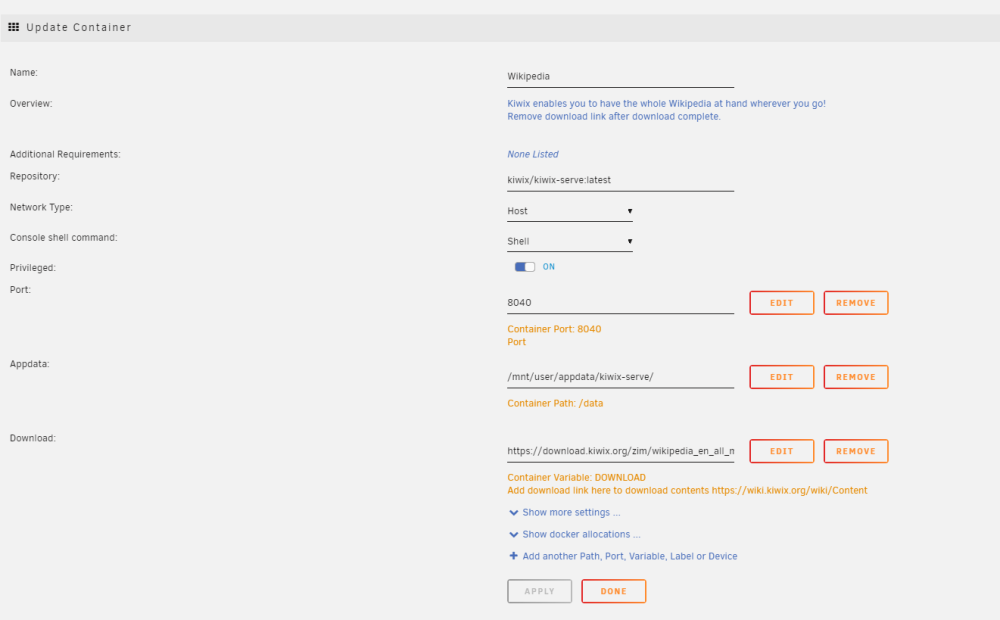
    Hey all, I am fairly new to Unraid, so I apologize if this is an easy fix. I am in the navy and have a server running with a lot of movies, tv show, etc. on it for deployment when internet is not an option. A buddy of mine with a similar one has wikipedia set up using Kiwix, and I cannot figure out how to get it working. I did get the english chemistry version downloaded and running (default settings) but cannot get the entire english version downloaded. I have 26Tb of storage, so I know that is not the problem. Any help would be appreciated. Thank you!
Account

Navigation

Search

Search

Configure browser push notifications

Chrome (Android)
  1. Tap the lock icon next to the address bar.
  2. Tap Permissions → Notifications.
  3. Adjust your preference.
Chrome (Desktop)
  1. Click the padlock icon in the address bar.
  2. Select Site settings.
  3. Find Notifications and adjust your preference.