





Virakocha
Members
-
Joined
-
Last visited
-
Hi Jorge, putting system in maintenance mode and running xfs_repair -v /dev/mdX in terminal has fixed the issue. Thanks a lot !!!!!
-
Hey Frank, So my setup is DELL poweredge R710. I don't have any UPS and power cut happened this Monday 22nd f Jan, twice. First one was at 6:00 then one more followed 1.5h later. Since Monday I have been struggling to get drive 6 back on-line. It could be that something has happened on 17th of Jan. I was on business trip so I can't really say that I have noticed anything unusual before. Since that I can't access VM Home assistant I would be sure that if this would happened on 17th I would know for sure.
-
Drive 6 is empty . other drives show various folders
-
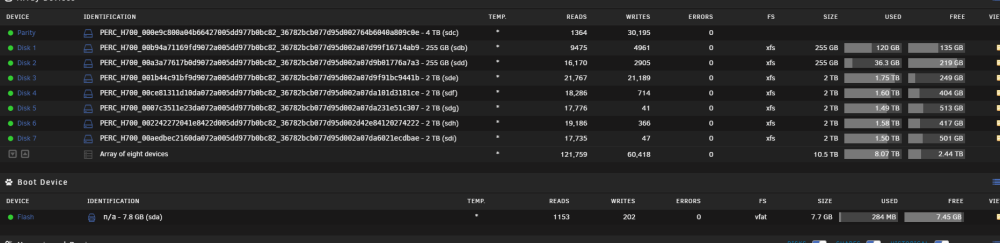
To add as well. on Main page Disk 6 shows as available. With this disk 6 failure my home assistant VM and several dockers stopped working.
-
Dear all, Two days ago I we had a power outrage and since then I can't get my unraid back and running. When I was looking I have noticed that drive 6 was showing RED like this "drive6?". I thought that my drive must have failed so I have replace it and performed "preclear" and data-rebuild. When I look at the df-h /dev/md1 238G 112G 126G 48% /mnt/disk1 /dev/md2 238G 34G 204G 15% /mnt/disk2 /dev/md3 1.9T 1.6T 233G 88% /mnt/disk3 /dev/md4 1.9T 1.5T 376G 80% /mnt/disk4 /dev/md5 1.9T 1.4T 478G 75% /mnt/disk5 /dev/md6 1.9T 1.5T 389G 80% /mnt/disk6 /dev/md7 1.9T 1.4T 467G 75% /mnt/disk7 Disk 6 shows 80% but when I look in /mnt/ disk 6 shows ' marks and when I enter the disk there is nothing there. drwxrwxrwx 4 nobody users 36 May 8 2022 disk1/ drwxrwxrwx 4 nobody users 42 Mar 5 2023 disk2/ drwxrwxrwx 13 nobody users 162 Jan 13 22:49 disk3/ drwxrwxrwx 6 nobody users 64 May 6 2022 disk4/ drwxrwxrwx 6 nobody users 64 Jan 13 22:49 disk5/ d????????? ? ? ? ? ? disk6/ drwxrwxrwx 9 nobody users 110 Dec 9 18:56 disk7/ drwxrwxrwt 2 nobody users 40 Jan 24 19:40 disks/ I have also attached my diagnostic file. Any idea how I can get my drive 6 back on-line. Thanks in advance. tower-diagnostics-20240124-2051.zip
-
Dear all, I have just moved from VMWARE to Unraid on my Dell T710 Server. For the moment all looks good, no major issues but I do have two (obviously nothing can't go without a glitch). I have additional Intel 4 port NIC installed in the server. Via Dell idarc I can see the NIC even in system devices I can see the NICs. They have been selected and green light is on the left. In Network Setting I don't see them therefore can't use them. Any ideas how to proceed? and I do apologize if I have duplicated the topic I just could not find anything similar that would help me. p.s. other one is that I can't get temperature for HDD and system. Cheers V tower-diagnostics-20220522-1816.zip



