helliott20
Members
-
Joined
-
Last visited
Everything posted by helliott20
-
🌍 Prunerr now speaks 7 languages The big addition in 1.5.9 is full internationalisation. The entire app — not just bits of it — is now translated: English, Spanish, French, German, Italian, Portuguese, and Dutch Covers the whole UI and notifications (Discord / plain-text) Dates and relative times localise too (e.g. "2 hours ago" → "hace 2 horas") How to switch: App language: Settings → Display Preferences → Language. The UI relabels instantly and your choice sticks across reloads. Notification language: there's a separate setting in the Notifications section, so you can run the UI in one language and send Discord alerts in another if you like. On first launch, Prunerr tries to match your browser's language automatically, and anything not yet translated quietly falls back to English — so nothing breaks. To update: pull the new image — helliott20/prunerr:1.5.9 (or latest). No config changes or migrations needed; your settings carry over. A note on the translations: if you're a native speaker and something reads awkwardly, I'd genuinely love the correction — drop a reply here or Open an issue on GitHub, and I'll get it fixed. Adding more languages is easy now that the groundwork is in place, so if there's one you'd like to see, just ask. 🙏
-
Update: Disk-Pressure Mode + Webhooks / Home Assistant 🪣 Disk-Pressure Mode — instead of only cleaning up on the nightly schedule, Prunerr now keeps an eye on your real free space and reclaims the lowest-value stuff only when you dip below a target you set (e.g. "keep 1TB free"). Reads space straight off your media paths, so it's not Unraid-specific. Starts in observe-only mode, so it'll show you what it'd remove before touching anything — and it respects all your existing protections and exclusions. 🔌 Webhooks + Home Assistant — events aren't Discord-only anymore. Prunerr can now fire signed JSON webhooks at anything (HA, n8n, your own scripts). With Home Assistant, you can get a phone push before content gets reclaimed, pull live disk stats, or kick off a scan from an automation. Docs included. Both are off by default — flip them on in Settings. Let me know what you think 🙂
-
Requesting New Features for PrunerrHey everyone — thanks for using Prunerr! I'm always looking for ways to make Prunerr better at cleaning up your Plex/Sonarr/Radarr libraries, and the best ideas come from people actually running it. If there's something you'd love to see added or changed, I'd really like to hear it. Where to request featuresThe best place to log a request is the Ideas board: https://github.com/helliott20/prunerr/discussions/categories/ideas Posting there (instead of burying it in this thread) means: 💬 Others can comment, refine, and build on your idea 👍 People can upvote requests they want too, which helps me prioritize ✅ Nothing gets lost in the thread scroll What to includeWhen you post an idea, it helps if you include: The problem — what are you trying to do that Prunerr can't do today? Your ideal solution — what would it look like? Any workarounds you're currently using Found a bug instead?Prefer GitHub Issues, or hit an actual bug? Use the forms here: https://github.com/helliott20/prunerr/issues/new/choose You're welcome to keep posting here on the Unraid forums, too — I read every reply — but GitHub is where I track everything, so requests there are far less likely to slip through the cracks. 🚀 Thanks again, and keep the ideas coming!
-
Give the latest release a try I've added watched by as an option in the rules. Special characters should be fixed too.
-
You are right! It wasn't implemented, but it is now v1.4.14 released. Let me know how you get on? Any other feedback, please let me know!
-
v1.5.1 — 2026-04-21 Bug Fixes Fixed: Rule-triggered deletions now properly tracked (issue #20). Scheduled scans were marking items for deletion without the queue metadata needed for them to actually get processed. This meant automatic deletions never fired, nothing was logged to Deletion History, and no Discord notifications were sent. The History UI was also displaying rule-triggered deletions as "Manual" due to a separate API contract issue. After this fix, scheduled rule deletions will appear in your Queue page with the rule name attached, actually get deleted when the grace period expires, show up in Deletion History tagged with the matching rule, fire Discord notifications on deletion completion, and appear in the Activity Log when filtered by "Rule" actor. v1.5.0 — 2026-04-21 Maintenance Major dependency updates across the entire stack: TypeScript 5.9 to 6.0, React 18 to 19, Vite 7 to 8, Tailwind CSS 3 to 4, ESLint 9 to 10, lucide-react 0.x to 1.x, and Node.js minimum bumped to 22 (Docker image updated). Also bumped axios, fast-xml-parser, @typescript-eslint, @tanstack/react-query, postcss, and others. Zero npm audit vulnerabilities. All tests passing. Docker: helliott20/prunerr:v1.5.1 (or :latest) If you were relying on rules to delete content automatically, please update — prior versions were silently failing to follow through on scheduled rule actions.
-
v1.3.0 Big update — collections support, a completely rebuilt rules engine, API key security, and a bunch of performance and UX improvements. CollectionsYou can now sync movie collections from Radarr (things like "Harry Potter Collection", "Marvel Cinematic Universe"). Protect entire collections to stop any of their items from being cleaned up, or queue a whole collection for deletion in one go. Collections sync automatically after every library scan, and there's a dedicated Collections page to browse, search, and manage them. Rules Engine v2The rules engine has been completely rebuilt. You now get: Three ways to build rules — Templates (personalised suggestions from your library), Easy Setup (plain English sentence builder), and a full Custom Builder with nested AND/OR/NOT condition groups 28 condition fields across quality, ratings, watch history, collections, and metadata Live preview that shows matching items, reclaimable storage, and poster art as you build Searchable dropdowns for fields and users — just start typing Priority system so higher-priority rules win when items match multiple rules Existing v1 rules auto-upgrade to v2 format, so nothing breaks. API Key AuthenticationThe API now requires authentication for external access. A key is auto-generated on first startup — find it in Settings. The web UI is exempt (same-origin), so nothing changes for normal use. Pass the key in an X-Api-Key header for scripts, automation, or adding Prunerr to nzb360. You can also set it via the PRUNERR_API_KEY environment variable. Data ImprovementsTags now sync from Radarr/Sonarr (previously empty — only Plex labels were pulled) Plex users sync automatically after scans (needed for per-user watch rules) Expanded metadata — genres, studio, ratings (IMDb/TMDB/RT), codecs, HDR, runtime, language, and more are all pulled during scans PerformanceMemoized card components to reduce re-renders when scrolling large libraries Removed staggered animations that were causing jank on pages with lots of items Lazy image loading with async decoding across all pages Reduced dashboard polling frequency Batch database queries for collection protection checks (eliminated N+1 queries) UX PolishPolished search input with smooth loading animations Rich loading skeletons that match the actual card layout Smooth transitions between loading, content, and empty states Activity timeline shows human-readable labels instead of raw action codes Storage values over 1000 GB display as TB Protected items in the library link directly to their protecting collection Collections count on the dashboard SecurityAPI key auth on all external endpoints Depth limit on rule condition trees (prevents malicious payloads) API key excluded from settings export/import Collection protection enforced across all deletion endpoints DocsFull documentation is now in the wiki — installation, configuration, rules, collections, API reference, mobile setup (nzb360), and troubleshooting.
-
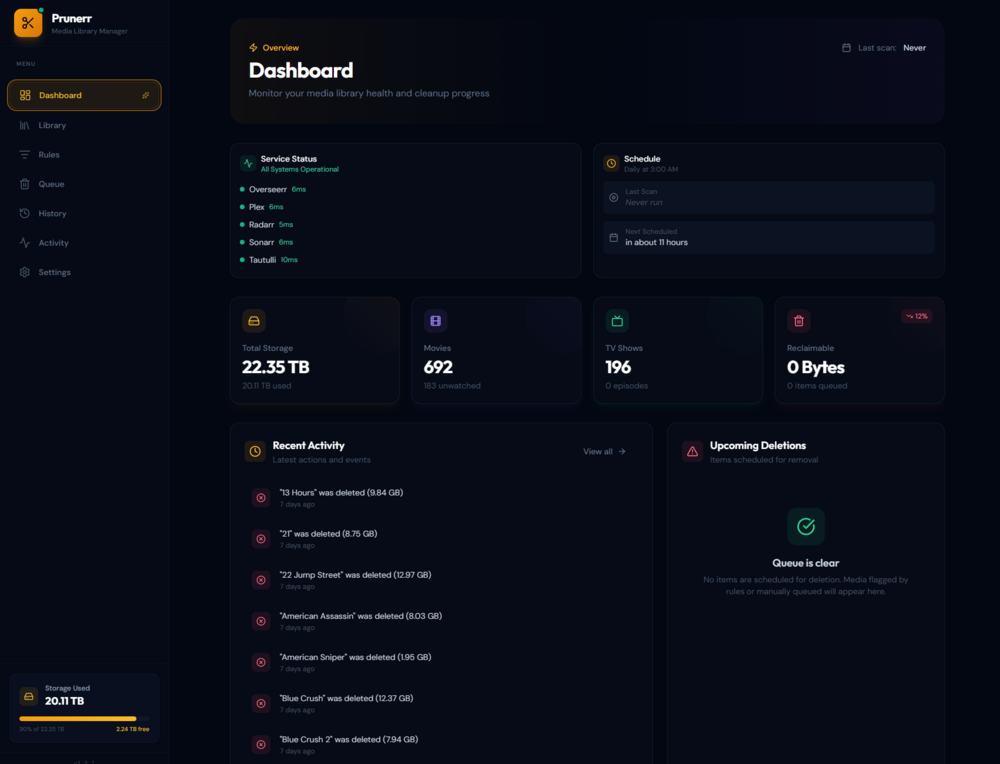
Prunerr is an automated media library management tool that helps you reclaim disk space by identifying and removing unwanted content from your Plex, Sonarr, and Radarr libraries. Set rules based on watch history, file size, age, and more — then let Prunerr handle the cleanup. Features- Rule-Based Cleanup — Create custom rules to automatically identify media for removal based on watch status, age, file size, and more - Plex Integration — Syncs with your Plex library and Tautulli watch history - Sonarr & Radarr Support — Removes content directly from your *arr apps with configurable deletion options - Overseerr Integration — Optionally reset requests when content is removed - Grace Period — Items are queued for deletion with a configurable grace period before permanent removal - Protection System — Mark items as protected to prevent accidental deletion - Unraid Storage Monitoring — View array disk usage directly in the dashboard - Activity Logging — Full audit trail of all actions and deletions - Smart Suggestions — AI-powered rule suggestions based on your library analysis - Mobile-Friendly UI — Responsive design works on any device Requirements- Unraid 6.x or 7.x - Plex Media Server - Tautulli (for watch history) - Sonarr and/or Radarr (optional, for deletion) - Overseerr (optional, for request management) --- InstallationFrom Community Apps (Coming Soon) 1. Search for Prunerr in Community Applications 2. Set your data path (default: /mnt/user/appdata/prunerr) 3. Click Apply 4. Access the Web UI at: http://YOUR-IP:3000 Before CA Approval SSH into your Unraid server and run: curl -o /boot/config/plugins/dockerMan/templates-user/my-prunerr.xml https://raw.githubusercontent.com/helliott20/unraid-templates/main/my-prunerr.xml Then refresh your browser, go to Docker → Add Container → Select Prunerr from the Template dropdown. --- Configuration1. Open Prunerr at http://YOUR-IP:3000 2. Go to Settings and configure your services: - Plex: URL and token - Tautulli: URL and API key - Sonarr/Radarr: URL and API key (optional) 3. Click Save and test each connection 4. Go to Library and click Sync to import your media 5. Create rules in the Rules page or use the smart suggestions --- Links- GitHub: https://github.com/helliott20/prunerr - Docker Hub: https://hub.docker.com/r/helliott20/prunerr - Documentation: https://github.com/helliott20/prunerr#readme --- Post any questions or issues below!