



Skip to content
View in the app

A better way to browse. Learn more.

Unraid

A full-screen app on your home screen with push notifications, badges and more.

To install this app on iOS and iPadOS
  1. Tap the Share icon in Safari
  2. Scroll the menu and tap Add to Home Screen.
  3. Tap Add in the top-right corner.
To install this app on Android
  1. Tap the 3-dot menu (⋮) in the top-right corner of the browser.
  2. Tap Add to Home screen or Install app.
  3. Confirm by tapping Install.

MCDNAS02

Members
  • Joined

  • Last visited

  1. I understood that going in, any suggestions on the more difficult ways to get around this?
  2. See attached. mcdnas02-diagnostics-20230105-1159.zip
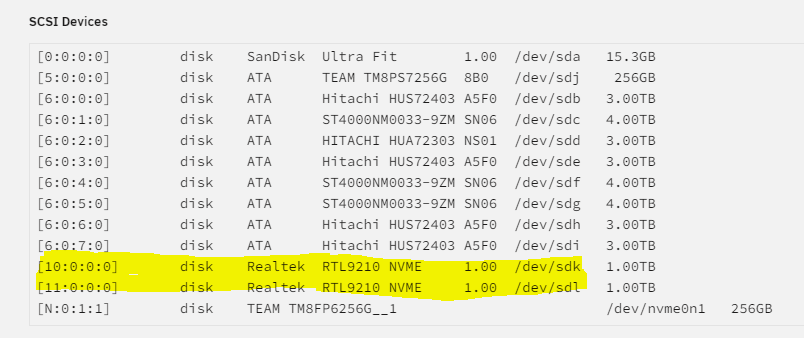
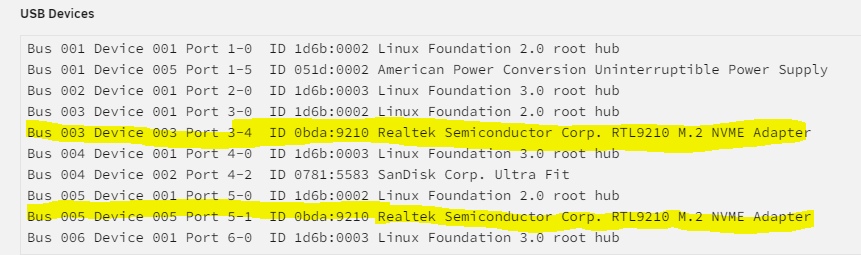
  3. I am attempting to setup a new cache pool using 2 External NVMe drives via USB, the OS is seeing both as /dev/sdk and /dev/sdl. However when attempting to create a cache pool with these two NVMes, I am only able to select one and I do not see any unassigned disks if I have /dev/sdl selected in the cache pool. I believe this might be due to the Realtek drivers, for some reason, not having a unique ID for these two drives. Is there anyway I can spoof or get around this?
Account

Navigation

Search

Search

Configure browser push notifications

Chrome (Android)
  1. Tap the lock icon next to the address bar.
  2. Tap Permissions → Notifications.
  3. Adjust your preference.
Chrome (Desktop)
  1. Click the padlock icon in the address bar.
  2. Select Site settings.
  3. Find Notifications and adjust your preference.