




Skip to content
View in the app

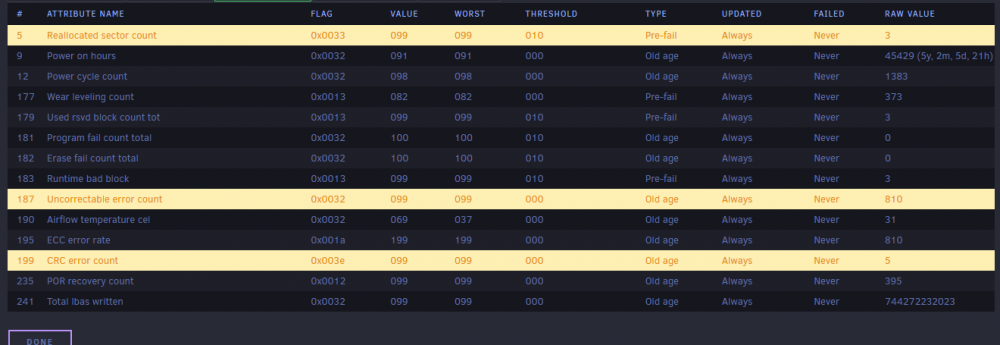
A better way to browse. Learn more.

Unraid

A full-screen app on your home screen with push notifications, badges and more.

To install this app on iOS and iPadOS
  1. Tap the Share icon in Safari
  2. Scroll the menu and tap Add to Home Screen.
  3. Tap Add in the top-right corner.
To install this app on Android
  1. Tap the 3-dot menu (⋮) in the top-right corner of the browser.
  2. Tap Add to Home screen or Install app.
  3. Confirm by tapping Install.

ChrisRay1985

Members
  • Joined

  • Last visited

  1. The extended offline Completed without error. Thanks for the help! I will keep using the disk for now. I will also be backing it up nightly in case something goes wrong.
  2. This was my boot drive for years and I have never noticed anything funny going on when using it. I throw it in unraid and I am questioning if I should toss it. Any input from this fantastic community is appreciated See smart status attached.
Account

Navigation

Search

Search

Configure browser push notifications

Chrome (Android)
  1. Tap the lock icon next to the address bar.
  2. Tap Permissions → Notifications.
  3. Adjust your preference.
Chrome (Desktop)
  1. Click the padlock icon in the address bar.
  2. Select Site settings.
  3. Find Notifications and adjust your preference.