Linkd
Members
-
Joined
-
Last visited
-
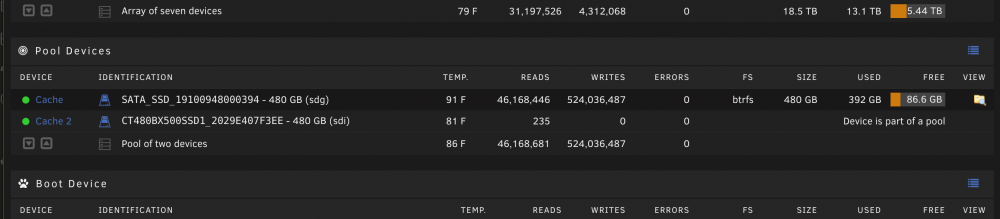
Attaching diagnostics to this message. Clicking into both drives, I only see the "Balance Status" section within the 1st drive (the one that's receiving reads/writes). However, inspecting the diagnostics config, you can see a cache-pool and in that file it list both drives, so I'm very confused. Thanks again for any help. unraid-diagnostics-20220526-1040.zip
-
I've had Unraid running for many years now with using a single cache pool of two SSDs of the same size. I've always noticed that even though Unraid reports the cache pool as healthy, and the second drive as being part of the pool. Only the 1st drive ever appears to receive reads/writes, and in general, only that one drive appears to be in-use? Is this expected, or have I been running it improperly this whole time? Thank you for any help!