Skip to content
View in the app

A better way to browse. Learn more.

Unraid

A full-screen app on your home screen with push notifications, badges and more.

To install this app on iOS and iPadOS
  1. Tap the Share icon in Safari
  2. Scroll the menu and tap Add to Home Screen.
  3. Tap Add in the top-right corner.
To install this app on Android
  1. Tap the 3-dot menu (⋮) in the top-right corner of the browser.
  2. Tap Add to Home screen or Install app.
  3. Confirm by tapping Install.

8473136

Members
  • Joined

  • Last visited

Everything posted by 8473136

  1. unraid绑定的ip是不是和其他有冲突
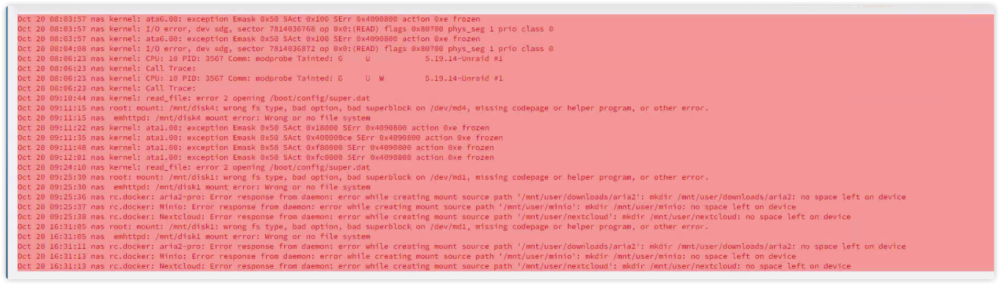
  2. 运行xfs_repair /dev/md1 后返回如下 Sorry, could not find valid secondary superblock Exiting now.
  3. 每次出现这个问题后手动通过window工具将文件拷贝出来格式化磁盘再将文件拷贝回磁盘 但是重启几次或者通过工具/新配置刷新磁盘配置后运行就还会出现“Unmountable: Wrong or no file system”
  4. 版本: 6.10.3 问题描述: 昨天往举一个示范数据盘,有一个奇偶校验的内容盘和一个存储盘显示“设备已失效,我就点击了停止示意,过了多小时的手势还没有停止”。就重启了在重启完成之前,那奇偶校验盘和存储盘显示”未分配“但这个标志还可以启动 。

Account

Navigation

Search

Search

Configure browser push notifications

Chrome (Android)
  1. Tap the lock icon next to the address bar.
  2. Tap Permissions → Notifications.
  3. Adjust your preference.
Chrome (Desktop)
  1. Click the padlock icon in the address bar.
  2. Select Site settings.
  3. Find Notifications and adjust your preference.