




Skip to content
View in the app

A better way to browse. Learn more.

Unraid

A full-screen app on your home screen with push notifications, badges and more.

To install this app on iOS and iPadOS
  1. Tap the Share icon in Safari
  2. Scroll the menu and tap Add to Home Screen.
  3. Tap Add in the top-right corner.
To install this app on Android
  1. Tap the 3-dot menu (⋮) in the top-right corner of the browser.
  2. Tap Add to Home screen or Install app.
  3. Confirm by tapping Install.

ibuprofen

Members
  • Joined

  • Last visited

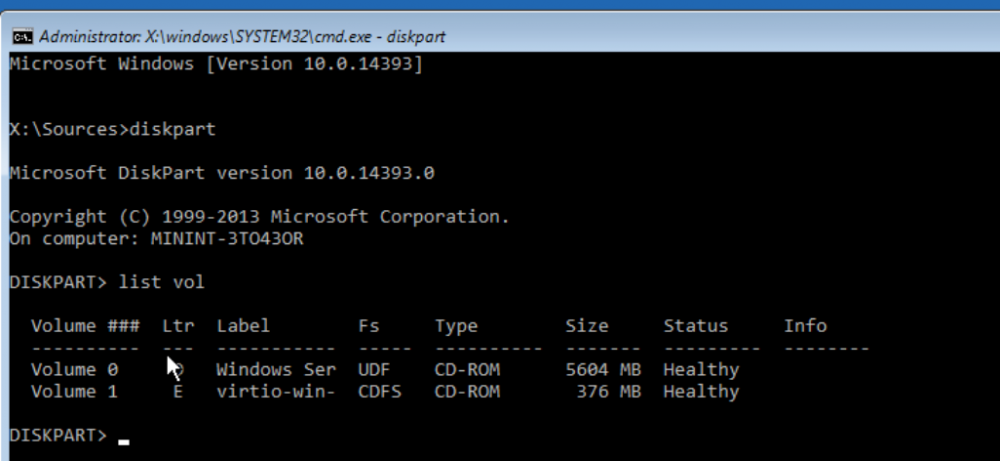
  1. Hello all, I have a Windows Server 2016 VM that's been running for quite some time. However, I'm having an issue and need to access some files outside of the OS. To do so, I've booted to a Windows install ISO over the VM and accessed a command prompt through the troubleshooting option. However, I can't find the system volume where Windows is installed. I've done some googling and the only thing that I can come up with is that it may be related to VM drivers not loading at boot. My questions are: Is there a way I can ensure that the VirtIO drivers are loading when I boot via a Windows ISO? And does anyone have any other idea why I possibly can't see the system volume that I'm looking for?
Account

Navigation

Search

Search

Configure browser push notifications

Chrome (Android)
  1. Tap the lock icon next to the address bar.
  2. Tap Permissions → Notifications.
  3. Adjust your preference.
Chrome (Desktop)
  1. Click the padlock icon in the address bar.
  2. Select Site settings.
  3. Find Notifications and adjust your preference.