Gabriel Patzleiner
Members
-
Joined
-
Last visited
Everything posted by Gabriel Patzleiner
-
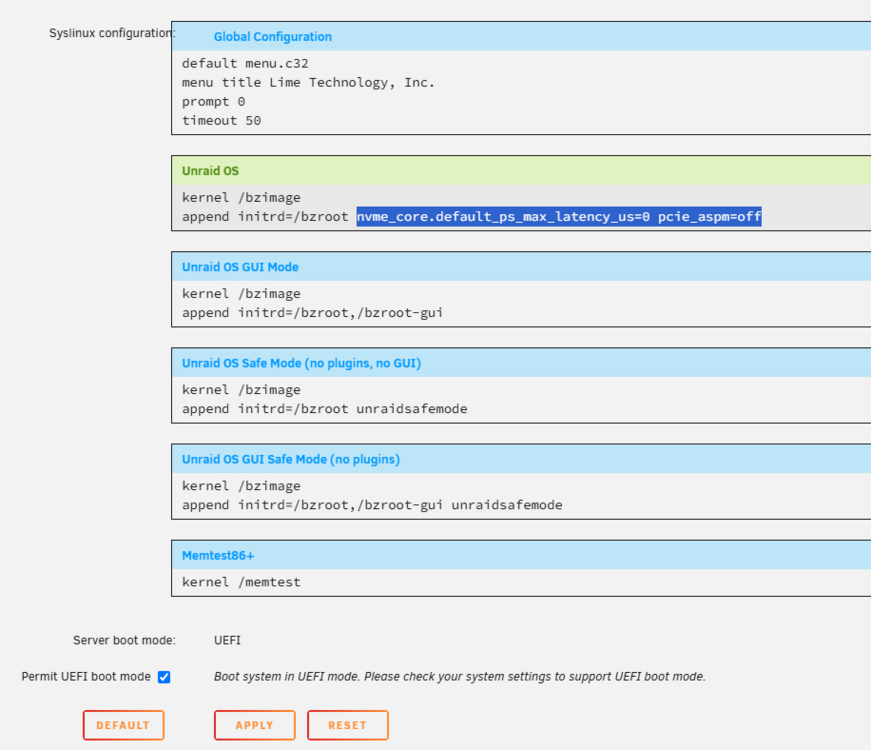
3 Days after my previous post, I sadly ran into the same problem again... I got the error messages over night, and I saw then that the same night the scheduled monthly scrub was taking place. maybe it was connected? After rebooting, the docker image was not mountable again and corrupt. The most annoying thing is that you have to recreate the whole docker image and reinstall all the containers. And the docker volumes that are stored in the image are lost, that's a big problem for me. I have added now "pcie_port_pm=off" to the syslinux container resulting in the following line: append initrd=/bzroot nvme_core.default_ps_max_latency_us=0 pcie_aspm=off pcie_port_pm=off I saw that here: Also, I made the update to Unraid 7.0.1. I hope that the problem will somehow be resolved or by a kernel upgrade or by the correct syslinux config. I find it strange that there are not more people with that problem, as the Samsung 990 Pro is quite popular I think. I switched one of my 2 Crucial 1TB NVMe drives to Samsung 990 Pro 2TB because I thought that Samsung would be more popular and better supported. Now I wanted to switch my second SSD of the pool to 2TB too, to be able to use the whole 2TB pool, but I am unsure if I should buy another Samsung. For those interested, I use the scripts in this post to get notified of those errors. Otherwise, you don't even notice that there is a problem, only if you see the star at the drive temperature or the error spam in the syslog.
-
I had the same problem at the start of the year, I swapped my old SSD with a new Samsung 990 Pro (2TB) using a btrfs cache pool with RAID1. I think It was already happening using Unraid 6, but I was updating Unraid to 7.0 at that same time, so I couldn't remember exactly. It happened 2-3 times at intervals of a week. I was using a cache pool with btrfs filesystem and a docker image with a btrfs image. Every time this happened, I had to hard reboot the server (complete shutdown and restart using power button, restarting directly wasn't working). I had to completely rebuild my docker image, because it wasn't able to mount again after the reboot. After the second time, I was really frustrated. I found this thread and the added the following config in the syslinux.cfg: For an updated syslinux config, checkout the updated post (added "pcie_port_pm=off") append initrd=/bzroot nvme_core.default_ps_max_latency_us=0 pcie_aspm=off I also changed the docker image from btrfs to xfs. It is working fine right now, I really hope this doesn't happen again, but it's looking good for now.