alexz003
Members
-
Joined
-
Last visited
-
Thanks JorgeB for the response. I was able to fix it by following the link. I did end up just reformatting and restoring the files according to the guide, but I suspect it was caused by the lack of partition of device 2 like you said.
-
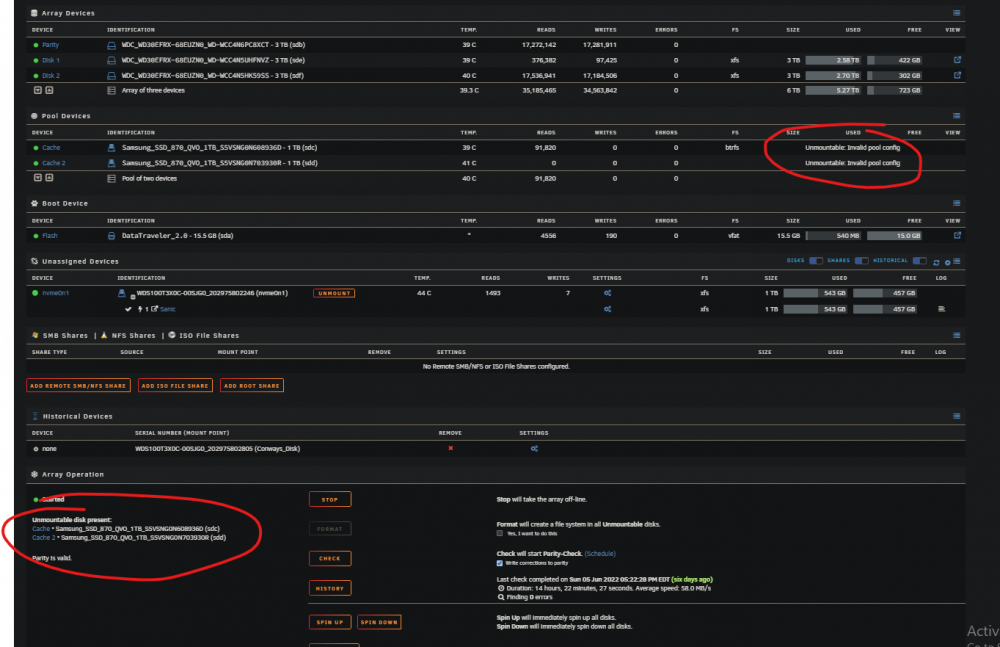
I recently upgraded UnRaid version to 6.10 from 6.6(? I don't remember exactly, but less than 6.9) in order to resolve some issues with docker container thread locking issues. Upgrading to this version fixed that issue, but broke almost all my other docker containers. When I went to investigate what was happening, I saw that my cache drives are now appearing as "Unmountable: Invalid Pool Config". These drives were working fine before the upgrade. I went into my Diagnostics and pulled the logs (attached) and can see in the syslog that it didn't mount properly, but I don't see any other error other than "Invalid pool config" Jun 11 19:48:32 TuringTower emhttpd: shcmd (34): mkdir -p /mnt/cache Jun 11 19:48:32 TuringTower emhttpd: /mnt/cache uuid: 253ded62-2620-46f7-a31b-57d06b615a7c Jun 11 19:48:32 TuringTower emhttpd: /mnt/cache Label: none uuid: 253ded62-2620-46f7-a31b-57d06b615a7c Jun 11 19:48:32 TuringTower emhttpd: /mnt/cache Total devices 2 FS bytes used 268.82GiB Jun 11 19:48:32 TuringTower emhttpd: /mnt/cache devid 1 size 931.51GiB used 511.03GiB path /dev/sdc1 Jun 11 19:48:32 TuringTower emhttpd: /mnt/cache devid 2 size 931.51GiB used 511.03GiB path /dev/sdd Jun 11 19:48:32 TuringTower emhttpd: /mnt/cache mount error: Invalid pool config Jun 11 19:48:32 TuringTower emhttpd: shcmd (35): umount /mnt/cache Jun 11 19:48:32 TuringTower root: umount: /mnt/cache: not mounted. I am currently following the steps here: I have an unmountable BTRFS filesystem disk or pool, what can I do to recover my data? and was able to mount sdc1 (according to the guide, I can mount the whole pool by mounting just 1 drive in the pool) to /temp and the data looks intact so I started a copy directly to my array. The copy is very slow (30MB/s max with midnight commander); my network could copy files at 100MB/s, but I just want to make sure it's backed up so I'll wait the few hours. I would prefer to not have to reformat and configure the cache pool again, so I wanted to see if anyone has run into this issue and could help me resolve it. Many of the other threads talk about this issue after replacing a drive or using xfs, but nothing was replaced in my system, it's running btrfs, and there were no issues before the upgrade. Any help would be greatly appreciated. turingtower-diagnostics-20220611-1953.zip