Nesh
Members
-
Joined
-
Last visited
-
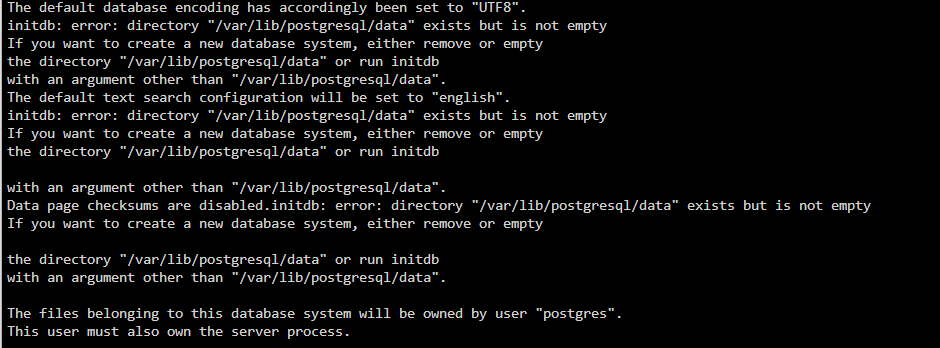
I managed to get some time to look into the issues i had earlier. I reinstalled everything with a new database , following your video instructions @LeonStoldt Ok so i'm back with the same postgres error, I think i have the backup part sorted out now.
-
Hello, after some tinkering, i seem to have everything running without any issues. [edit] just checked the instances today, and found that both Postgres and Ghostfolio has stopped. I started both but now my security key is no longer working (incorrect key error). 100% certain the key is correct because i tried it a few times on the day of the installation. I am now looking at backing up my Appdata in general. I have checked all the folders manually but i am unable to find a folder for Gostfolio in the appdata folder. How can i backup Ghostfolio? The app itself has an option to export the data as JSON but i do not see any option to restore. currently i am using Duplicati to directly backup my ebook library. I also downloaded CA Backup with the intention of backing up my appdata and then backing that up again via Duplicati to the cloud.
-
Hi @LeonStoldt, Thank you for getting back to me. I'm not sure if deleted my previous installations correctly. Before each reinstallation, i uninstalled, the dockers and used krusader to delete the folders for postgres, redis and ghostfolio. Can you advise if this is correct, if it is then i might have missed something out the last few times.
-
Seems to be one account per docker container.
-
Hi Guys, Need some help! Followed the installation instructions. Using Postgres 12.5. It work fine the first time, then after a few days postgres stops working. When i try to start the container, i get the following errors (copied from my log file). I've been more of a hardware guy and now trying to learn more about dockers and backend development. Tried searching on then net, but still stuck. Thank you for your time in advance!! PS: Done 3 fresh installations, with the first one using Postgres 14, but the issue persists.