





sinopi
Members
-
Joined
-
Last visited
Everything posted by sinopi
-
明白了,因为我没接显示器,只听见硬盘停机和启动的声音,以为是重启了,其实只是S3 把硬盘休眠了,然后马上又唤醒了,我再看一下S3的设置吧,多谢大佬~最近一直麻烦你:)
-
请大佬给看一眼,我觉得跟硬盘自动休眠有关,我关掉了S3 sleep 目前似乎还好 unraid-diagnostics-20230927-0315.zip
-
这是刚刚的又一次: Sep 26 23:43:22 UNRAID kernel: Freezing user space processes Sep 26 23:43:22 UNRAID kernel: Freezing user space processes completed (elapsed 0.001 seconds) Sep 26 23:43:22 UNRAID kernel: OOM killer disabled. Sep 26 23:43:22 UNRAID kernel: Freezing remaining freezable tasks Sep 26 23:43:22 UNRAID kernel: Freezing remaining freezable tasks completed (elapsed 0.001 seconds) Sep 26 23:43:22 UNRAID kernel: printk: Suspending console(s) (use no_console_suspend to debug) Sep 26 23:43:22 UNRAID kernel: serial 00:03: disabled Sep 26 23:43:22 UNRAID kernel: sd 8:0:0:0: [sde] Synchronizing SCSI cache Sep 26 23:43:22 UNRAID kernel: sd 0:0:0:0: [sda] Synchronizing SCSI cache Sep 26 23:43:22 UNRAID kernel: sd 6:0:0:0: [sdc] Synchronizing SCSI cache Sep 26 23:43:22 UNRAID kernel: sd 9:0:0:0: [sdf] Synchronizing SCSI cache Sep 26 23:43:22 UNRAID kernel: sd 7:0:0:0: [sdd] Synchronizing SCSI cache Sep 26 23:43:22 UNRAID kernel: sd 8:0:0:0: [sde] Stopping disk Sep 26 23:43:22 UNRAID kernel: sd 6:0:0:0: [sdc] Stopping disk Sep 26 23:43:22 UNRAID kernel: sd 9:0:0:0: [sdf] Stopping disk Sep 26 23:43:22 UNRAID kernel: sd 7:0:0:0: [sdd] Stopping disk Sep 26 23:43:22 UNRAID kernel: sd 5:0:0:0: [sdb] Synchronizing SCSI cache Sep 26 23:43:22 UNRAID kernel: sd 5:0:0:0: [sdb] Stopping disk Sep 26 23:43:22 UNRAID kernel: ACPI: PM: Preparing to enter system sleep state S3 Sep 26 23:43:22 UNRAID kernel: ACPI: PM: Saving platform NVS memory Sep 26 23:43:22 UNRAID kernel: Disabling non-boot CPUs ... Sep 26 23:43:22 UNRAID kernel: smpboot: CPU 1 is now offline Sep 26 23:43:22 UNRAID kernel: smpboot: CPU 2 is now offline Sep 26 23:43:22 UNRAID kernel: smpboot: CPU 3 is now offline Sep 26 23:43:22 UNRAID kernel: smpboot: CPU 4 is now offline Sep 26 23:43:22 UNRAID kernel: smpboot: CPU 5 is now offline Sep 26 23:43:22 UNRAID kernel: smpboot: CPU 6 is now offline Sep 26 23:43:22 UNRAID kernel: smpboot: CPU 7 is now offline Sep 26 23:43:22 UNRAID kernel: ACPI: PM: Low-level resume complete Sep 26 23:43:22 UNRAID kernel: ACPI: PM: Restoring platform NVS memory Sep 26 23:43:22 UNRAID kernel: Enabling non-boot CPUs ... Sep 26 23:43:22 UNRAID kernel: x86: Booting SMP configuration: Sep 26 23:43:22 UNRAID kernel: smpboot: Booting Node 0 Processor 1 APIC 0x1 Sep 26 23:43:22 UNRAID kernel: CPU1 is up Sep 26 23:43:22 UNRAID kernel: smpboot: Booting Node 0 Processor 2 APIC 0x2 Sep 26 23:43:22 UNRAID kernel: CPU2 is up Sep 26 23:43:22 UNRAID kernel: smpboot: Booting Node 0 Processor 3 APIC 0x3 Sep 26 23:43:22 UNRAID kernel: CPU3 is up Sep 26 23:43:22 UNRAID kernel: smpboot: Booting Node 0 Processor 4 APIC 0x4 Sep 26 23:43:22 UNRAID kernel: CPU4 is up Sep 26 23:43:22 UNRAID kernel: smpboot: Booting Node 0 Processor 5 APIC 0x5 Sep 26 23:43:22 UNRAID kernel: CPU5 is up Sep 26 23:43:22 UNRAID kernel: smpboot: Booting Node 0 Processor 6 APIC 0x6 Sep 26 23:43:22 UNRAID kernel: CPU6 is up Sep 26 23:43:22 UNRAID kernel: smpboot: Booting Node 0 Processor 7 APIC 0x7 Sep 26 23:43:22 UNRAID kernel: CPU7 is up Sep 26 23:43:22 UNRAID kernel: ACPI: PM: Waking up from system sleep state S3 Sep 26 23:43:22 UNRAID kernel: sd 5:0:0:0: [sdb] Starting disk Sep 26 23:43:22 UNRAID kernel: sd 6:0:0:0: [sdc] Starting disk Sep 26 23:43:22 UNRAID kernel: sd 7:0:0:0: [sdd] Starting disk Sep 26 23:43:22 UNRAID kernel: sd 8:0:0:0: [sde] Starting disk Sep 26 23:43:22 UNRAID kernel: sd 9:0:0:0: [sdf] Starting disk Sep 26 23:43:22 UNRAID kernel: i915 0000:00:02.0: [drm] GuC firmware i915/tgl_guc_70.bin version 70.5.1 Sep 26 23:43:22 UNRAID kernel: i915 0000:00:02.0: [drm] HuC firmware i915/tgl_huc.bin version 7.9.3 Sep 26 23:43:22 UNRAID kernel: serial 00:03: activated Sep 26 23:43:22 UNRAID kernel: nvme nvme0: Shutdown timeout set to 8 seconds Sep 26 23:43:22 UNRAID kernel: nvme nvme1: Shutdown timeout set to 7 seconds Sep 26 23:43:22 UNRAID kernel: nvme nvme0: 8/0/0 default/read/poll queues Sep 26 23:43:22 UNRAID kernel: i915 0000:00:02.0: [drm] HuC authenticated Sep 26 23:43:22 UNRAID kernel: i915 0000:00:02.0: [drm] GuC submission disabled Sep 26 23:43:22 UNRAID kernel: i915 0000:00:02.0: [drm] GuC SLPC disabled Sep 26 23:43:22 UNRAID kernel: ixgbe 0000:01:00.0: Multiqueue Enabled: Rx Queue count = 8, Tx Queue count = 8 XDP Queue count = 0 Sep 26 23:43:22 UNRAID kernel: ixgbe 0000:01:00.1: Multiqueue Enabled: Rx Queue count = 8, Tx Queue count = 8 XDP Queue count = 0 Sep 26 23:43:22 UNRAID kernel: r8169 0000:04:00.0 eth0: Link is Down Sep 26 23:43:22 UNRAID kernel: nvme nvme1: 8/0/0 default/read/poll queues Sep 26 23:43:22 UNRAID kernel: usb 1-7: reset full-speed USB device number 2 using xhci_hcd Sep 26 23:43:22 UNRAID kernel: ixgbe 0000:01:00.1 eth3: detected SFP+: 6 Sep 26 23:43:22 UNRAID kernel: ata10: SATA link down (SStatus 0 SControl 300) Sep 26 23:43:22 UNRAID kernel: ixgbe 0000:01:00.1 eth3: NIC Link is Up 10 Gbps, Flow Control: None Sep 26 23:43:22 UNRAID kernel: ata9: found unknown device (class 0) Sep 26 23:43:22 UNRAID kernel: ata5: link is slow to respond, please be patient (ready=0) Sep 26 23:43:22 UNRAID kernel: ata7: link is slow to respond, please be patient (ready=0) Sep 26 23:43:22 UNRAID kernel: ata8: link is slow to respond, please be patient (ready=0) Sep 26 23:43:22 UNRAID kernel: ata6: link is slow to respond, please be patient (ready=0) Sep 26 23:43:22 UNRAID kernel: ata9: softreset failed (device not ready) Sep 26 23:43:22 UNRAID kernel: ata7: COMRESET failed (errno=-16) Sep 26 23:43:22 UNRAID kernel: ata5: COMRESET failed (errno=-16) Sep 26 23:43:22 UNRAID kernel: ata6: COMRESET failed (errno=-16) Sep 26 23:43:22 UNRAID kernel: ata8: COMRESET failed (errno=-16) Sep 26 23:43:22 UNRAID kernel: ata7: SATA link up 6.0 Gbps (SStatus 133 SControl 300) Sep 26 23:43:22 UNRAID kernel: ata7.00: configured for UDMA/133 Sep 26 23:43:22 UNRAID kernel: ata9: SATA link up 6.0 Gbps (SStatus 133 SControl 300) Sep 26 23:43:22 UNRAID kernel: ata9.00: configured for UDMA/133 Sep 26 23:43:22 UNRAID kernel: ata8: SATA link up 6.0 Gbps (SStatus 133 SControl 300) Sep 26 23:43:22 UNRAID kernel: ata8.00: configured for UDMA/133 Sep 26 23:43:22 UNRAID kernel: ata6: SATA link up 6.0 Gbps (SStatus 133 SControl 300) Sep 26 23:43:22 UNRAID kernel: ata6.00: configured for UDMA/133 Sep 26 23:43:22 UNRAID kernel: ata5: link is slow to respond, please be patient (ready=0) Sep 26 23:43:22 UNRAID kernel: ata5: COMRESET failed (errno=-16) Sep 26 23:43:22 UNRAID kernel: ata5: SATA link up 6.0 Gbps (SStatus 133 SControl 300) Sep 26 23:43:22 UNRAID kernel: ata5.00: configured for UDMA/133 Sep 26 23:43:22 UNRAID kernel: OOM killer enabled. Sep 26 23:43:22 UNRAID kernel: Restarting tasks ... Sep 26 23:43:22 UNRAID kernel: mei_hdcp 0000:00:16.0-b638ab7e-94e2-4ea2-a552-d1c54b627f04: bound 0000:00:02.0 (ops i915_hdcp_component_ops [i915]) Sep 26 23:43:22 UNRAID kernel: mei_pxp 0000:00:16.0-fbf6fcf1-96cf-4e2e-a6a6-1bab8cbe36b1: bound 0000:00:02.0 (ops i915_pxp_tee_component_ops [i915]) Sep 26 23:43:22 UNRAID kernel: done. Sep 26 23:43:22 UNRAID kernel: random: crng reseeded on system resumption Sep 26 23:43:22 UNRAID kernel: PM: suspend exit Sep 26 23:43:22 UNRAID emhttpd: read SMART /dev/sdb Sep 26 23:43:22 UNRAID kernel: x86/split lock detection: #AC: CPU 1/KVM/22473 took a split_lock trap at address: 0xfffff803bb84bc32
-
建议找个可以量产的盘,读出U盘ID后备用,一旦坏了就用之前备份的ID再量产一个就行了~
-
直通的话 docker下的emby之类的转码是不是就不可用了?
-
困扰我很久了,完全没有规律,哪怕毫无负载的情况下也会直接重启,救命~ 万分感谢 reboot log.txt
-
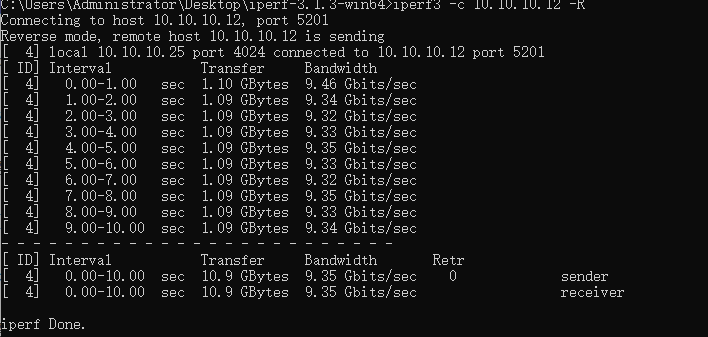
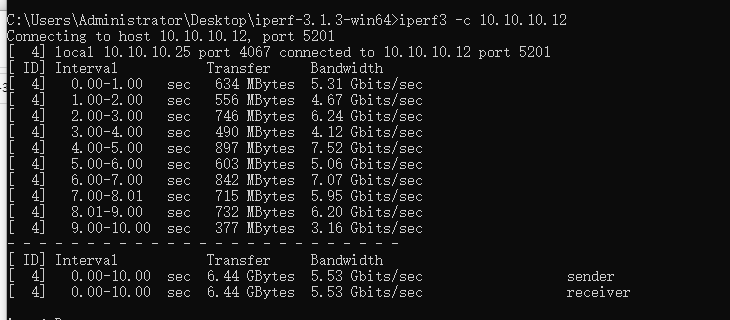
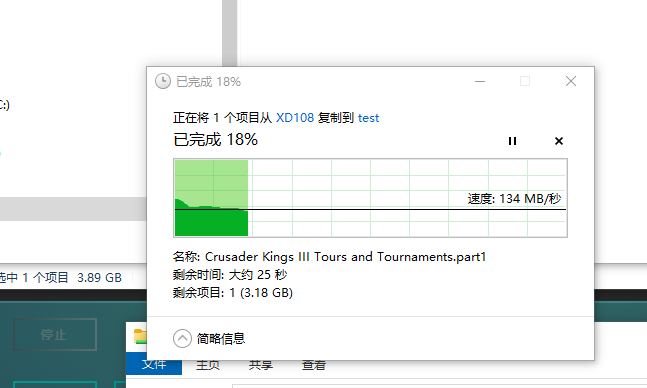
多谢如此详细无私的解答,很是感动,这种感觉也是久违了的互联网精神,并且去了您的blog好好研读了一番,重新理清思路准备如下部署,您看看有什么问题么? 其实对DSM的依赖并不是很大,主要的需求基本满足,方便搭建使用各种VM,Docker,基于SMB的共享使用(没有万兆视频素材编辑调用需求),存储安全资料,EMBY。 目前的配置 i3 12100 B670itx 32Gram Intel 520x D1 万兆双口光网卡 板载2块2.5G 螃蟹卡 2片M.2 1T 三星pm9a1 5块 希捷银河16T 乔思伯N2 部署思路: 1片m2 做缓存池 1片m2 给docker和VM使用(阵列) 2块16T 做池 zfs 格式 镜像模式 用于存储照片等安全数据 3块16T 分别单独挂载为存储空间 装载电影音乐等(阵列) 不在使用校验机制,请问上述这个思路有什么问题吗?(不考虑电影 音乐等文件的安全性) 另外,我在测试中发现,我在M.2固态硬盘上建立共享文件夹,cp速度也只有100Mb-200Mb,用Iperf3测试 正向平均5G左右 反向能到10G。 看您的blog 分别在bios关闭了各种节能模式 开启了4G SMB设置中也多通道等。另外还更换过Mellanox 的万兆光卡,也都是同样的问题。 不知是内核的问题还是有什么其他特别需要修改的地方。
-
几天用下来,校验盘无休止的校验,拖慢整个系统效能,还增加了功耗,有点难受。 我想问在unraid下部署 freenas dsm TrueNAS OMV一类的NAS系统,然后把硬盘全部直通过去,再那边重新建立Raid。 是否可行,有什么负面影响?比如网速下降等。 还有个问题一直困扰我,unraid的文件系统我理解是一块一块硬盘的用,那么硬盘的读写速度大多是根据当前这一块硬盘来决定的吗? 暂时不考虑缓存盘的情况下,这样效能是不是比不上raid5 这种阵列形式?好处是能耗较低?不是阵列中所有硬盘一起工作?
-
非常感谢大佬,一语道破,一直没搞懂它日志的机制,现在明白了,去部署观察一下。
-
这是我看到日志中一些警告的记录,但是无从下手,也不知道是设置、硬件、插件、Docker哪个环节造成的,请大佬帮着看下或者提供一点思路。 Aug 31 15:26:19 UNRAID kernel: x86/split lock detection: #AC: crashing the kernel on kernel split_locks and warning on user-space split_locks Aug 31 15:26:19 UNRAID kernel: ACPI: Early table checksum verification disabled Aug 31 15:26:19 UNRAID kernel: floppy0: no floppy controllers found Aug 31 15:26:25 UNRAID mcelog: failed to prefill DIMM database from DMI data Aug 31 15:27:51 UNRAID kernel: BTRFS info (device nvme1n1p1): using crc32c (crc32c-intel) checksum algorithm Aug 31 15:27:54 UNRAID kernel: BTRFS info (device loop2): using crc32c (crc32c-intel) checksum algorithm Aug 31 15:27:56 UNRAID kernel: BTRFS info (device loop3): using crc32c (crc32c-intel) checksum algorithm
