



Skip to content
View in the app

A better way to browse. Learn more.

Unraid

A full-screen app on your home screen with push notifications, badges and more.

To install this app on iOS and iPadOS
  1. Tap the Share icon in Safari
  2. Scroll the menu and tap Add to Home Screen.
  3. Tap Add in the top-right corner.
To install this app on Android
  1. Tap the 3-dot menu (⋮) in the top-right corner of the browser.
  2. Tap Add to Home screen or Install app.
  3. Confirm by tapping Install.

b0r15

Members
  • Joined

  • Last visited

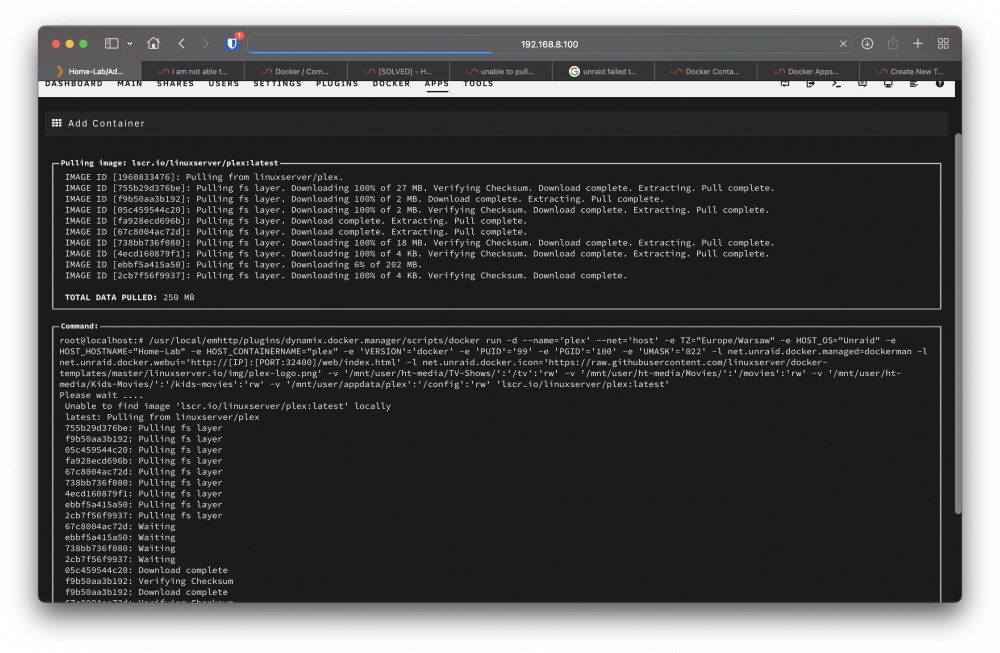
  1. Hey guys, I am new Unraid user for about a month and everything was great until recently. I have no idea what caused my issue, but suddenly my docker apps refused to update. I tried to install new containers and they start downloading but after few seconds it stops and complete UI is frozen. I found similar issues in past here on forum and I try everything that you guys was suggesting without success (Network Settings set DNS to 208.67.222.222, disabling bonding, disabling docker and deleting docker.img,...) But every time the result is the same container start downloading and after few seconds it stops and my UI is frozen. Thank you in advance! home-lab-diagnostics-20220711-0100.zip
Account

Navigation

Search

Search

Configure browser push notifications

Chrome (Android)
  1. Tap the lock icon next to the address bar.
  2. Tap Permissions → Notifications.
  3. Adjust your preference.
Chrome (Desktop)
  1. Click the padlock icon in the address bar.
  2. Select Site settings.
  3. Find Notifications and adjust your preference.