





dsharp9000
Members
-
Joined
-
Last visited
-
im going to run a non correcting parity check just to be on the safe side..... should i keep this set at non correcting from now on?... Also, if i run a correcting check "after" the non correcting check will the 5 errors still show up in the correcting parity check?... im just curious if the errors will always be there everytime i run a future correcting parity check "if needed"..... its just a bit confusing to me; please forgive my lack of knowledge regarding this. I appreciate the help on this.
-
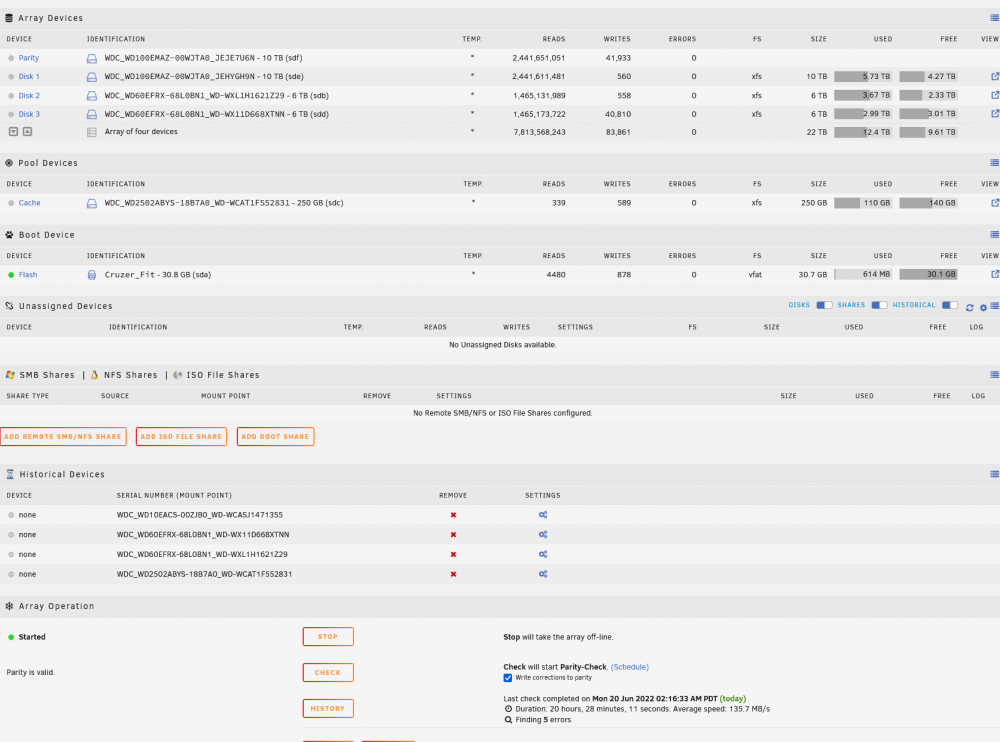
thanks for your reply. My settings show write corrections to parity and still get the 5 errors... not sure if i unwisely should of not of set this box to write corrections to parity as its default...can i run a non corecting parity check then a correcting parity check .... or perhaps i need to do something else?

-
I think this is due to an unclean shut down when we lost power; but im unsure how to proceed form here and what further checks i need to do or if i need to replace a disk. I have very limited knowledge on how to resolve errors in unraid with regard to the array or how to interpret the results...... any help would be appreciated. I have ran a parity check twice... each time it did the same thing...5 errors. The array is still running and the disks appear to be operating normal; but the 5 errors makes me nervous as am thinking something is wrong somewhere. WDC_WD60EFRX-68L0BN1_WD-WX11D668XTNN-20220620-0739 disk3 (sdd).txt WDC_WD60EFRX-68L0BN1_WD-WXL1H1621Z29-20220620-0739 disk2 (sdb).txt WDC_WD100EMAZ-00WJTA0_JEHYGH9N-20220620-0739 disk1 (sde).txt WDC_WD100EMAZ-00WJTA0_JEJE7U6N-20220620-0739 parity (sdf).txt syslog.txt main-diagnostics-20220620-0739.zip

