




Skip to content
View in the app

A better way to browse. Learn more.

Unraid

A full-screen app on your home screen with push notifications, badges and more.

To install this app on iOS and iPadOS
  1. Tap the Share icon in Safari
  2. Scroll the menu and tap Add to Home Screen.
  3. Tap Add in the top-right corner.
To install this app on Android
  1. Tap the 3-dot menu (⋮) in the top-right corner of the browser.
  2. Tap Add to Home screen or Install app.
  3. Confirm by tapping Install.

Zixties60

Members
  • Joined

  1. Thank you @JorgeB My array is running fine now.
  2. The thing is, I have unassign that disk from the array and now it's an unassigned disk (just thinking that the disk was failure and can be rebuild if re-add to array, but it is not). Do I have to add it back before check filesystem or just check with emuated disk? and How to add the disk back to array without rebuild the data?
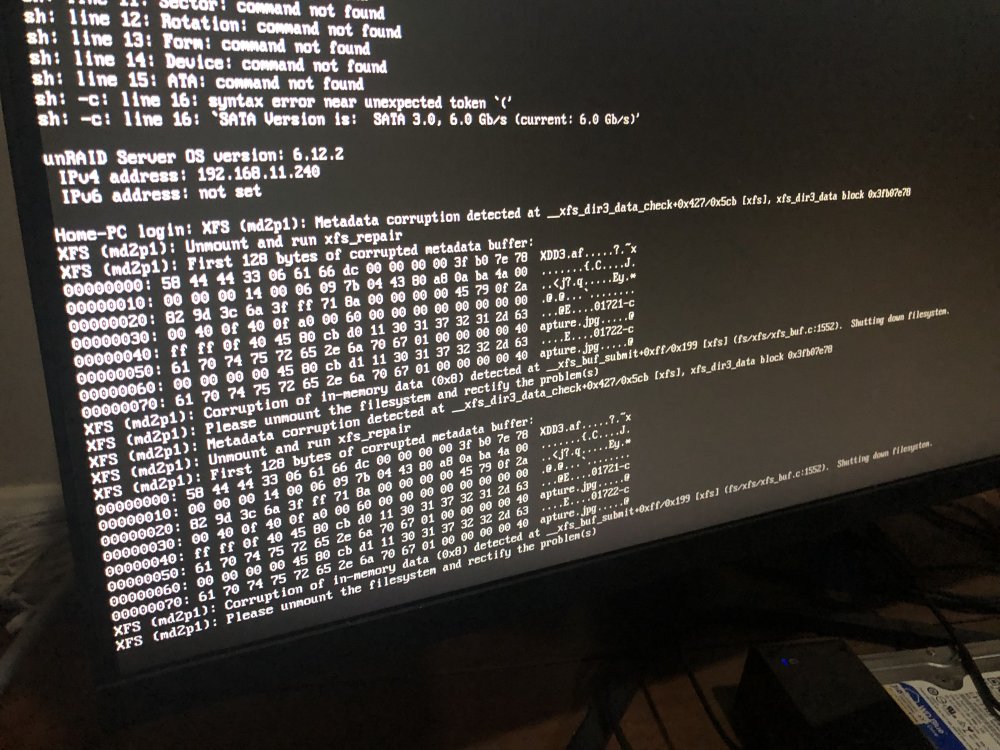
  3. One of my disk has message "Unmountable: Unsupported or no file system" and I saw this message on Unraid monitor. Please help me fix this issue. Thank you home-pc-diagnostics-20230705-2004.zip

Account

Navigation

Search

Search

Configure browser push notifications

Chrome (Android)
  1. Tap the lock icon next to the address bar.
  2. Tap Permissions → Notifications.
  3. Adjust your preference.
Chrome (Desktop)
  1. Click the padlock icon in the address bar.
  2. Select Site settings.
  3. Find Notifications and adjust your preference.