





DougBoat
Members
-
Joined
-
Last visited
-
Thanks for all your help, PEBCAK strikes again. Everything is up and running like before, thank you so so much for helping me along, greatly appreciated!
-
Hi, sorry about the late reply, I've attached the logs. When trying to access the GUI via a browser, it gives an error_address_unreachable. Thank you for your help so far, -Doug tower-diagnostics-20250903-0455.zip
-
Hi, thanks for your reply. I did the things, and attached is the output; I did try to start the GUI using slim in the CLI after removing the cache.cfg file (it all booted as it has been; I can login via the terminal but the GUI is out of reach), but it left me with a blinking cursor. Thanks again, -Doug
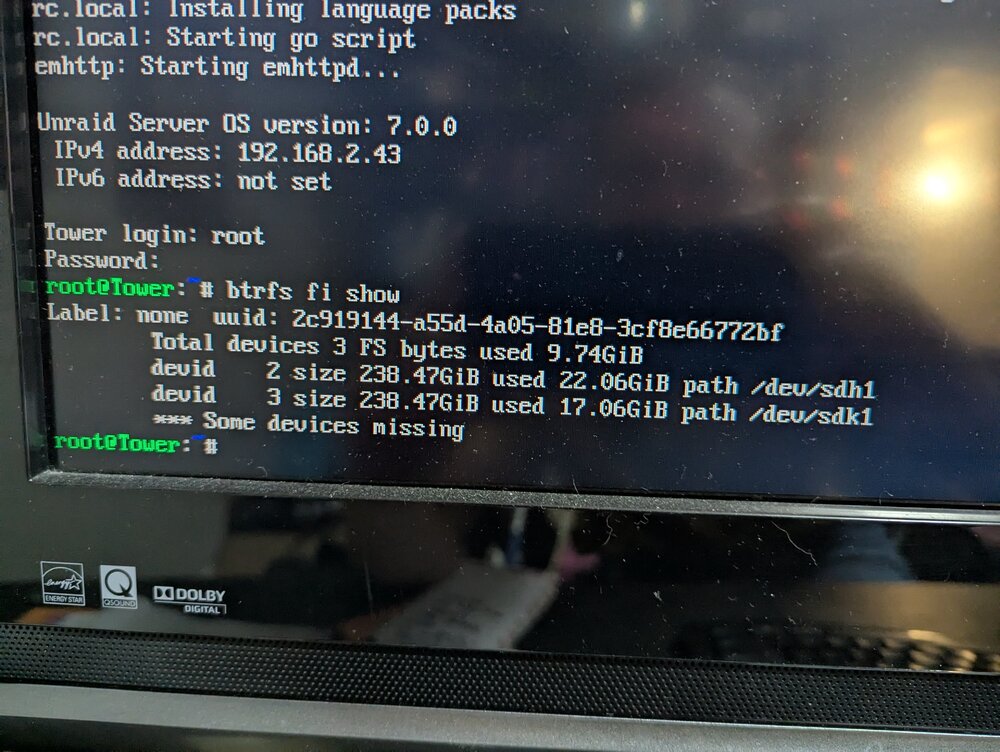
-
Hi Folks, Longtime user and it's been without issues that I couldn't resolve on my own until now. I've attached the latest diagnostics log that I created maybe an hour ago, but here's some red-herring-filled background. -I was running headless without any problems until maybe 2 weeks ago, at which point I had an error pop up on a cache drive (it no longer showed up with an identity, just with a red dot where it should have been). I rebooted my server, and at that point I haven't been able to boot much of anything since. -I have an ancient GTX 750 Ti GPU that I'll plop in whenever I need some kind of visual feedback to my issues, and I was getting past POST, but not much further. Since I treat this thing like a rented mule, I had it apart on carpet, and I must have zapped the motherboard, since it failed to do a whole lot of anything after a certain point. -I replaced the motherboard, and got a smaller GPU (the 750 might have bought the farm too, but I wanted something that wouldn't take up two PCI slots). This guy, a Glorto (lol) GT210 works perfectly fine and is giving me an output. The problem is I can get as far as the CLI login page, and beyond with my credentials, but trying to get it to boot into the WebGUI just doesn't work, ever, under any circumstance I've tried (like removing the GPU and just letting it boot). I've been thinking it's just something borked with the IP address and my router, but as far as I can tell, that all seems fine, and it is pingable but it's giving me ERR_CONNECTION_REFUSED on any browser, WiFi or hardlined. I've tried resetting my network.conf file to defaults, and it's the same problem. Please let me know what I could try or what the diagnostics reveal, I'm at my wits' end and I don't know what else to try. Thanks! -Doug Edit: This is based on a 7.0.0 Unraid build. tower-diagnostics-20250901-2245.zip
-
I have no idea how/why my docker.img is that big, and I wasn't aware there could be problems filling it lol. Is there somewhere to modify that? I've tried to move the appdata stuff off the array, but I can't quite figure it out. I gather it's one of those not great but not horrible things to do so I've kinda just left it. Thanks for the tips!
-
Hi guys, I've been having some issues crop up with my server, and I finally got around to checking the Fix Common Problems app to see what's what. I've attached the zip file of the diagnostics, but the symptoms are: Docker apps frequently stopping, in particular a Minecraft docker/server, and lately, I've tried to add an additional mapped drive/folder to my Emby docker, and it'll cause the server to hang for a certain period, seems like hours but could be 20+ minutes before I'm able to access the Unraid GUI. The only fix I've had to that is to not have a second mapped folder, which works fine. Otherwise, my system works pretty great 99% of the time, but I lack the know-how to solve this one. Thanks for any advice! Edit: I just perused a thread regarding limiting docker apps' memory, and I've set the (potential) offenders (emby, minecraft, nzbget) to a 4 gb limit on memory. I hope that's all it is and not some hardware fail, but if the diagnostics reveal something else, please let me know. Thanks! tower-diagnostics-20230917-1030.zip

