





TomySLO
Members
-
Joined
-
Last visited
-
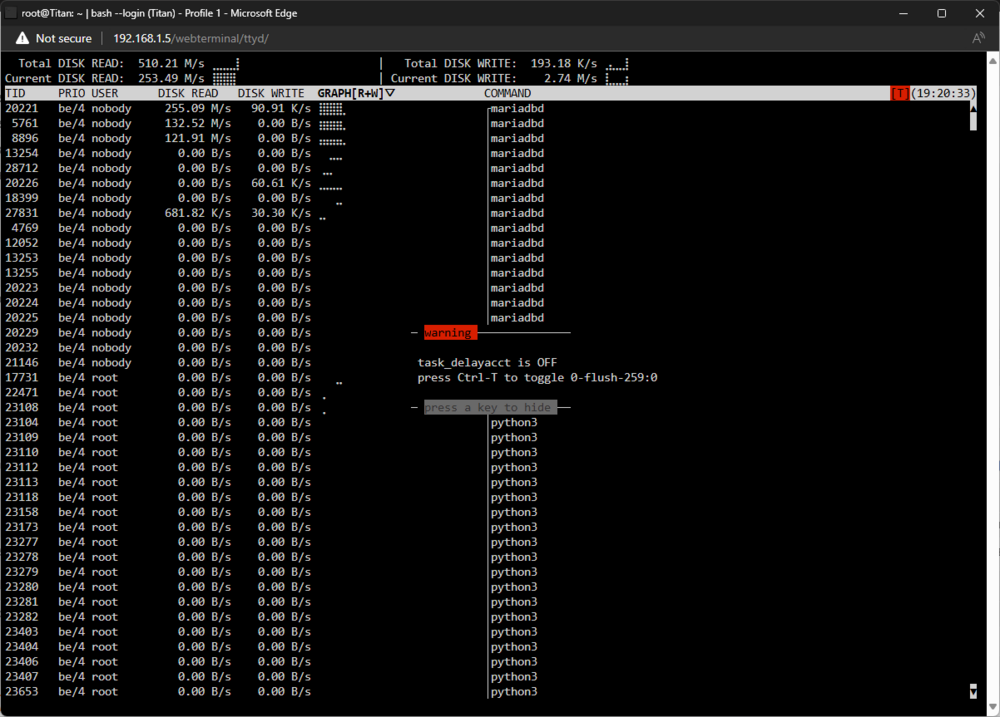
Hello, over the past few days I've noticed that the cache SSD has been getting a lot of reads - it's at around ~260 MB/s almost constantly. With `iotop-c` I saw that the culprit is MariaDB somehow, but there is nothing in the MariaDB logs and I'm not sure how to diagnose it. Any help would be appreciated! I'm happy to prove more information if needed. I'm attaching some images as well.

-
Hi, as the title says, I got a warning about my flash drive being corrupted or offline. I'm attaching the diagnostics below. The flash drive in question is a SanDisk 32GB Ultra Fit USB 3.1 Flash Drive - SDCZ430-032G-G46. I have it plugged in inside the case right into the motherboard with this USB 2.0 motherboard header adapter. I'm thinking of replacing it with a SAMSUNG BAR Plus 64GB. I'm still unsure why the current SanDisk one has corrupted though, I don't want the Samsung one or any other one to corrupt as well - what did I do wrong? Thank you for your time. titan-diagnostics-20240218-0033.zip
-
Hi, as the title says, I'd like to pass through the onboard audio controller to my Windows VM, but it's grouped with other things in an IOMMU group and I don't want to try binding the group to VFIO in case that somehow breaks something. Here I'm attaching the IOMMU groups. If I'm not mistaken, it's in IOMMU group 12 - [8086:f0c8] 00:1f.3 Audio device: Intel Corporation Device f0c8 (rev 11) IOMMU group 0: [8086:9bc5] 00:02.0 VGA compatible controller: Intel Corporation CometLake-S GT2 [UHD Graphics 630] (rev 05) IOMMU group 1: [8086:9b43] 00:00.0 Host bridge: Intel Corporation 10th Gen Core Processor Host Bridge/DRAM Registers (rev 05) IOMMU group 2: [8086:1901] 00:01.0 PCI bridge: Intel Corporation 6th-10th Gen Core Processor PCIe Controller (x16) (rev 05) [10de:1b82] 01:00.0 VGA compatible controller: NVIDIA Corporation GP104 [GeForce GTX 1070 Ti] (rev a1) [10de:10f0] 01:00.1 Audio device: NVIDIA Corporation GP104 High Definition Audio Controller (rev a1) IOMMU group 3: [8086:1911] 00:08.0 System peripheral: Intel Corporation Xeon E3-1200 v5/v6 / E3-1500 v5 / 6th/7th/8th Gen Core Processor Gaussian Mixture Model IOMMU group 4: [8086:43ed] 00:14.0 USB controller: Intel Corporation Tiger Lake-H USB 3.2 Gen 2x1 xHCI Host Controller (rev 11) Bus 001 Device 001 Port 1-0 ID 1d6b:0002 Linux Foundation 2.0 root hub Bus 001 Device 002 Port 1-2 ID 174c:2074 ASMedia Technology Inc. ASM1074 High-Speed hub Bus 001 Device 003 Port 1-8 ID 06da:ffff Phoenixtec Power Co., Ltd Offline UPS Bus 001 Device 008 Port 1-12 ID 0781:5583 SanDisk Corp. Ultra Fit Bus 001 Device 009 Port 1-13 ID 26ce:01a2 ASRock LED Controller Bus 002 Device 001 Port 2-0 ID 1d6b:0003 Linux Foundation 3.0 root hub Bus 002 Device 002 Port 2-6 ID 174c:3074 ASMedia Technology Inc. ASM1074 SuperSpeed hub [8086:43ef] 00:14.2 RAM memory: Intel Corporation Tiger Lake-H Shared SRAM (rev 11) IOMMU group 5: [8086:43e0] 00:16.0 Communication controller: Intel Corporation Tiger Lake-H Management Engine Interface (rev 11) IOMMU group 6: [8086:43d2] 00:17.0 SATA controller: Intel Corporation Device 43d2 (rev 11) [2:0:0:0] disk ATA ST4000VN008-2DR1 SC60 /dev/sdb 4.00TB [3:0:0:0] disk ATA ST4000VN008-2DR1 SC60 /dev/sdc 4.00TB [4:0:0:0] disk ATA ST2000VX008-2E31 CV12 /dev/sdd 2.00TB [5:0:0:0] disk ATA ST2000LM015-2E81 0001 /dev/sde 2.00TB [6:0:0:0] disk ATA ST1000DX001-1CM1 CC43 /dev/sdf 1.00TB IOMMU group 7: [8086:43c2] 00:1b.0 PCI bridge: Intel Corporation Device 43c2 (rev 11) IOMMU group 8: [8086:43c3] 00:1b.3 PCI bridge: Intel Corporation Device 43c3 (rev 11) IOMMU group 9: [8086:43c4] 00:1b.4 PCI bridge: Intel Corporation Device 43c4 (rev 11) IOMMU group 10: [8086:43b0] 00:1d.0 PCI bridge: Intel Corporation Tiger Lake-H PCI Express Root Port #9 (rev 11) IOMMU group 11: [8086:43b4] 00:1d.4 PCI bridge: Intel Corporation Device 43b4 (rev 11) IOMMU group 12: [8086:4385] 00:1f.0 ISA bridge: Intel Corporation Z590 LPC/eSPI Controller (rev 11) [8086:f0c8] 00:1f.3 Audio device: Intel Corporation Device f0c8 (rev 11) [8086:43a3] 00:1f.4 SMBus: Intel Corporation Tiger Lake-H SMBus Controller (rev 11) [8086:43a4] 00:1f.5 Serial bus controller: Intel Corporation Tiger Lake-H SPI Controller (rev 11) IOMMU group 13: [1b73:1100] 02:00.0 USB controller: Fresco Logic FL1100 USB 3.0 Host Controller (rev 10) This controller is bound to vfio, connected USB devices are not visible. IOMMU group 14: [1ac1:089a] 03:00.0 System peripheral: Global Unichip Corp. Coral Edge TPU IOMMU group 15: [144d:a809] 04:00.0 Non-Volatile memory controller: Samsung Electronics Co Ltd NVMe SSD Controller 980 (DRAM-less) This controller is bound to vfio, connected drives are not visible. IOMMU group 16: [144d:a808] 05:00.0 Non-Volatile memory controller: Samsung Electronics Co Ltd NVMe SSD Controller SM981/PM981/PM983 [N:0:4:1] disk Samsung SSD 970 EVO Plus 2TB__1 /dev/nvme0n1 2.00TB IOMMU group 17: [10ec:8125] 06:00.0 Ethernet controller: Realtek Semiconductor Co., Ltd. RTL8125 2.5GbE Controller (rev 05) Thank you for your time
-
Well that’s unfortunate… Do you have any suggestions on where I should go from here?
-
Okay, I downloaded these from the flash drive now. syslog-previous syslog
-
Hi, I enabled the syslog server shortly after you replied. The 1st crash today happened about 6h ago (when I made this thread) and the 2nd crash of the day was around 10min ago. I downloaded the syslogs from Tools - System Log - Download and am attaching them here titan-syslog-20240102-2149.zip titan-syslog-previous-20240102-2149.zip
-
Hi, I'm running Unraid 6.12.6 and have been experiencing random server crashes / freezes. It gets completely unresponsive and I have to hard reboot it with the power button. I recreated the Docker image already and also ran Memtest with 2 passes successfully and now I'm kind of lost. I'm attaching diagnostics which I downloaded right after the server crashed again and I rebooted it. Thank you for your time 🙂 titan-diagnostics-20240102-1502.zip
-
No worries, you've done a lot already 🙂 Thank you again for all the help, you've been amazing.
-
You're right, I found that Immich was restarting, or more specifically - immich_microservices. I have Immich installed through docker-compose since it wasn't yet available in the APPS tab when I first set it up. Here is the docker-compose script if it's at all relavant: version: "3.8" services: immich-server: container_name: immich_server image: ghcr.io/immich-app/immich-server:${IMMICH_VERSION:-release} command: [ "start.sh", "immich" ] volumes: - ${UPLOAD_LOCATION}:/usr/src/app/upload env_file: - .env ports: - 2283:3001 depends_on: - redis - database - typesense restart: always immich-microservices: container_name: immich_microservices image: ghcr.io/immich-app/immich-server:${IMMICH_VERSION:-release} # extends: # file: hwaccel.yml # service: hwaccel command: [ "start.sh", "microservices" ] volumes: - ${UPLOAD_LOCATION}:/usr/src/app/upload env_file: - .env depends_on: - redis - database - typesense restart: always immich-machine-learning: container_name: immich_machine_learning image: ghcr.io/immich-app/immich-machine-learning:${IMMICH_VERSION:-release} volumes: - model-cache:/cache env_file: - .env restart: always typesense: container_name: immich_typesense image: typesense/typesense:0.24.1@sha256:9bcff2b829f12074426ca044b56160ca9d777a0c488303469143dd9f8259d4dd environment: - TYPESENSE_API_KEY=${TYPESENSE_API_KEY} - TYPESENSE_DATA_DIR=/data # remove this to get debug messages - GLOG_minloglevel=1 volumes: - tsdata:/data restart: always redis: container_name: immich_redis image: redis:6.2-alpine@sha256:70a7a5b641117670beae0d80658430853896b5ef269ccf00d1827427e3263fa3 restart: always database: container_name: immich_postgres image: postgres:14-alpine@sha256:28407a9961e76f2d285dc6991e8e48893503cc3836a4755bbc2d40bcc272a441 env_file: - .env environment: POSTGRES_PASSWORD: ${DB_PASSWORD} POSTGRES_USER: ${DB_USERNAME} POSTGRES_DB: ${DB_DATABASE_NAME} volumes: - pgdata:/var/lib/postgresql/data restart: always volumes: pgdata: model-cache: tsdata: Maybe some update changed the behaviour of it and is now constantly restarting. Should I try to set it up from the APPS tab and remove the docker-compose one? What is the "better" solution when it comes to running Docker containers on Unraid?
-
Alright, thank you, I set that up yesterday, and today it crashed/froze again. I'm attaching two syslogs - I'm not sure which one is the correct one, that's why. syslog syslog-previous
-
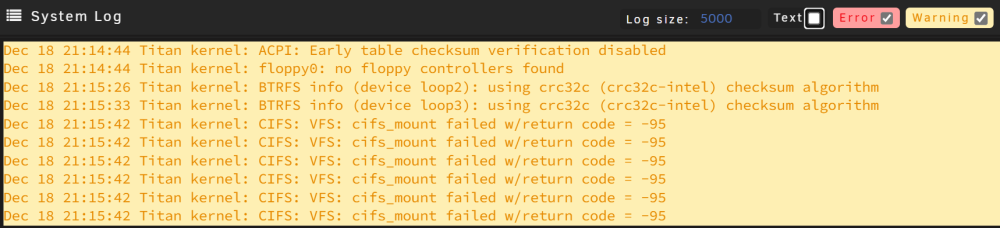
Hi, I'm back a few days later. Yesterday I marked this as solution because it was running fine for 3-4 days, but around 10 minutes ago it froze/crashed again. I can't see any errors in the system log so I'm attaching new diagnostics in hopes you can help me again. 🙂 titan-diagnostics-20231218-2118.zip
-
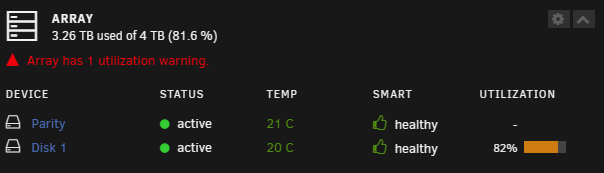
Oh okay, lol. I feel a bit dumb now that I noticed the utilization column being yellow. Oh well... Thank you itimpi 🙂
-
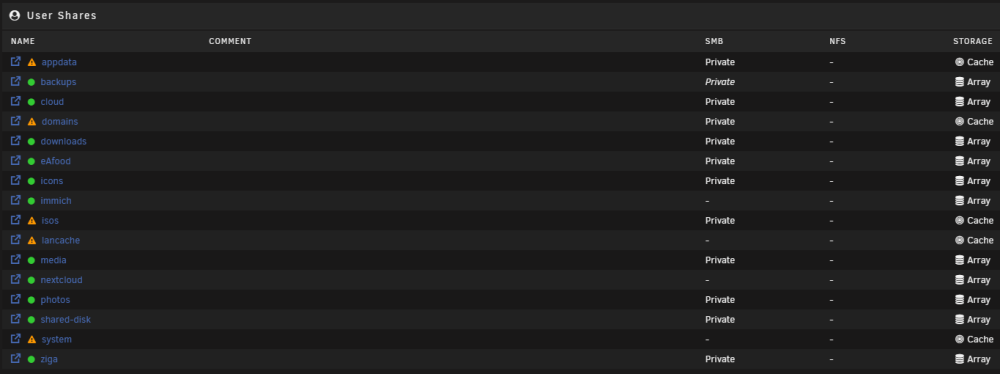
Hi, I'm on Unraid version 6.12.6 and it's saying that I my array has 1 utilization warning - as seen on the attachments. I'm guessing it's something to do with some shares being on the array and others being on the cache, but I'm not sure.
-
I managed to successfully recreate the Docker image and also moved it to my cache as I noticed it was on the array. For now it's running great, so thank you again. I will update this in a few days and then mark it as solved if it's still alive.
-
Alright, will try that tomorrow, thank you. I already finished 2 Memtest passes without errors prior to this post so I hope the RAM’s fine.


