SarahSzabo
Members
-
Joined
-
Last visited
-
So I should DL latest UNRAID creator tool, use the .zip option, and then replace the config folder with the one from the USB I have and that will allow the OS to boot?
-
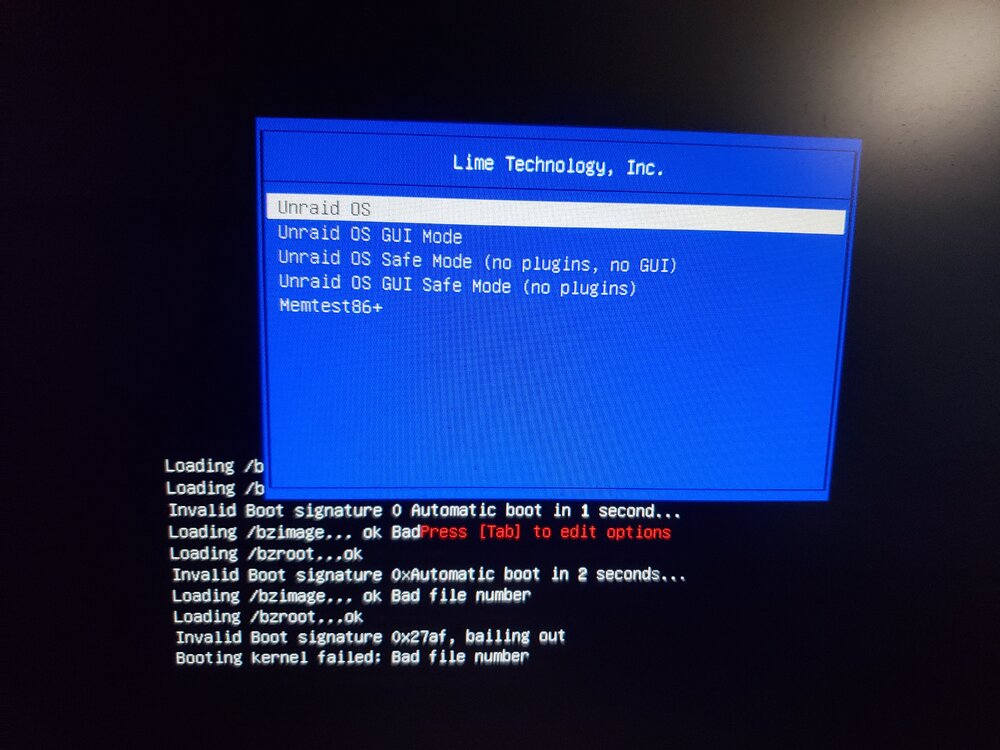
Hello everyone, I had a version of UNRAID which was somewhat recent (not sure the actual version, likely ~6.10 which I was booting off of using a USB drive (Samsung FIT). I have since replaced it with the exact same USB to ensure compatibility, however, I get the following error after flashing the USB with the Windows UNRAID USB maker tool (and selecting my most recent backup from UNRAID connect (.zip)): I tried several other USBs just to test if it was a USB problem, and they all had the same error. Not sure where to go from here, I still have the same old USB, but cannot `dd` it since it disconnects spontaniously. I think I have all the files from it from a file transfer off of its disk. How can I make the new USB boot properly using my old backup configuration data?