




Skip to content
View in the app

A better way to browse. Learn more.

Unraid

A full-screen app on your home screen with push notifications, badges and more.

To install this app on iOS and iPadOS
  1. Tap the Share icon in Safari
  2. Scroll the menu and tap Add to Home Screen.
  3. Tap Add in the top-right corner.
To install this app on Android
  1. Tap the 3-dot menu (⋮) in the top-right corner of the browser.
  2. Tap Add to Home screen or Install app.
  3. Confirm by tapping Install.

SocialBrent

Members
  • Joined

  • Last visited

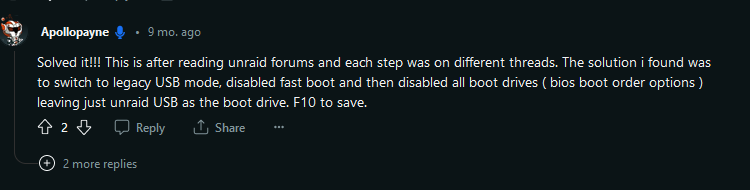
  1. Thanks, I was just about to try that. I found something that seemed to work for me though on reddit. I really appreciate the quick response. Only had the server setup for about a year. Still a total newbie and this has been my first issue.
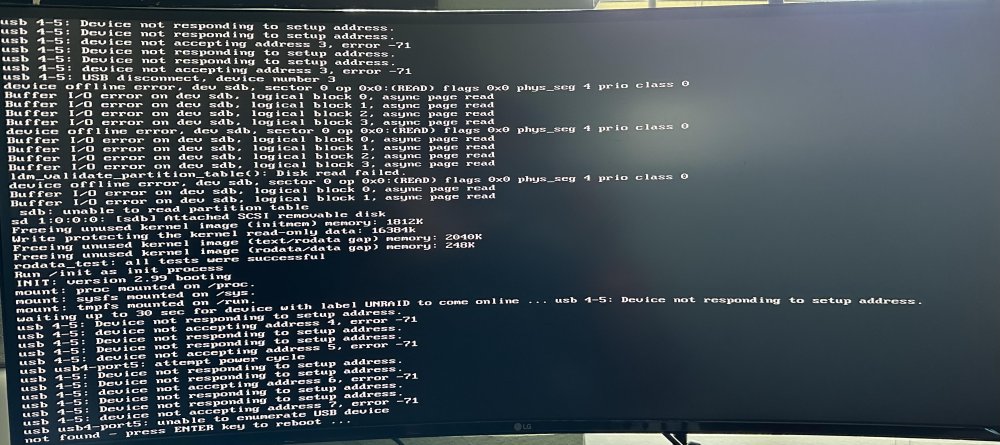
  2. I had to power off my server recently, and when I went to boot it back up it wasn't detecting the usb drive. I powered off my server and relocated the drive to a different port and that seemed to work until it started to go through its boot process. I've attached an image with the errors I'm betting. Any assistance would be greatly appreciated. Thank you
Account

Navigation

Search

Search

Configure browser push notifications

Chrome (Android)
  1. Tap the lock icon next to the address bar.
  2. Tap Permissions → Notifications.
  3. Adjust your preference.
Chrome (Desktop)
  1. Click the padlock icon in the address bar.
  2. Select Site settings.
  3. Find Notifications and adjust your preference.