





AceEaton
Members
-
Joined
-
Last visited
-
Here is a screen shot of cache 2 I dont really know what the errors mean.
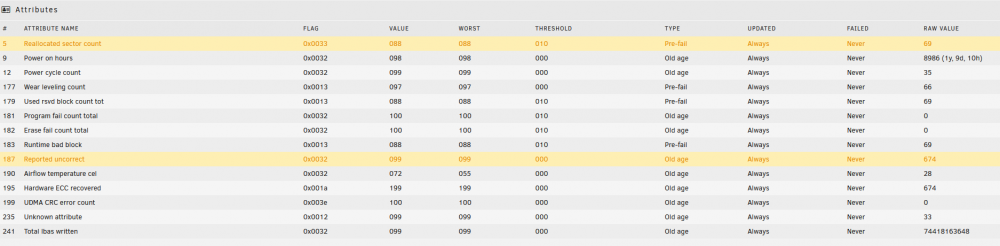
-
Here is a new diagnostics file after fixing the cache. ae-diagnostics-20220712-1250.zip
-
I've upgraded the cache now. Currently my SMB shares will just randomly go offline. Is there a way to reset everything in unraid without losing my share with my files?
-
I upgraded my cpu and now my shares keep crashing. I think it might be a cache issue. I tried adding a new SSD to the pool but Unraid isn't seeing it. I also noticed that one of my cache drives is no longer there. It was a M.2 after investigating that I discovered that it might be a mother board problem for the M.2 I just need my shares up because i use this server my be design business and my employees cant access files which is costing me money. Please help. Model: Custom M/B: ASUSTeK COMPUTER INC. ROG STRIX B450-F GAMING II Version Rev 1.xx - s/n: 210281119100117 BIOS: American Megatrends Inc. Version 4007. Dated: 12/08/2020 CPU: AMD Ryzen 7 5700G with Radeon Graphics @ 3800 MHz HVM: Enabled IOMMU: Enabled Cache: 512 KiB, 4 MB, 16 MB Memory: 32 GiB DDR4 (max. installable capacity 128 GiB) Network: bond0: fault-tolerance (active-backup), mtu 1500 eth0: interface down eth1: 1000 Mbps, full duplex, mtu 1500 Kernel: Linux 5.10.28-Unraid x86_64 ae-diagnostics-20220705-1034.zip

