Gerald Edwards
Members
-
Joined
-
Last visited
Everything posted by Gerald Edwards
-
Diagnostics attached. Thank you for your help tower-diagnostics-20240923-1328.zip
-
Thank you for your reply. UNRAID disabled the disk, so i ran a long SMART Test to try and have some diagnostics to share here. after looking at the forum it seemed like changing the SATA cable might be a solution, but before re-enabling the disk I was hoping to make sure it was safe to try and rebuild with this drive.
-
I changed the cable, and it has pass SMART Test. I have attached the SMART report, is it safe to re-enable? thank you for you all for your help. WDC_WUH721414ALE6L4_9RHJWWZC-20240922-1101.txt
-
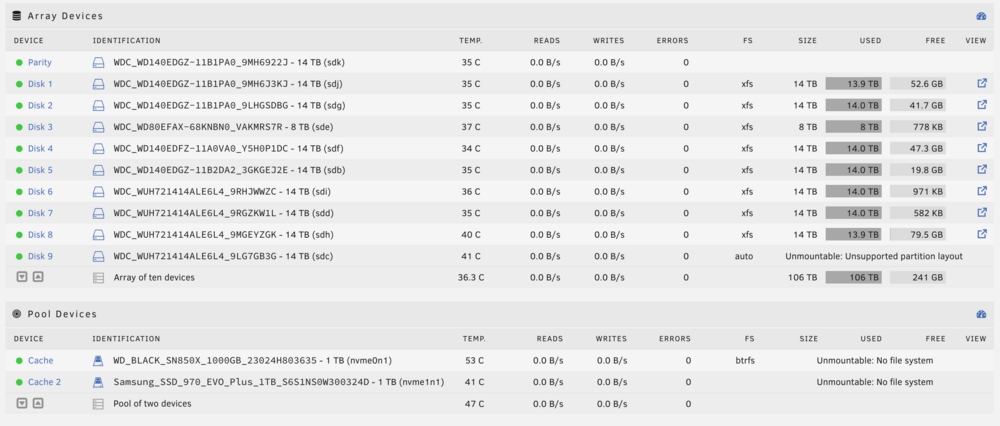
- At the same time i added an additional array drive, and second 1tb nvme cache drive to create a pool. - Rebooted, added new 14tb to its array slot & added second cache nvme to a new, second slot in the cache pool - Restarted array - both pool drive are showing "Unmountable: No file system" - Allowed 14tb array drive to finish its pre-clear before assessing - stopped array / started array - now all dockers missing - wants to format the new array drive, and both cache drives - original cache drive shows it has same volume of data Have a monthly appdata backup from 4/24 Also in Shares > Disk Shares it is saying "There are no exportable disk shares" Diagnostics attached. Thank you for any help tower-diagnostics-20240505-1343.zip