mojestic
Members
-
Joined
-
Last visited
-
My system is dell inspiron 3880 pc, i3-10800, no gpu, and just one ssd cache, one storage 6tb wd red.
-
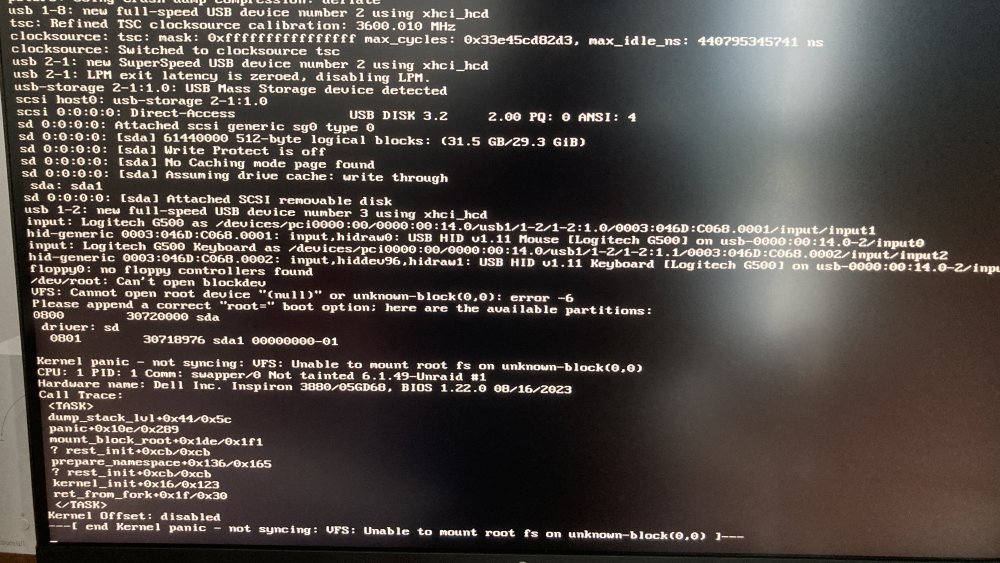
I updated my Unraid to latest, then I clicked update all to the plugins. Next day the system stopped working. I tried almost everything and nothing is working, and everytime there is a new error (The one in the picture is when trying a new flash with new unraid without my own config) I just need to enter unraid and see my files, I don't care about plugins or anything at this point. I was considering using Unraid for my business but after this I would never think about this, three days and no luck!
-
I use Windows 10 as a plex and file server, and I want to do the move today and try Unraid. I'm just consiered about moving my docker server setup without re-doing everything. and is there a guide on how to setup self hosted cloud storage on unraid?