DerSIlver
Members
-
Joined
-
Last visited
-
Hi Mam59, e.g. the prefix of the Fritzbox and then 1:1:1:3? --ip6='2a02:8071:masked:masked:1:1:1:3' -e “ServerIPv6”='2a02:8071:masked:masked:1:1:1:3' -e “IPv6”='True' docker: Error response from daemon: invalid config for network br0: invalid endpoint settings: * invalid IPv6 address: 2a02:8071:masked:masked:1:1:1:3 * user specified IP address is supported only when connecting to networks with user configured subnets. See “docker run --help”. Unfortunately this did not work either.
-
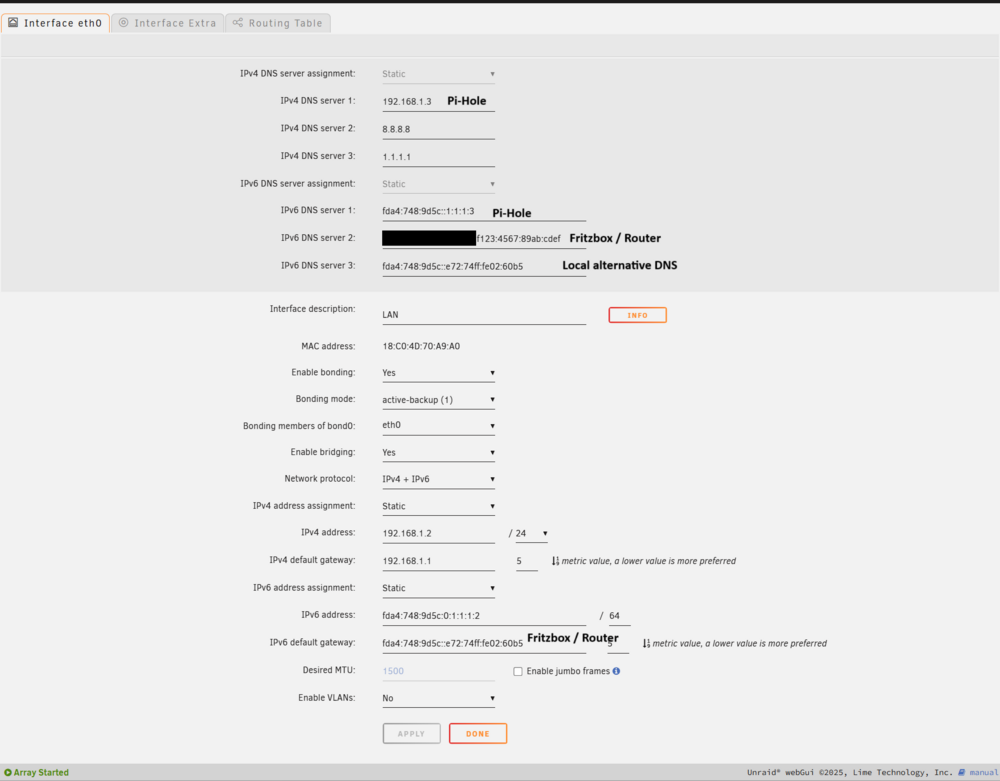
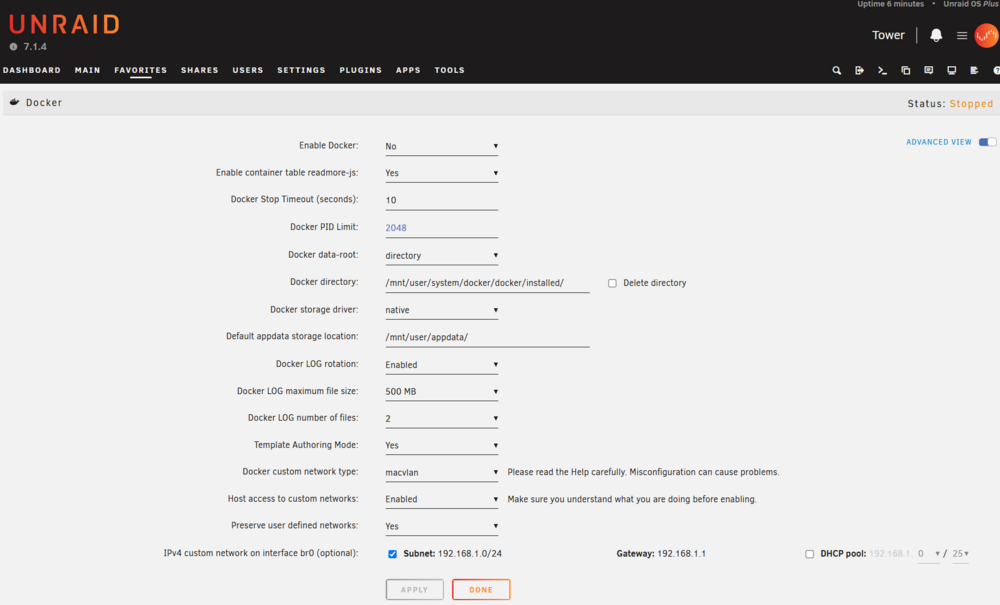
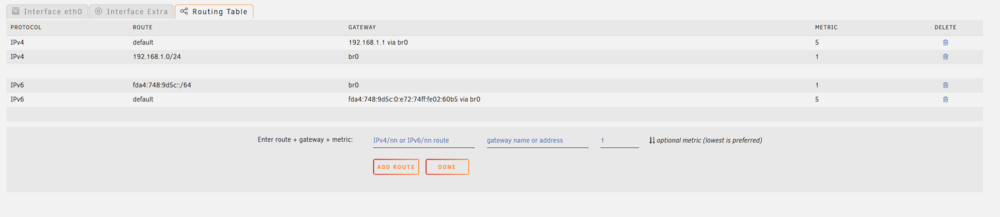
Hello everyone, after changing the hardware and updating to Unraid 7.1.4 I have problems with my Pi-Hole Docker container / the ipv6 settings of the Docker Containers, which can no longer be operated in ipv6. IP Adress of the Unraid Host: 192.168.1.2 | fda4:748:9d5c:0:1:1:1:2 IP Adress of the PiHole Container: 192.168.1.3 | fda4:748:9d5c::1:1:1:3 The following settings are currently set: Network Settings: Routing Table: Docker Settings: Docker pi-Hole Container docker run -d --name='Pihole-DoT-DoH' --net='br0' --ip='192.168.1.3' --ip6='fda4:748:9d5c:0:1:1:1:3/64' --pids-limit 2048 -e TZ="Europe/Berlin" -e HOST_OS="Unraid" -e HOST_HOSTNAME="Tower" -e HOST_CONTAINERNAME="Pihole-DoT-DoH" -e 'TCP_PORT_53'='53' -e 'UDP_PORT_53'='53' -e 'UDP_PORT_67'='67' -e 'TCP_PORT_80'='80' -e 'TCP_PORT_443'='443' -e 'DNS1'='127.1.1.1#5153' -e 'DNS2'='127.2.2.2#5253' -e 'TZ'='Europe/Berlin' -e 'WEBPASSWORD'='MaskedPassword' -e 'INTERFACE'='eth0' -e 'ServerIP'='192.168.1.3' -e 'ServerIPv6'='fda4:748:9d5c:0:1:1:1:3' -e 'IPv6'='True' -e 'DNSMASQ_LISTENING'='all' -v '/mnt/user/appdata/pihole-dot-doh/pihole/':'/etc/pihole/':'rw,slave' -v '/mnt/user/appdata/pihole-dot-doh/dnsmasq.d/':'/etc/dnsmasq.d/':'rw,slave' -v '/mnt/user/appdata/pihole-dot-doh/':'/config':'rw,slave' --cap-add=NET_ADMIN --restart=unless-stopped --hostname ns 'devzwf/pihole-dot-doh:latest' docker: Error response from daemon: invalid config for network br0: invalid endpoint settings: * invalid IPv6 address: fda4:748:9d5c:0:1:1:1:3/64 * user specified IP address is supported only when connecting to networks with user configured subnets. See 'docker run --help'. The command failed. Does anyone have an idea and can help me?