




Skip to content
View in the app

A better way to browse. Learn more.

Unraid

A full-screen app on your home screen with push notifications, badges and more.

To install this app on iOS and iPadOS
  1. Tap the Share icon in Safari
  2. Scroll the menu and tap Add to Home Screen.
  3. Tap Add in the top-right corner.
To install this app on Android
  1. Tap the 3-dot menu (⋮) in the top-right corner of the browser.
  2. Tap Add to Home screen or Install app.
  3. Confirm by tapping Install.

Frank Ku

Members
  • Joined

  • Last visited

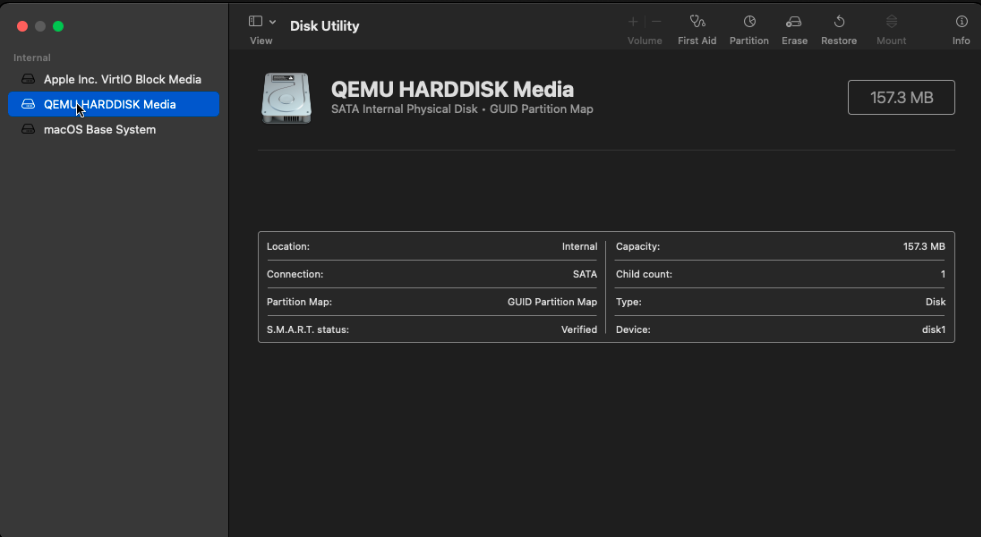
  1. Hi, All, When I tried to install Monterey with macinabox, everything was fine until when I used the Disk Utility to format the quemu harddisk. That disk was showing only 157 MB as shown in 1.png. When I collapsed the VM in 2.png, I can see that disk with 157 MB in size was Monterey-opencore.img. Is it possible that this was loaded incorrectly? I can also see 300GB of macos_disk.img was create. At the end, I couldn't install Monterey properly because the disk space is not enough. It has been resolved. I simply posted this in the wrong place and also format the wrong disk.

Account

Navigation

Search

Search

Configure browser push notifications

Chrome (Android)
  1. Tap the lock icon next to the address bar.
  2. Tap Permissions → Notifications.
  3. Adjust your preference.
Chrome (Desktop)
  1. Click the padlock icon in the address bar.
  2. Select Site settings.
  3. Find Notifications and adjust your preference.