





daemontus
Members
-
Joined
-
Last visited
Everything posted by daemontus
-
Soo... I think it's fixed. The problem was tailscale, even though tailscale is not used by any of the docker containers directly. Some more info is available here: https://github.com/tailscale/tailscale/issues/12108 and here https://www.reddit.com/r/docker/comments/1do20m6/docker_container_randomly_losing_ability_to/, but overall what happened seems to be this: 1. Tailscale is installed on the Unraid server for remote management. The docker containers don't use it for anything relevant. 2. However, tailscale changes the DNS settings of the Unraid server to allow name resolution across the VPN network. As I learned, this is largely fine, as long as the containers use the same DNS config as the host machine. 3. If a DHCP IP renewal happens, this also changes the DNS settings, at which point tailscale automatically comes in and "fixes" the config. But this may not be correctly reflected by the docker containers, especially if that container has its own IP address or it uses a custom docker network (in such case, the container does not even use the same config as the host machine anyway). 4. My understanding is that the reason why the issue was appearing randomly is because it was triggered by the DHCP renewal. 5. Earlier this year, tailscale added a security feature to prevent "unauthorized" DNS requests on the VPN network. Unfortunately, if the configuration in the docker container and on the host machine are out of sync, this meant that any DNS request coming from that container was recognized as malicious and ignored by the tailscale resolver, which would otherwise forward it to the "normal" DNS server before. 6. So for now, using --stateful-filtering=false with tailscale seems to have fixed the issue. Anyway, thank you again for the help. I was looking at the wrong things, but at least you gave me a list of stuff that I checked to make sure they are probably ok and so I know I have to look elsewhere
-
Thank you very much for the detailed answer! Regarding your questions: * Host access is enabled. * The two interfaces are just 1gbit, but you are right that bonding is disabled. Original plan was to passthrough one of them to a VM for streaming games, but in the end it stayed unused. I guess this fixes the "I don't know where to start troubleshooting" I now have a few things to look for and test. (1) I'll try to experiment with bonding. (2) I'll reconfigure the docker containers to get rid of the extra bridge networks. I'll report back one I have more info. The failure has not happened since we started this thread, so I haven'd had a chance to look into it while it's not working. I guess this will also yield some new info. Once more, thank you very much.
-
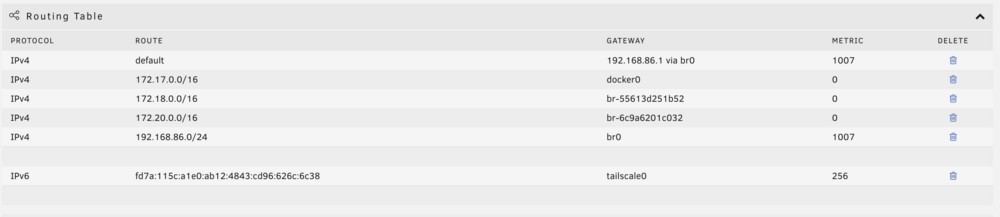
Also... I am somewhat suspicious of my routing table? It almost looks like docker is doing something weird with its networks... I tried to clean it up by removing the "none", but it eventually re-appears. This is captured when everything is working... I'll see if anything changes once the system breaks again. root@Zavazadlo:~# docker network ls NETWORK ID NAME DRIVER SCOPE 0882f7a85bf4 bridge bridge local 0ea9b4c23941 eth1 macvlan local deb2eb468f02 host host local 6c9a6201c032 immich_default bridge local b160a6775829 none null local 55613d251b52 seafile-net bridge local
-
Hi! Thank you for the suggestion! (1) Sadly, macvlan. I am currently only running a basic router box that gets very upset when I enable IPvlan, but I might be able to make it work somehow. (2) Regarding the misconfiguration: You mean the reverse proxy container? That one is usually fine. What is breaking most often are the services (although it does seem to be random, sometimes it is indeed the reverse proxy that breaks). What I mean by that: Let's say I have a Seafile container that I am accessing through the reverse proxy, and the Seafile container needs to connect to an identity provider (to authenticate users) that is not on my network. Once the issue occurs, the Seafile container cannot access the identity provider anymore, but everything works fine otherwise. So, as long as I am logged in, the service is completely fine, but the login itself is not working because Seafile can't talk to the identity provider. Once I reboot the server, it works again for a week or two. If I open a console directly in the Seafile container and try to run wget on something on my server, it works fine. If I wget the identity provider, it times out. (If I wget the identity provider from the Unraid terminal directly, it of course works). (3) Also, the reverse proxy config has not changed for two years now, and this is only happening for the last ~6 months. (4) Diagnostics are now attached zavazadlo-diagnostics-20241031-1653.zip
-
Hi! I have an issue that I don't quite know how to troubleshoot... I have a bunch of docker containers running on my Unraid server. An nginx reverse proxy and a few services (Seafile, Immich, Plex, some static websites, etc.). I'm also running tailscale directly on the server for remote access, but not in the containers. For about two years, this was working perfectly. But during the last 3-6 months, a weird issue started appearing: The containers all should have access to the outside network. However, after running for some time, eventually some of the containers just... lose that access? And once that happens, the computer cannot be restarted normally and needs to be turned off by disconnecting power. This is an issue because some of those services do actually need to talk to each other, or to some APIs that live on the internet. Detailed description: After a fresh start, each container can access the other containers and the internet (e.g. ping/wget works for e.g. google.com). However, after some random period of time, one of the containers (any one of them, not a specific one) will lose access to the outside network. I can still access the service that is running in that container, but running ping/wget to any URL that is outside of the container will just timeout. At this point, if I try to restart the computer, it will just freeze and I have to unplug the power. Once it reaches this "error state", I can still turn docker on/off in the Unraid interface, but it will not restore the network connectivity. I believe that completely deleting the problematic container and creating it from scratch does help, but I haven't tried that in a while. Any idea what to look for or what to try?
-
Hi! I have an i7 4790 desktop PC set up as Unraid with a bunch of storage and docker containers (normal stuff like plex/seafile, but also vscode and jupyter lab as a remote workspace). It's been rock solid for about a year, but recently (roughly after the 6.12 update, but I'm not quite sure if there is a direct correlation), I've been running into some very strange behaviour: - After Unraid starts, docker starts as well without any issues. However, once I disable it, I cannot turn it back on ("Docker service failed to start"), but I don't see anything relevant in the system log. I have to reboot, at which point it again starts without any problems. - After running for some non-deterministic amount of time (usually more than 2 days and less than 2 weeks), the server becomes unresponsive to anything except ping. Smart plug reports unusually high power usage for an idle machine. Other relevant information: - It also responds to ping over Tailscale... so not only is ping running, the VPN is running too. - Since the behaviour started, I've more or less recreated all the docker containers from scratch, but the underlying images/configuration is the same. - Originally, I thought it was related to OOM errors, since I've been running some memory intensive computations in one of the docker containers. I've added quite aggressive memory limits to all containers, but this did not solve it. - I'm running "maclan" instead of "iplan" because my basic router is super not happy about "iplan" (drops connection randomly for several minutes and some containers just can't connect at all). I've seen warnings about "maclan" causing kernel panics. Could this be it? - A year ago, before setting it up, I ran memtest and a bunch of stability tests and it all seemed good. Right now, it's physically in a place where connecting screen/keyboard is very inconvenient, so I'd like to avoid doing that if possible (ofc, I can reboot it just fine). - At some point, there was a GPU in the PC that was used by a Windows VM. The GPU is now out and the VM is deleted. I don't see why this should be related, yet the problems started roughly when the GPU was removed. What's the best course of action here? I'm quite used to basic management of linux systems, but I'm relatively new to Unraid. I am more-or-less open to just reinstalling the whole thing. I can safely nuke the docker configuration (I keep all config for that in a separate github repo), but I am a bit anxious about messing up my array in the process (I have plans for an offsite backup, but that's not going to be online for a few months still and the freezing is driving me crazy since I'm actually need to work on the machine remotely from time to time).

