





Chris in GA
Members
-
Joined
-
Last visited
-
When inserting a new Western Digital 20TB SAS drive I get these errors and the disk doesn't show up in unassigned devices. This is in a Super Micro CSE-847 My other drives are HGST HUH721010AL42C0 and they all work fine. I'm running dual parity drives on 10 TB and upgrading to 20 TB for parity so I can increase to 20 TB in the array. Is there any known issue with this drive? I have two of them and both behave the same. unraid version 7.0.0 Feb 8 19:34:42 Tower kernel: sd 2:0:28:0: Attached scsi generic sg8 type 0 Feb 8 19:34:42 Tower kernel: end_device-2:1:27: add: handle(0x0023), sas_addr(0x5000cca2c70847b9) Feb 8 19:34:42 Tower kernel: sd 2:0:28:0: [sdh] Test Unit Ready failed: Result: hostbyte=0x01 driverbyte=DRIVER_OK Feb 8 19:34:42 Tower kernel: sd 2:0:28:0: [sdh] Read Capacity(16) failed: Result: hostbyte=0x01 driverbyte=DRIVER_OK Feb 8 19:34:42 Tower kernel: sd 2:0:28:0: [sdh] Sense not available. Feb 8 19:34:42 Tower kernel: sd 2:0:28:0: [sdh] Read Capacity(10) failed: Result: hostbyte=0x01 driverbyte=DRIVER_OK Feb 8 19:34:42 Tower kernel: sd 2:0:28:0: [sdh] Sense not available. Feb 8 19:34:42 Tower kernel: sd 2:0:28:0: [sdh] 0 512-byte logical blocks: (0 B/0 B) Feb 8 19:34:42 Tower kernel: sd 2:0:28:0: [sdh] 0-byte physical blocks Feb 8 19:34:42 Tower kernel: sd 2:0:28:0: [sdh] Test WP failed, assume Write Enabled Feb 8 19:34:42 Tower kernel: sd 2:0:28:0: [sdh] Asking for cache data failed Feb 8 19:34:42 Tower kernel: sd 2:0:28:0: [sdh] Assuming drive cache: write through Feb 8 19:34:42 Tower kernel: sd 2:0:28:0: [sdh] Attached SCSI disk Feb 8 19:34:42 Tower kernel: mpt3sas_cm0: handle(0x0023), ioc_status(0x0022) failure at drivers/scsi/mpt3sas/mpt3sas_transport.c:225/_transport_set_identify()! Feb 8 19:34:42 Tower kernel: mpt3sas_cm0: mpt3sas_transport_port_remove: removed: sas_addr(0x5000cca2c70847b9) Feb 8 19:34:42 Tower kernel: mpt3sas_cm0: removing handle(0x0023), sas_addr(0x5000cca2c70847b9) Feb 8 19:34:42 Tower kernel: mpt3sas_cm0: enclosure logical id(0x50030480184c74ff), slot(5) Feb 8 19:34:42 Tower kernel: mpt3sas_cm0: enclosure level(0x0001), connector name( )
-
6.12.6 fresh install with only Plex and unassigned devices plugin. crond[1368]: exit status 255 from user root /usr/local/emhttp/plugins/dynamix/scripts/monitor &> /dev/null This appears in my logs every minute. How do I fix this?
-
Thank you. That worked this issue out. It's odd to have a formatting problem on such a late build.
-
Attached tower-diagnostics-20221113-1214.zip
-
Mover is still moving one dir back to cache. It will be a while. Do I need to move it back to the array before unassigning the cache1 Hitachi?
-
Attached tower-diagnostics-20221113-1021.zip
-
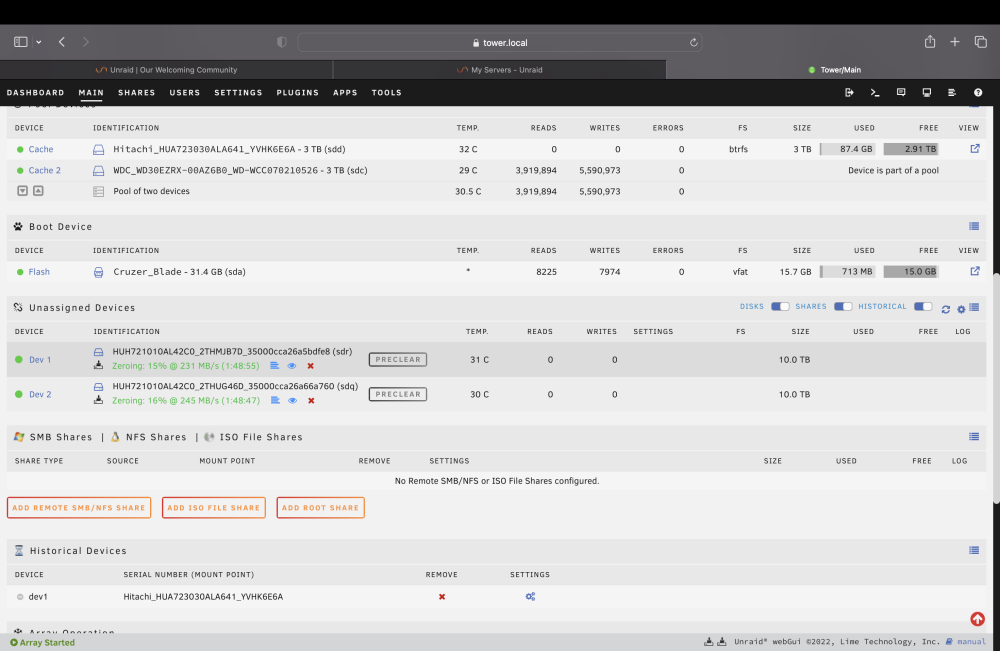
I'm trying to change my cache drive and the new one doesn't appear to be writing to. I run a pool of 2 drives. I removed one of them after moving everything back to the array. I ran a pre clear on the new drive and added it. I then tried to move data back to the cache pool and only the original drive in the pool appears to be written to. Screenshot attached.
-
Thank you
-
Is anyone aware of an open source document management program? I'm looking for something like what that Neat scanner does. I'm pretty sure that's the name of it. Sure I can create folders and make tags but it would be really convenient to have software to do so for me to help keep things organized and a bit more streamlined. ETA: preferably something I can run in Docker.
