




Skip to content
View in the app

A better way to browse. Learn more.

Unraid

A full-screen app on your home screen with push notifications, badges and more.

To install this app on iOS and iPadOS
  1. Tap the Share icon in Safari
  2. Scroll the menu and tap Add to Home Screen.
  3. Tap Add in the top-right corner.
To install this app on Android
  1. Tap the 3-dot menu (⋮) in the top-right corner of the browser.
  2. Tap Add to Home screen or Install app.
  3. Confirm by tapping Install.

JeremieB

Members
  • Joined

  • Last visited

Everything posted by JeremieB

  1. Ok, thank you very much !
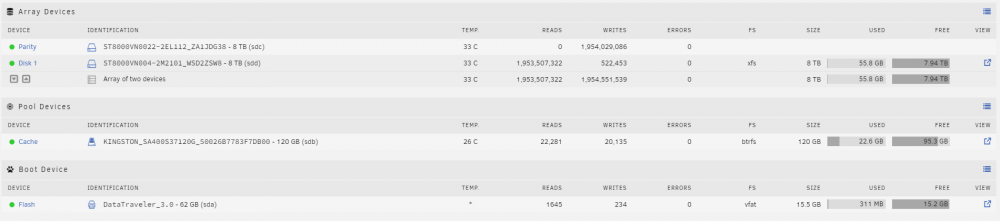
  2. Then, I probably don't understand what is the difference between Parity device and a disk device. I would like to have access to all my disk size (so, 16 tb). Do I need to remove the Parity disk and place it like Disk 2?
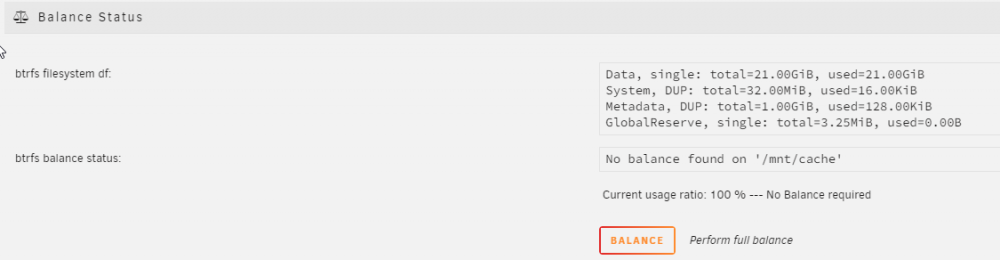
  3. How to setup raid0 ? I have the Unraid version 6.10.3. I read this section of the manual: https://wiki.unraid.net/Manual/Storage_Management#Change_Pool_RAID_Levels Here is my configuration: If I go in my pool device (KINGSTON_SA400S37120G_50026B7783F7DB00 - 120 GB (sdb)) and I go in the section balance, I don't have the dropdown. What did I do wrong to not have the option&
Account

Navigation

Search

Search

Configure browser push notifications

Chrome (Android)
  1. Tap the lock icon next to the address bar.
  2. Tap Permissions → Notifications.
  3. Adjust your preference.
Chrome (Desktop)
  1. Click the padlock icon in the address bar.
  2. Select Site settings.
  3. Find Notifications and adjust your preference.