




Skip to content
View in the app

A better way to browse. Learn more.

Unraid

A full-screen app on your home screen with push notifications, badges and more.

To install this app on iOS and iPadOS
  1. Tap the Share icon in Safari
  2. Scroll the menu and tap Add to Home Screen.
  3. Tap Add in the top-right corner.
To install this app on Android
  1. Tap the 3-dot menu (⋮) in the top-right corner of the browser.
  2. Tap Add to Home screen or Install app.
  3. Confirm by tapping Install.

Tranquilliser

Members
  • Joined

  • Last visited

  1. This worked! Thank you.
  2. yes I'm pretty sure it was. I used the unraid boot creator usb tool from the website to install 6.10.3 its got an AMD dual core at about 1.35GHZ and 5GB of DDR3-1333 RAM, 1024mb of ECC and 4096MB of non ECC.
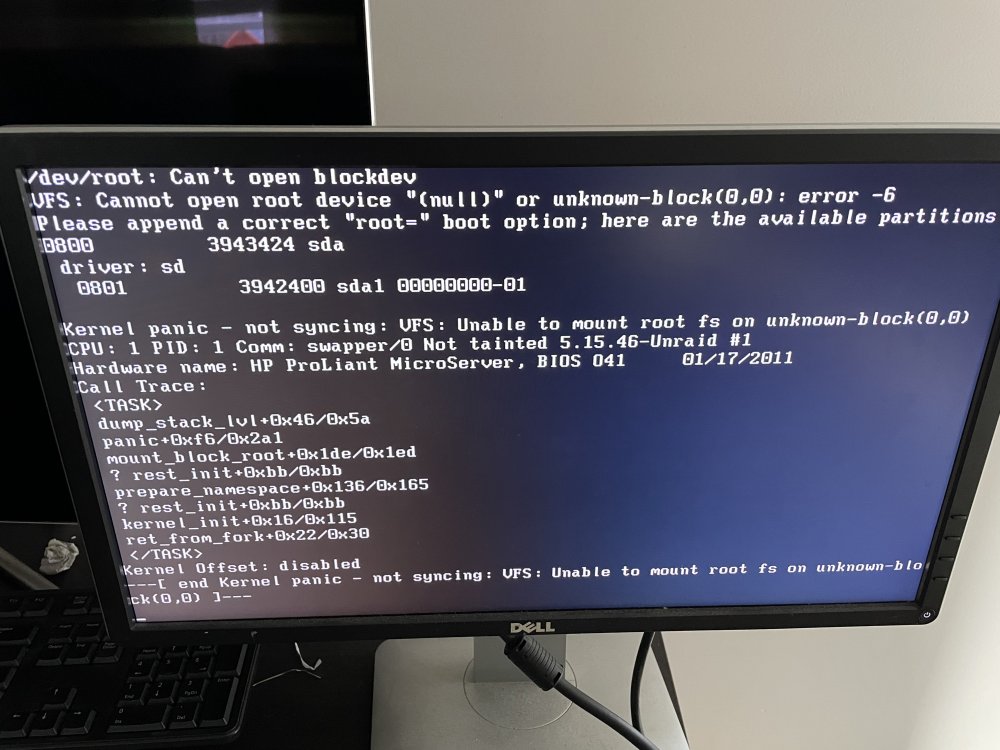
  3. Hi everyone. I'm very new to this, inherited the server off a friend. I'm trying to get it to start up so I can run it but it keeps failing to boot into Unraid OS GUI. I've included a screenshot of the error. any assistance or guidance appreciated thank you

Account

Navigation

Search

Search

Configure browser push notifications

Chrome (Android)
  1. Tap the lock icon next to the address bar.
  2. Tap Permissions → Notifications.
  3. Adjust your preference.
Chrome (Desktop)
  1. Click the padlock icon in the address bar.
  2. Select Site settings.
  3. Find Notifications and adjust your preference.