





StewLoft
Members
-
Joined
-
Last visited
Everything posted by StewLoft
-
Dev1 is a SSD used for the main OS of the computer. Dev2 was the original parity disc
-
tower-diagnostics-20220806-1318.zipOKThank you.Yes, after I added the 12 TB to parity it showed valid. After I removed the 6TB parity it was valid. It went invalid when disc1 failed.Sorry, I was confused on what you meant.
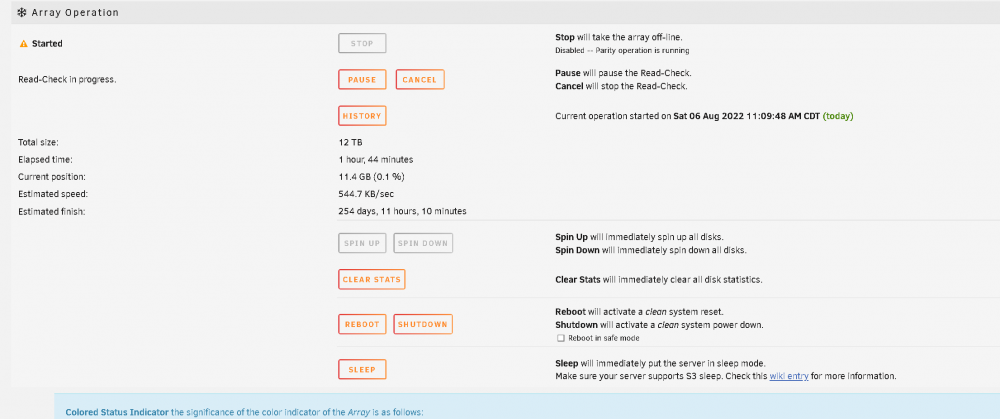 Main - Array Operation??When the system finished bringing the array up I had the orange triangle with the exclamation and it showed Array started, parity not valid. I thought the read-check would go through and validate the Array. What actions should I take instead? And thank you for looking at this!!I originally had a 6TB parity. I wanted to add a 12TB to the array so I added a 12TB to parity2, then I could not add the 12TB to the array as the 6TB was smaller. I deselected the 6TB, everything was fine, then added the first of 2 12TB HDD's, everything was good, added the last 12TB HDD, then shortly after a 4TB (disc1) failed and this is where I am at.I read somewhere in the forums about running the read-check if parity is not valid.Yes, disk22 was part of the original build and I just left it there. Planning on re-assigning to cache but I guess that will have to wait until I get everything back in order.Parity 1 was a 6TB HDD. I had to remove it from the Array to add the 12TB HDD. I tried moving parity 2 to parity but it would not let me.Here is the diagnostic report. tower-diagnostics-20220806-1119.zipHey there, I need some help. I have an unraid (6.9.2) system that I have had in operation for about 2 years now. I have never had any issues. It is mainly used for media and for backing up several computers. I recently had the opportunity to purchase 3 - 12TB HDD's. I had a 6TB Parity, 4 - 4TB HD, 4 - 3TB HDD, and a 240GB SSD. Never had an issue. I precleared 1 of the 12TB HDD and then added it to Parity so I could add the other 2 - 12TB down the road. After the 12TB Parity was installed and running good I removed the 6TB Parity so I could add a 12 TB HDD. This went fine. I added a 12TB HDD to the Array, all good. I added the last 12 TB HDD, all good. After about 1 day one of the 4TB HDD in the array failed. I checked sata and power cables, even switched the cables from another HDD in the Array, no change. I removed the effected 4TB HDD from the Array assignment. After I brought the system back up orange triangle with exclamation. I started read-check but it is saying 176 days to complete. Do I really have to wait for half a year to get back to parity? With read-check working on the system I am not able to access a lot of the data on the system. I am not well versed in Unraid. I have a few Dockers but don't use them much. As I said I use the system for media (Emby) and for back-up. I have not had a reason to do much else in unraid, and frankly did not want to do something that could cause a situation like I am in...


Account
Navigation
Search
Configure browser push notifications
Chrome (Android)
- Tap the lock icon next to the address bar.
- Tap Permissions → Notifications.
- Adjust your preference.
Chrome (Desktop)
- Click the padlock icon in the address bar.
- Select Site settings.
- Find Notifications and adjust your preference.
Safari (iOS 16.4+)
- Ensure the site is installed via Add to Home Screen.
- Open Settings App → Notifications.
- Find your app name and adjust your preference.
Safari (macOS)
- Go to Safari → Preferences.
- Click the Websites tab.
- Select Notifications in the sidebar.
- Find this website and adjust your preference.
Edge (Android)
- Tap the lock icon next to the address bar.
- Tap Permissions.
- Find Notifications and adjust your preference.
Edge (Desktop)
- Click the padlock icon in the address bar.
- Click Permissions for this site.
- Find Notifications and adjust your preference.
Firefox (Android)
- Go to Settings → Site permissions.
- Tap Notifications.
- Find this site in the list and adjust your preference.
Firefox (Desktop)
- Open Firefox Settings.
- Search for Notifications.
- Find this site in the list and adjust your preference.