





TheFreeman
Members
-
Joined
-
Last visited
-
damn, was hoping I wouldn't have to replace it
-
Diagnostics are attached. nas-diagnostics-20230601-1903.zip
-
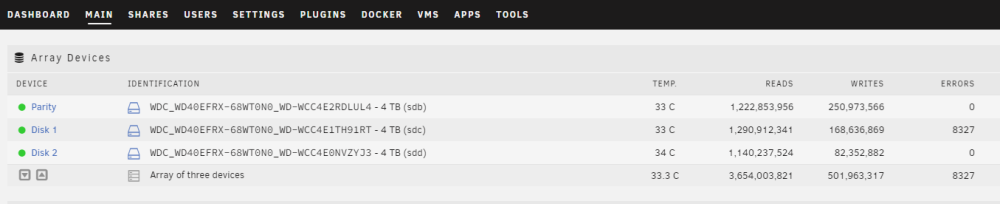
Sorry maybe this is the screenshot I should have posted. This is where I initially noticed the errors.
-
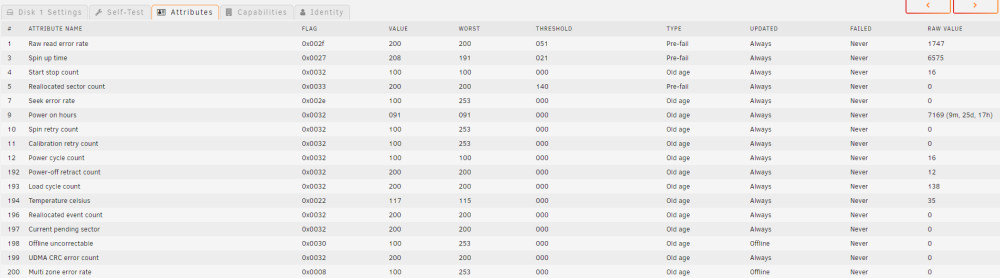
I logged into the webgui and noticed that one of my drives has a lot of errors listed under the status page. This drive has very little wear on it with only 9 months of runtime whereas my others have over 4 years and are going strong. As I am new to Unraid how do I determine if this drive needs to be replaced or if there is something else wrong with it? Below is a read out of the affected drive.
-
Just following up. I implemented the BIOS changes 3 days ago and the system has been solid since. Thanks again for your help.
-
Thank you for the reply. I was able to find the BIOS options listed in that post. Now to play the waiting game.
-
I just completed a fresh install of Unraid version 6.10.3, after approximately 24-48 hours I am no longer able to access the WebUI and the CLI appears to be frozen despite me still being able to ping the device. Only way to regain access is to perform a hard reset of the server. I am new to this OS and am unsure what information may prove useful in troubleshooting. Hardware: Unraid OS 6.10.3 CPU: Ryzen 5 1600 Motherboard: msi b350 pc mate RAM: 16gb of Corsair Vengeance LPX 2666Mhz USB: Kingston DataTraveler Kyson 32GB USB 3.2 Any thoughts on what may cause this behaviour?


