R4D4R
Members
-
Joined
-
Last visited
-
OK, good point! I'll install once it's back up and running.
-
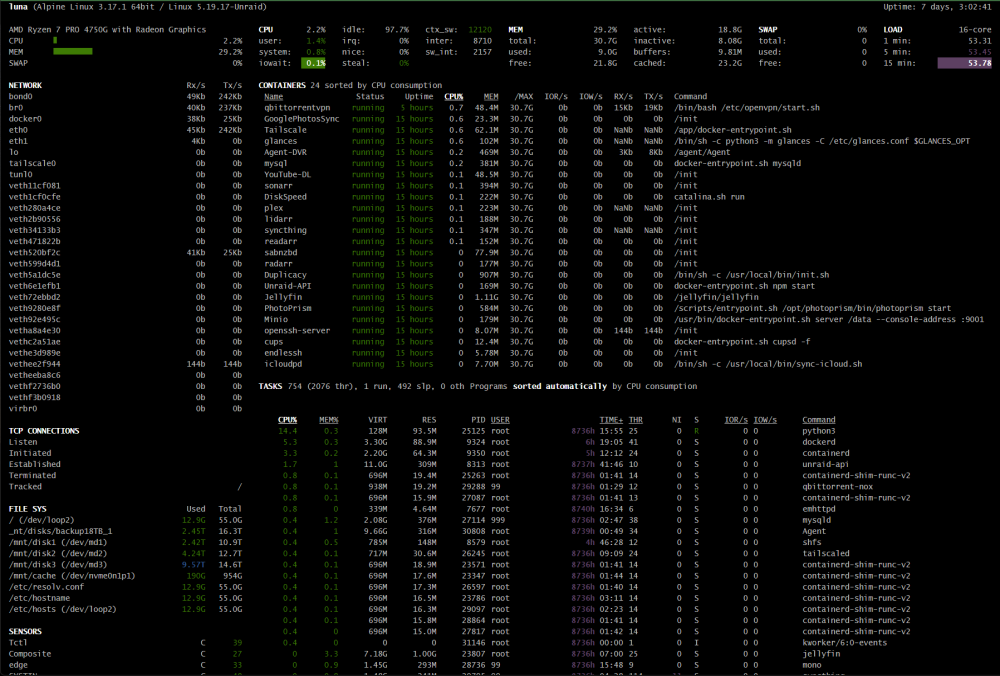
Hi all, This is the 5th or 6th time this has happened to me (and is currently happening as I type this): Web UI gives me "500 Internal Server Error" Can't access the console - no video signal (and keyboard non-responsive) via KVM or local monitor/keyboard Docker containers appear to be running normally Duplicacy was running a job, which I just stopped. Plex seems to be running normally, brings up video quickly and without issue. Some info: Global C-states disabled RAM was on the QVL for the X470D4U, is ECC and not overclocked (but not sure about the X570D4U) This has happened since I installed Unraid, around Sept. Since then, I have: Swapped out the X470D4U for a X570D4U Replaced the PSU Removed the nVidia GPU Upgraded to a 1TB SSD for Cache (one was Samsung, the other WD - can't remember which is which) Removed the LSI HBA in favor of an IOCREST Dual Mini-SAS M.2 board. I installed Glances last time this happened - here's what I get from it right now: Low CPU usage - less than 5% Low RAM usage - currently right around 29% Low iowait (0-0.3% at any given point) Very high 1/5/15 load - greater than 50 Performing an ACPI shutdown doesn't work - the server does not seem to respond to the graceful shutdown command. I can attach a log when I can get to it - but right now, I have no way of accessing the server unless I hard reset it. Any thoughts on what I can try next before I hit the reset button?