Brakmaren
Members
-
Joined
-
Last visited
Everything posted by Brakmaren
-
That's how I have it configured now. 128gb nvme for boot plus temp. But i like to have a optane as boot only, and maybe two as raid for peace of mind 😇
-
Ok, maby i should have make it a bit more detailed. I'm not using usb, I'm using a nvme. The reason for asking is because I would like to switch to an Intel optane m10, and like to know what the minimum size to get, to be able to use same nvme on unRAID OS 8. But I think I'm going with the first tip on 16gb. Thanks.
-
The numbers reference the version of unRAID OS, not the number of drives 😘
-
-
The recommended USB size for 7 had to my knowledge been 8gb. Anyone know what the recommended size is for 8 ? I assume it will be bigger due to being immutable.
-
I get that, but thanks anyway 😉
-
-
Hi. I'v got two 4tb parity drives, and would like to exchange one of them for a 6tb. Does it matter if the biggest drive is in the parity or parity 2 slot in the gui ?
-
Got it, done, thanks.
-
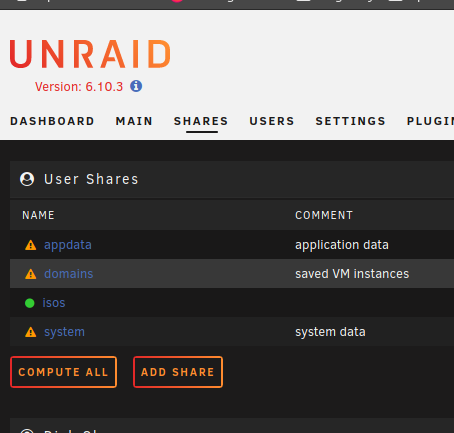
Hi New to unraid, so some stupid questions are bound to happen while getting my head around everything 😇 I have read 'i think' all i could find on the subject in the forum, and getting a pretty good understanding of how it works. I have: appdata and system cached to 1tb ssd as (prefer) . domains cached to 500gb ssd as (prefer). isos cached to 128gb ssd as (yes). Like in the picture isos are green but the ones with (prefer) have the exclamation mark. Because setting cache prefer will hold the data in the cache, does that means that those shares will always have the exclamation mark. The exclamation mark is so to speak the NORMAL state