





Angelikfear
Members
-
Joined
-
Last visited
-
So what Path is not in Ram? And Many thanks JonathanM
-
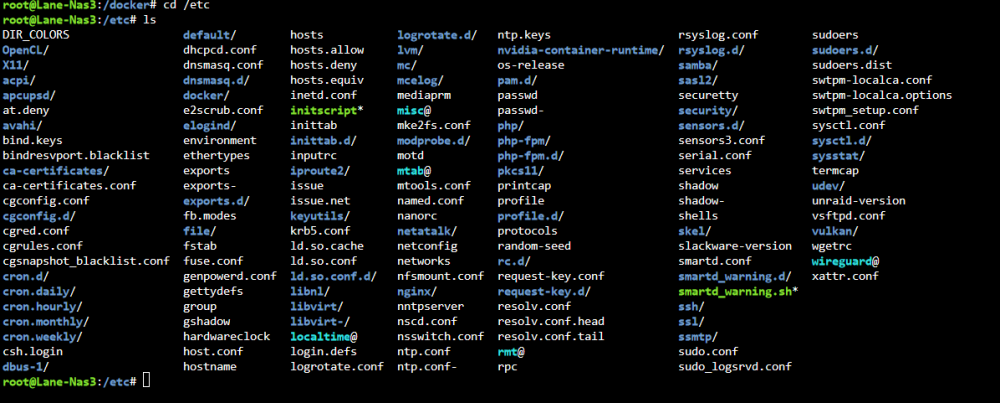
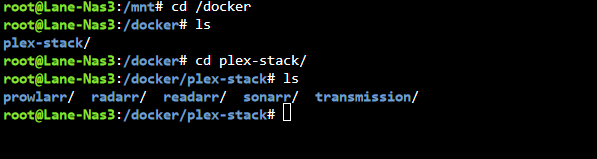
the Path is /etc/Docker/ Inside there is a File Called Plex-stack which I have used on Synology and worked without issue. Inside the Plex-Stack directory is prowlarr, radarr, etc and that is where I had my Config File for All of those and the VPN. I have attached Screenshots.
-
I am not sure. Yes I am Using the Docker Plugin, But I am talking about Opening The terminal and changind Directories to Docker and Listing the Items in there. My Config File Always gets removed and I am not sure why.
-
Good evening! I am sorry if I am beating a Dead horse or if I am just not on the same level of Intellect as you are but I keep having to Copy and Paste my Config.yml file in the Docker location because it keeps getting Deleted Somehow. I was wondering if someone else had similar issues and was able to resolve it? I am running out of my trial Time trying to troubleshoot different things. (yes I know you can extend it as I am on my Extension now)
-
Angelikfear joined the community
-
Hello! I am new to Unraid (still in Trial) and so far I am enjoying it. One thing I am trying to do and Setup is Plex. I currently Have a Qnap that has All my Files on it and I am trying to use the Unassigned Devices to map the Qnap File share to the Unraid. (I dont have the space for my MANY years of Media on the Unraid) I was Hoping someone has had Better luck with mapping a NAS to the Unraid and would be willing to work with me on this. TIA

